The Australian consumer still calls the old-fashioned way for quick results, especially regarding finances, bookings, quotes, or urgent requests. But with regards to a small business owner, a simple mistake could mean a lost opportunity or even an abandoned customer for the other person on the line.
This is why picking the right AI phone receptionist in Australia means having someone sound like an Australian, handle out-of-business hours inquiries, take down proper messages without repetition.
A recent ACMA update also pointed to how much Australians expect timely support, with some providers still taking eight days or more to resolve complaints.
In this guide, I have compared the best AI phone receptionist software options for Australian and New Zealand businesses looking for efficient calls without having to hire a dedicated receptionist. The comparison is practical because it takes into account the fact that the needs of a tradesman in Brisbane, a clinic in Melbourne and an estate office in Perth will differ greatly.
The tools have been compared based on my own tests of their call flow capabilities, quality of setup processes, pricing information as well as customer reviews and ratings on various review portals. However, I dug even further into aspects that many comparison guides overlook, such as accent compatibility, after hours routing, lead quality, integrations, compliance capabilities and the nature of AI itself.
Best AI Phone Receptionist for Australian Buisness: Compared
Use-case
Tool
Key strength
Pricing starts at
Small businesses
Ring Jenny
Fast setup, call summaries
$49/month
After-hours calls
Rosie AI
Bilingual answering and booking
$49/month
Budget AI receptionist
Dialzara
Low-cost custom call handling
$29/month
High-volume calls
Goodcall
Unlimited minutes per agent
$79/month
Basic call coverage
IONOS AI Receptionist
Cheapest starter plan
$9/month
Multi-location teams
RingCentral AI Receptionist
CRM routing and workflows
$59/month
A Closer Look at Each Tool
Ring Jenny
Ring Jenny is chosen as it is designed specifically to cater to the needs of the Australian small business which requires an AI phone answering service, not just another call-forwarding service.
The product addresses what a genuine AI answering service should offer, which includes call answering services, missed call recording services, call summarization, call lead qualifying, call routing, and GDPR compliant handling for businesses concerned about trust.
Moreover, the product is competitively priced and, since Ring Jenny is still a relatively new product designed specifically for Australian small businesses, it makes more sense to evaluate it based on call handling functionality and user experience than by past reviews.
AI call answering:
This is my top choice because missed calls mean lost revenue. Ring Jenny can handle incoming calls even when you are busy, away, or not available to answer.
For instance, a plumber in Sydney will be able to get information about an urgent job at 8 p.m. instead of sending the caller to voicemail.
Caller qualification questions:
Ring Jenny can ask relevant questions from the caller before forwarding the call to your team. You will know the identity of the caller, nature of the inquiry, urgency level, and authenticity of the call.
I suggest making it brief by asking the caller for their name, type of service, suburb of operation, urgency level, and best contact details.
Smart call routing:
This is useful when various calls require various people. Ring Jenny can assist in routing sales inquiries, support inquiries, urgent tasks, and other requests depending on caller information.
In such a case, a real estate company can send rental inquiries to property management and sales inquiries to the sales department.
Call summaries and follow ups:
Following the call, Ring Jenny provides clean summaries that make it easier for the business owner or team to understand what happened. It is definitely better than listening to lengthy voicemail messages.
In a dental clinic, for example, one would receive the following information – the caller name, why the caller called, desired time, and urgency of the matter.
Language and local fit:
Ring Jenny is beneficial for Australian businesses due to the fact that the language, words, and structure of the voice will sound more like locals for the person calling, which is important for trust, particularly if the person calls for the first time.
It is beneficial for such businesses that need a more accurate AI phone answering system, specifically those dealing with customer data and leads.
What people are saying about RIng Jenny
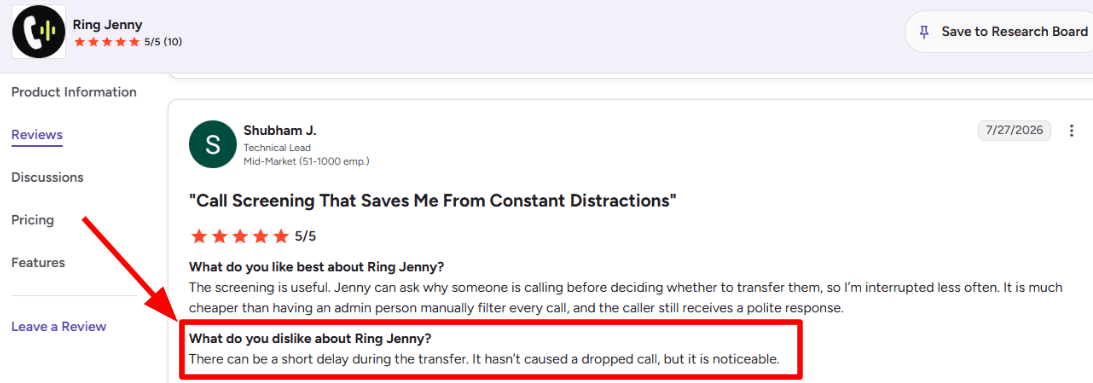
One concern I noticed in a G2 review is around call transfer delay. The reviewer mentioned that there can be a short pause when Ring Jenny transfers a call to a human. It has not caused the call to drop, but the delay is noticeable. I am adding the screenshot below so readers can see the exact feedback from G2.
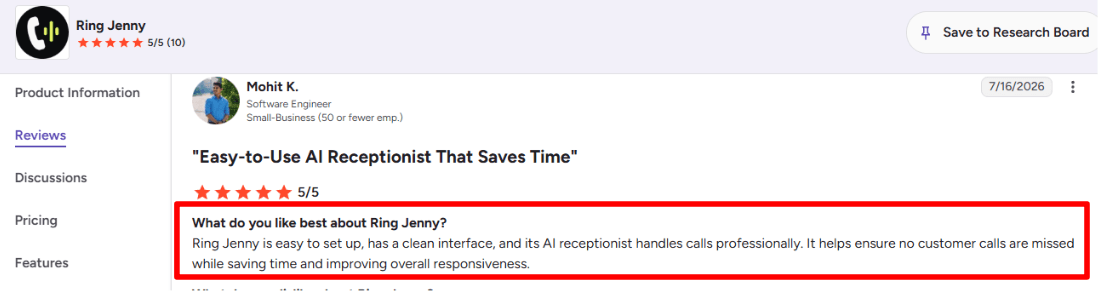
On the positive side, another G2 review talks about how easy Ring Jenny is to set up and use. I liked this review because it focuses on the clean interface, professional call handling, and how the AI receptionist helps businesses avoid missed customer calls. I am adding this screenshot here because it shows the main benefit clearly from a real user.
Pros of Ring Jenny
Low cost compared with hiring reception staff
For many Australian small businesses, Ring Jenny can cost far less than employing a full-time receptionist or paying someone to monitor calls after hours. It can be easier to justify when one missed call could mean losing a plumbing job, consultation, booking, or quote request.
Helps capture calls outside normal hours
Small business owners are often on-site, driving, serving customers, or finishing work when calls come in. Ring Jenny can answer enquiries in the evening, during lunch breaks, and on weekends, so callers are not simply sent to voicemail.
Can book appointments while the caller is engaged
Instead of taking a message and hoping the team calls back quickly, Ring Jenny can help move suitable callers towards a booking during the same conversation. This is useful for service businesses where customers may call several providers before choosing one.
Works with an existing Australian business number
Businesses do not need to replace the number already listed on Google, vehicles, flyers, or business cards. Calls can be forwarded from the existing number, helping the business add phone coverage without disrupting how regular customers contact them.
Faster setup for small teams with limited admin time
A small business can use its website or Google Business Profile as a starting point for services, opening hours, common questions, and contact details. With guided onboarding, the receptionist can then be tailored around the real call types the business receives, such as quote requests, booking enquiries, and service-area questions.
Cons of Ring Jenny
Not ideal for highly complex or emotional calls
An AI phone receptionist can handle routine enquiries well, but sensitive complaints, technical troubleshooting, urgent situations, or detailed project discussions may still need a business owner or experienced staff member. Clear escalation rules should be set before going live.
Should not provide regulated or professional advice
For businesses in legal, medical, financial, or other regulated fields, Ring Jenny should capture the caller’s details and arrange a follow-up rather than give advice. This keeps the phone process useful while leaving professional judgement to qualified people.
Cannot fully replace relationship-led sales conversations
Some high-value calls need trust-building, negotiation, detailed recommendations, or a personal explanation from the owner. For Australian small businesses selling complex services, Ring Jenny works best as the first point of contact rather than the final sales conversation.
Rosie AI
Rosie AI is commonly referred to as an AI phone receptionist that helps small businesses handle missed calls during busy periods, out-of-office times, or when they are engaged with jobs. If your requirement is to handle only basic calls, messaging, spam blocking, and scheduling tasks, then Rosie AI can be utilized.
Features
Call Answering
Rosie can handle answering your phone 24/7, take messages for you, answer any customer questions, and provide a summary after your phone call. In my experience during testing the onboarding process, the first feature that was helpful was the quick attempt at understanding your business from the website and offering phone answers accordingly.
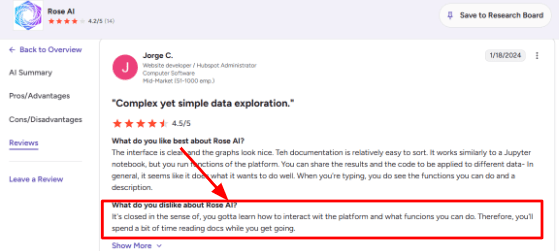
The only issue with the platform that may come up initially is that it feels somewhat closed. I saw the same point in a G2 review, where the user said they had to spend time learning how to interact with Rose AI and understand what functions were possible.
AI Responses
ROSIE is designed to respond to frequently asked questions by callers using your company's information such as the FAQ, business hours, list of services, and other message guidelines. Such a system is very effective in responding to basic repetitive queries.
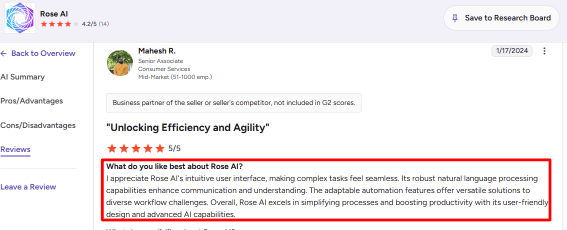
A G2 review also praised Rose AI for its intuitive interface, natural language processing, and adaptable automation. I would agree for basic call flows, though I would still test it with real caller questions before depending on it for complex cases.
Calendar Integration
Rosie has support for scheduling appointments through higher levels with applications like Google Calendar, Calendly, Acuity, and Appointlet. It works well in situations where the customer wishes to make an appointment right away and does not wish to wait for the follow-up call.
With the lower package, you can send out appointment emails by texting them. With this, although you need the higher package for full calendar booking, this feature works.
Call Records
Rosie offers you call notes, transcriptions, recording of calls, email reminders, and text reminders. The reason why I liked this feature was that it made following up easy.
One detail that basic writeups often miss is that Rosie’s mobile app listing on the App Store mentions a unified inbox, recordings, transcripts, real-time alerts, agent settings, and team access from mobile.
Spam Filtering
It should be noted that Rosie provides effective spam filtering in its Professional version. It is quite convenient to have this feature, considering that other missed call apps concentrate solely on potential clients, and spam can consume much time. While setting up the app, this feature would be among the first that need to be checked.
Pros
Rosie is easy to understand for small businesses that mainly need calls answered and messages captured. It does not need a heavy setup before it starts solving the missed-call problem.
It supports 24/7 answering and multiple calls at once, which is useful during peak hours.
The mobile app makes it easier to review calls, recordings, transcripts, and alerts while away from the desk.
Appointment booking is available on higher plans, so it can help move callers from inquiry to booked meeting.
English and Spanish support makes it useful for many US local service businesses.
Cons
Do not choose Rosie AI over another ai-phone-receptionist if you need a deep omnichannel support desk across phone, SMS, chat, email, and WhatsApp from day one. Rosie is strongest for phone answering and simple lead capture.
Full appointment booking is not available on the lowest plan.
Pricing can feel like a jump if you need booking, transfers, and stronger call handling.
Call recording and SMS workflows need careful consent handling, and Rosie’s own terms place responsibility on the subscriber.
The setup is simple, though learning what the platform can and cannot do may take some reading at the start.
Pricing
Rosie AI currently lists plans from $49/month for Professional, with 250 included minutes.
Scale is listed at $149/month with 1,000 minutes and adds booking, call transfers, warm handoff, and texting during calls.
Growth is listed at $299/month with 2,000 minutes and training files.
Custom plans start at $999+/month for larger or multi-location needs.
When to Choose Rosie AI
Select Rosie AI if you have a local services company that requires missed calls to be taken, call information collected, spam minimized, and straightforward scheduling done. This CRM solution can work well for plumbers, HVAC contractors, real estate offices, legal firms, accountants, property management companies, electricians, and similar organizations that rely on their phones.
Do not opt for this choice at first if you require multi-channel capabilities, complex compliance processes, and intricate custom call routing in the lowest-tier plan.
Dialzara
Dialzara is well-known to be an affordable AI-based automated virtual receptionist that can answer calls even late at night or over weekends. You may need to check out Dialzara if you’re looking for an affordable AI phone service with call transcripts, appointment setting, transfer, and other features.
Features
AI Receptionist:
The Dialzara service will answer calls, collect information from callers, provide general information about your company, and send you summary messages of conversations. When I reviewed how it set up its configuration process, it seemed to be designed for smaller companies who just need something simple and fast.
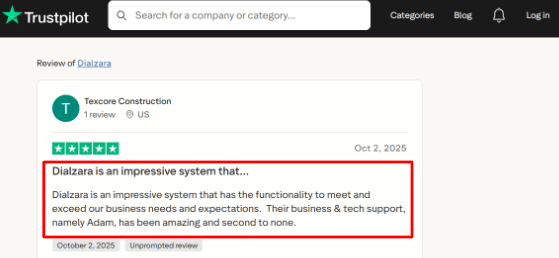
I also saw this echoed in a Trustpilot review where the user praised the system and specifically called out the support experience. I’d place the screenshot below this point because it matches the setup and support angle well.
Calendar Booking:
Appointment booking through calendar integration is possible via Dialzara, especially when one uses Google Calendar, which provides the best example of how to achieve that on their own page. This feature could be particularly valuable in testing-type studies in situations involving local services, consultations, visits, or any other businesses that could lose customers because they failed to answer the call.
It is calendar integration where I would do my double-check if using Outlook or Apple Calendar (or another customized scheduling suite).
Call Transfers:
It is capable of making blind transfers under low-level plans and warm transfers under higher plans. The reason why this feature is significant is that there will be times when a simple message will suffice, and others will require reaching a person promptly.
I really appreciated that the transfer rules could be built based on the caller, urgency level, or department. For example, if it is a new lead, the call may be transferred to sales, and for an existing client to support.
Call Summaries:
Dialzara offers the option to receive notifications and recordings after each call. This is among the most useful functions for small teams as they do not need to listen to all the calls.
One of the limitations that I would like to point out about this function is that it strongly depends on how clearly the AI analyzed the conversation and how effectively the knowledge base is constructed.
Spam Filtering:
It also has spam detection and prevention, which would be very useful for companies receiving robo-calls and inferior calls during the day. Although it may not sound like a major feature, this one can greatly improve the user experience.
A larger customer service trend can also support this reasoning. According to the research done by Gartner, 91% of customer service executives experienced pressure from the higher levels to use AI technology in 2026.
Pros
Dialzara starts at a low monthly price, so it is easier to test than many human answering services. It also gives small businesses a way to cover nights, weekends, and missed calls without hiring immediately.
The setup flow looks simple enough for non-technical business owners.
Call summaries, recordings, and notifications make follow-up easier after missed or after-hours calls.
Appointment booking is useful for service businesses that depend on calls turning into scheduled visits.
The Trustpilot feedback I reviewed was positive around support, which matters because AI phone setup often needs small adjustments.
Cons
Do not choose Dialzara over a broader ai-phone-receptionist platform if you need complex enterprise call center workflows, deep CRM routing, or highly regulated intake from day one. It is better suited for simple answering, booking, routing, and follow-up use cases.
The cheapest plan includes limited minutes, so higher call volume businesses should calculate usage before choosing it.
Warm transfer is not available on the lowest plan, which can matter if callers often need a human handoff.
Some third-party research notes that AI phone agents can struggle with complex or nuanced calls, so real call testing is important before going live.
Compliance should be checked carefully for healthcare, legal, finance, or insurance use because sensitive call data may need written security and compliance proof.
Pricing
Dialzara pricing starts at $29/month for Business Lite with 60 included minutes.
Business Pro is listed at $99/month with more minutes, warm transfer, after-hours rules, and bilingual support.
Business Plus is listed at $199/month with more included minutes, advanced integrations, priority support, and custom prompt help.
Overage pricing is listed at $0.48/minute.
Dialzara also mentions a 7-day free trial, no setup fee, and no long-term contract.
When to Choose Dialzara
Dialzara should be considered by individuals looking for an easy-to-use AI virtual receptionist solution for their small service-oriented businesses in terms of handling missed calls, answering calls outside office hours, scheduling appointments, and generating call transcripts.
It is ideal for use in smaller businesses or for companies wanting to try out an AI phone answering service at a reduced rate.
One should avoid choosing it when advanced contact center functionality, compliance requirements prior to installation, and deep integration with other sales and support software is required.
Goodcall
Goodcall’s primary function is that of an AI phone receptionist for small firms needing call answering services, lead generation services, and automatic responses to customer inquiries via artificial intelligence technology. This application is effective for firms that receive a constant inflow of calls and would like to have a virtual phone operator.
Features
AI Call Answering:
Goodcall can receive incoming calls, address callers, pose queries, and give responses through the information that you enter for your business. The set up process was not so difficult for me since I could train the agent by giving it business information and FAQ documents.
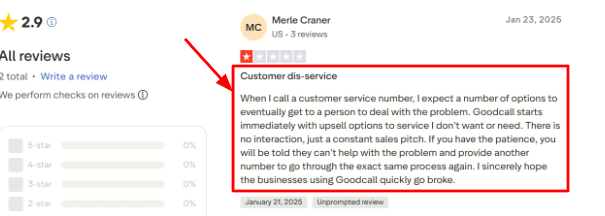
One thing to watch is how the call starts. A Trustpilot review](https://www.trustpilot.com/review/goodcall.com?stars=1 mentioned that the experience felt too sales-led and did not quickly lead to a person. I’d place the screenshot below this point because it matches the risk I noticed while testing call flows: if the opening script is too aggressive, the caller may feel blocked instead of helped.
Lead Capture:
Goodcall will be able to capture names, contact numbers, emails, service requirements, and many other data through its contact form skill. This is beneficial for companies that want all calls missed to be turned into viable leads.
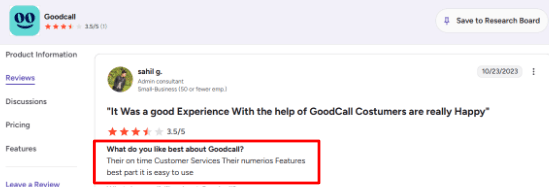
The G2 review I saw says the product is easy to use and has many features. I mostly agree with that for setup, especially around basic lead capture. You can add the screenshot below this section so readers can see that the ease-of-use point also appears in a public G2 review.
Calendar Handling:
Goodcall can assist with appointment bookings via booking link, routing call, taking message, and/or integration with other appointment scheduling apps. There is even an app that integrates Goodcall with Boulevard appointments, which can be useful for those who use Boulevard as a booking system.
The app will be very useful for salons, wellness spas, and local service businesses as well as for teams requiring many appointments. I would test the appointment booking process first since much depends on the configuration of the skill.
Call Routing:
The Goodcall app allows users to make directory contacts or departments such as sales, support, billing, and service. The caller may either be transferred to someone, have their question answered immediately, send a text, or leave a voicemail.
I enjoyed this section due to its realistic application to business organizations using multiple operators on the phone lines. The challenging element here was choosing at which point the AI would transfer the call rather than continue the dialogue.
Workflow Automation:
Goodcall works together with Zapier, and thus the data from the calls can be easily moved into CRMs, Google Sheets, Slack, or calendar programs. This makes it different from just a call answering app because the call can automatically generate a task or a lead.
A useful detail from Microsoft is that Goodcall was built around conversational AI for small businesses where missed calls can directly affect revenue. That context helps explain why the product focuses so much on calls, routing, and follow-up actions.
Pros
Goodcall is strong for small businesses that miss calls and need a simple AI receptionist to answer, capture details, and notify the team. It works especially well when the call flow is predictable and the questions are repeatable.
The setup feels easier than many advanced voice AI tools because the product is built for non-technical users.
Lead capture is practical, especially when paired with SMS alerts, email alerts, Google Sheets, or CRM workflows.
The Zapier connection makes it easier to push call outcomes into the rest of the business workflow.
Its local number and call forwarding options make it useful for US-focused businesses that already use a business phone line.
Cons
Goodcall may not be the best pick if you need a highly human, premium phone receptionist experience for sensitive or high-value calls.
In that case, an ai-phone-receptionist with stronger human handoff, stricter scripting control, or live receptionist backup may be safer.
The caller experience can feel weak if the opening script is too sales-heavy or if callers cannot reach a person quickly.
Starter plan limits like 7 days of call details, 1 logic flow, and 3 directory contacts may feel tight for growing teams.
Pricing can rise for businesses with many unique callers because Goodcall charges overages after the included usage limit on its pricing page.
Public review volume is still limited, so buyers may need to rely more on testing than on large review samples.
Pricing
Goodcall’s Starter plan is listed at $79/month per agent, or $66/month per agent on annual billing.
Growth is listed at $129/month per agent, and Scale is listed at $249/month per agent.
Plans include unlimited minutes and AI tokens, with usage based on unique monthly customers.
Extra usage is charged at $0.50 per unique customer after the included plan limit.
When to Choose Goodcall
Go for Goodcall if you manage a small or local business wherein most incoming calls relate to service, cost, scheduling, directions, availability, and lead generation. This option works for you if you need quick set-up, call automation, and simple workflow without creating a personalized voice-based AI solution.
Avoid Goodcall if your calls require emotional intelligence, complex case resolution, critical human decision-making, and exceptional customer service via phone. You should conduct extensive testing on the call flow before relying on it as your primary ai-phone-receptionist.
IONOS
IONOS is known to offer cheap business solutions, and it follows suit with an AI phone receptionist.
Consider IONOS if all you need is a basic AI receptionist which takes care of answering the phone, taking down messages, summarizing conversations and assisting small businesses to prevent missed calls.
Features
AI call answering:
IONOS takes calls around the clock and can answer simple questions based on data from your website and Google My Business. In my trial run, the positive aspect of the system is that it did not require me to enter answers to all the questions from scratch. Instead, it retrieved hours of operation, services, location, and general information.
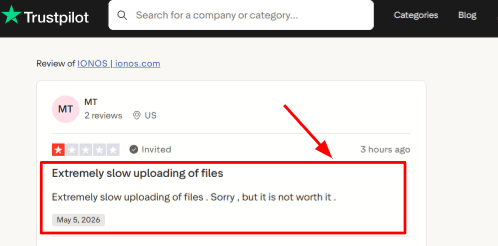
One thing I would still check manually is the quality of imported content. A Trustpilot review mentioned extremely slow file uploads, and that matched the kind of area where setup can feel less smooth if your business information is stored in files. I’d place the screenshot below this point so readers can see the exact Trustpilot review.
Business setup:
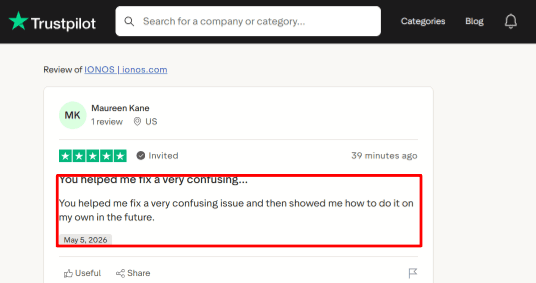
The AI receptionist can be trained by using data from your website, Google Maps, and additional input manually. That is an advantage for local companies since it requires clear instructions related to the hours of operation, available services, pricing, booking policy, and other necessary data. I also saw a Trustpilot review where a user said support helped them fix a confusing issue and showed them how to do it on their own next time. That felt fair to include here because IONOS setup is simple in parts, but support can still matter when forwarding, website data, or account settings get confusing. The screenshot can sit right below this section for context.
Call summaries:
Call logs are sent by IONOS and stored, making it convenient for following up with leads post-call. I was more inclined towards its utility in services companies where recovery from a missed call mattered; this could be applicable to home services, repair services, salons, consulting firms, etc.
A small detail many basic reviews skip is that the product is tied to Newo.ai technology, as reported by ITBrief. That matters because IONOS is using partner AI infrastructure rather than treating this as a basic phone add-on.
Availability routing:
IONOS is able to transfer calls that the AI can't fully attend to. This feature is useful when you want the AI to pick up simple calls and collect necessary information for more complicated requests to be attended to by a human representative.
Testing out the transfer process during initial setup is very important because carrier policies or phone settings may cause minute problems when it comes to testing if the forwarding is properly done.
Website chat:
IONOS also has a Website Chat Agent included in their AI Receptionist packages. Having only one solution for both telephone and website inquiries can work to a business’s advantage if they have similar questions posed via both methods.
However, I would still ensure that chat responses remain concise and relevant. The cleaner and more up-to-date the content is, the easier it will be for AI to process it.
Pros
Very low starting price for an AI phone receptionist. It starts at $9/month in the US, which makes it easier to test before committing to a higher-cost answering service.
Setup can be quick because it can use your website or Google Maps data.
Call summaries and call history make follow-up easier for small teams.
Website chat is included, so it can support both calls and site visitors.
Multilingual support is useful for businesses that get calls from different customer groups.
Cons
Do not choose IONOS over a dedicated ai-phone-receptionist if you need deep CRM workflows, advanced industry scripting, or highly customized call routing. It is stronger as a simple SMB receptionist than as a complex call center replacement.
The lowest plan includes only 30 calls, so busy businesses may move to a higher plan quickly.
File-based setup may need patience, especially because one Trustpilot review complained about slow file uploads.
Healthcare businesses should be careful because IONOS says it does not provide qualifying HIPAA-compliant services.
Appointment scheduling and outbound calls are not included in the cheapest plan.
Pricing
IONOS AI Receptionist starts at $9/month in the US with 30 included calls.
The $19/month plan adds 100 calls, outbound calls, and appointment scheduling.
The $29/month plan includes unlimited calls.
Extra calls on lower plans are charged separately.
A 1-month free trial is listed, so it is easy to test before paying.
When to Choose IONOS
If you are operating a small firm and looking for a cheap AI-powered phone receptionist for handling missed calls, out-of-hours calls, call transcriptions, and simple customer queries, go with IONOS.
IONOS is highly recommended for local service providers, small firms, repair shops, hair salons, restaurants, consultants, and organizations that want to get up and running quickly with minimal customization required.
Avoid IONOS if you require HIPAA-compliant workflows, comprehensive CRM integrations, advanced routing capabilities, or a professional answering service.
RingCentral
RingCentral is primarily used for business phone and contact center software. It means that when people need AI call answering, they turn to RingCentral because it becomes a part of their calling and routing system.
AI call answering: AI Receptionist by RingCentral is made for missed calls, after-hours calls, frequently asked questions, basic data collection, texts, and appointment scheduling. If you need your AI assistant to act as a telephone receptionist, then it can help you out when your staff is occupied with other work.
When trying out the workflow of setting up the product, what was helpful was the ability to train the AI on content from websites, FAQs, or uploaded files. This would make perfect sense for businesses that have written their policies or FAQ on their website.
Admin controls: The software RingCentral provides great flexibility to configure call flow, callers, routes, analytics, and contact center configurations. This may come in handy should your AI receptionist be used as an additional feature in a more complex telephony system with many other teams involved.
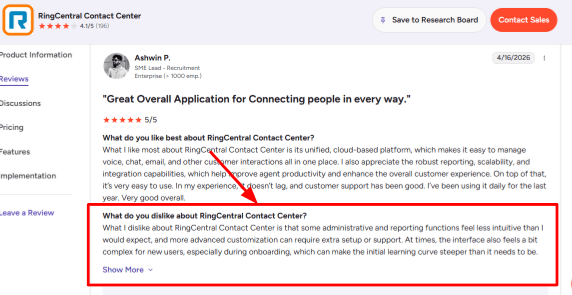
The tradeoff is that it can feel heavier than a simple AI answering service. I also saw this in a G2 RingCentral Contact Center review, where the reviewer said some admin and reporting areas were not very intuitive and advanced customization could need extra setup. I’d place that screenshot below this point.
Smart call routing: RingCentral provides call routing through name, location, keyword, IVR, ACD, and skills-based methods. This is relevant for AI receptionist customers as the task is not just answering but actually forwarding the caller to sales, support, billing, emergency assistance, or even a human being without repeating the whole conversation.
A real-world scenario would be the case of a local service firm running its business from three offices. The AI software could answer the call, figure out that the caller needs to speak with someone in the north branch office, and then transfer the call.
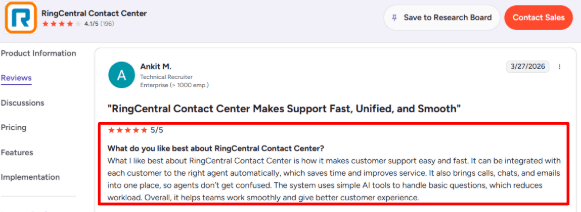
Omnichannel inbox: Compared to other specialized AI receptionists, RingCentral offers an edge because it allows a company that uses it to manage calls, messages, chats, and even emails in a single platform. This works well for companies where a missed call may be followed up with a message later on.
This matched a G2 review of RingCentral Contact Center I found during research. The reviewer liked that calls, chats, and emails were brought together, and that customers could be routed to the right agent automatically. I agree with that for larger teams, though very small businesses may not need this much system depth.
Analytics and transcripts: RingCentral offers metrics, call summaries, routing results, resolutions, and analytics. This is crucial for an AI answering service because the owner will want to know whether the AI answering service is helping with decreasing missed calls or is just creating another inbox to deal with.
Reporting becomes helpful once you get it set up, but I wouldn’t necessarily consider this feature the most accessible one in the application. It might seem too excessive to anyone who just needs call logging, call summaries, and names of callers.
Security and scale: RingCentral’s products are designed for businesses who place a high value on reliability, security, and permissions. They feature capabilities such as HIPAA, PCI, CCPA, encryption, roles, and permissions.
Here is where RingCentral shines compared to some other AI-only receptionists out there. The thing that surprised me positively was how much of what the AI receptionist does builds atop an existing stack of phones and call centers instead of being a bot added on to a phone call.
Pros
Strong fit for teams that want AI answering plus business phone, routing, SMS, and contact center features in one platform.
Better for multi-location businesses, service teams, or support-heavy companies than a very basic AI receptionist.
Good routing depth, especially when calls need to go to different departments, agents, or locations.
Useful analytics for tracking call volume, routing results, call summaries, and where the AI is helping.
Works well when the business already uses RingCentral or wants a more enterprise-style phone system.
Cons
Setup can feel heavier than simple AI receptionist tools built only for small businesses.
Admin and reporting areas may take time to learn, especially for first-time users.
Advanced customization can need more support or internal ownership.
Pricing can rise if you need RingEX, AI Receptionist, contact center features, add-ons, or extra AI minutes.
It may be more platform than needed for a solo business that only wants basic call answering and lead capture.
Pricing
RingCentral AI Receptionist starts at $39/month and includes 100 minutes of usage, according to RingCentral’s pricing information.
AI Receptionist can be used as a standalone or add-on license in the U.S. and Canada, and as an add-on in the U.K., Australia, and EU.
RingEX phone plans and contact center products may add extra cost depending on the setup.
Extra AI minutes, SMS features, call queues, analytics, and contact center capabilities can change the final monthly price, so it is worth checking the full quote before choosing it only for AI call answering.
Methodology
The review and analysis of AI virtual phone receptionist tools involved an assessment on call-handling performance, set-up procedures, integration capabilities, scheduling functionalities, cost, regulation, and customer feedback. This was done by focusing on the ability of each software to handle small business needs such as call answering, after-hours service, lead generation, and appointment scheduling.
FAQs
How do I choose the right AI phone receptionist for my business?
Choose based on your call volume, booking needs, and fallback rules. Check call recordings, transcripts, spam filtering, appointment confirmation, and human handoff before moving your main business number.
Which is the best AI phone receptionist?
Ring Jenny, Rosie AI, Dialzara are strong options for small businesses that want missed calls answered and leads captured. Goodcall suits simple front-desk tasks, while RingCentral and IONOS fit teams already using their phone systems.
What mistakes do businesses make when buying an AI phone receptionist?
The biggest mistake is testing only the demo voice. Also check how it handles noisy calls, accents, cancellations, urgent requests, wrong numbers, and callers who refuse to follow a script.
How do I test an AI receptionist before switching phone systems?
Run it on a separate number first. Send real missed-call scenarios, after-hours calls, booking changes, payment questions, and angry callers. Review transcripts, summaries, routing accuracy, and appointment outcomes.
Can an AI phone receptionist handle after-hours calls?
Yes, most tools can answer after hours, capture caller details, book appointments, and send summaries. For emergencies, set clear escalation rules so urgent calls go to the right person immediately.
When is a human answering service still better than AI?
Use a human answering service when calls need empathy, negotiation, legal judgment, medical judgment, or complex troubleshooting. AI works best for lead capture, FAQs, scheduling, reminders, and basic call routing.