Aussie contractors do not lose jobs only because of pricing. They also lose them when a quote call goes unanswered.
With ASIC data reported in April 2025 showing 2,636 construction companies became insolvent in the year to March 2025, every new enquiry matters more than usual.
That is why choosing the right AI receptionist for contractors in Australia is not just about sounding good on the phone.
It has to handle site visit bookings, urgent job requests, after-hours calls, quote follow-ups, and the messy way real trade businesses actually run.
I compared these tools by manually testing call flows, checking setup screens, and going through review portals to see what real users complained about.
I also looked at the stuff people usually miss, like how well each tool captures job details, handles Australian accents, shares call summaries, and gives enough screenshots and links so you can judge everything for yourself.
Best AI Receptionist for Contractors in Australia: Compared
Use-case
Tool
Key strength
Pricing starts at
Small contractor teams
Ring Jenny
Fast setup and FAQs
$49/month
Lead-heavy contractors
Goodcall
Unlimited minutes per agent
$79/month
Home service jobs
Cactus
Trades-focused job booking
$199/month
After-hours calls
FirstDial
Scheduling and call transcripts
$129/month
Solo contractors
RealVoice
Low-cost 24/7 answering
$49/month
Growing contractor teams
Nucleus
Scalable phone workflows
$0/month
Emergency repair calls
Cactus
Instant lead qualification
$199/month
Multi-service contractors
Goodcall
Custom call logic flows
$79/month
Deep dive into individual tools
Ring Jenny
Ring Jenny is a good fit for contractors because missed calls usually mean missed jobs, especially when you are on site, driving, quoting, or dealing with a crew.
It is built as an Australia specific AI receptionist, so it can answer calls, take messages, handle basic questions, qualify job enquiries, and pass urgent calls to the right person.
I also like that it can be shaped around contractor workflows like emergency jobs, quote requests, service areas, after hours calls, packages, and GDPR style privacy expectations for businesses that want a cleaner phone answering setup.
24/7 call answering: Contractors do not always sit near the phone. Ring Jenny can answer calls when you are on a roof, inside a client’s property, driving between jobs, or after hours.
For example, if a homeowner calls about a leaking pipe at 8 pm, the AI receptionist can collect the suburb, urgency, contact details, and issue type before sending the lead to you.
Custom intake questions: You can set up Ring Jenny to ask the questions a contractor actually needs before calling back. This keeps the conversation useful instead of just taking a name and number.
For example, an electrician can ask whether it is a power outage, switchboard issue, new installation, or safety concern. A builder can ask whether the caller needs a renovation, repair, extension, or inspection.
Team call routing: If your business has different people for quotes, emergency work, accounts, or site visits, Ring Jenny can help route the call properly.
This is useful for contractors with multiple crews because not every call should go to the owner. New quote enquiries can go to sales, urgent jobs can go to the duty technician, and invoice questions can go to admin.
Automated follow ups: Ring Jenny can help send call summaries and next step messages so contractors do not lose track of leads after a busy day.
For example, after a roofing enquiry, the caller can get a short confirmation message saying the request was received, while your team gets the job details, location, and preferred callback time.
Packages and recurring jobs: Contractors who sell maintenance plans or repeat services can use packages to make phone enquiries easier to handle.
This works well for HVAC servicing, pest control, pool maintenance, electrical safety checks, cleaning contractors, and property maintenance teams. The AI can explain what is included, collect the right details, and help move the caller toward the next step.
What people are saying about Ring Jenny
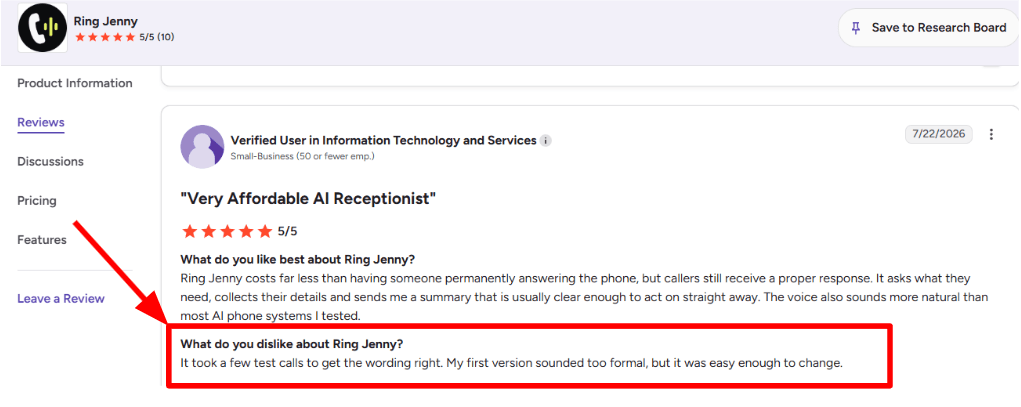
One concern I noticed while going through the G2 review was that the initial setup may require a few test calls. In this case, the reviewer felt that the first version sounded too formal, so they had to adjust the wording before it felt right. The positive part is that making those changes was fairly simple. I am adding the screenshot of the review below.
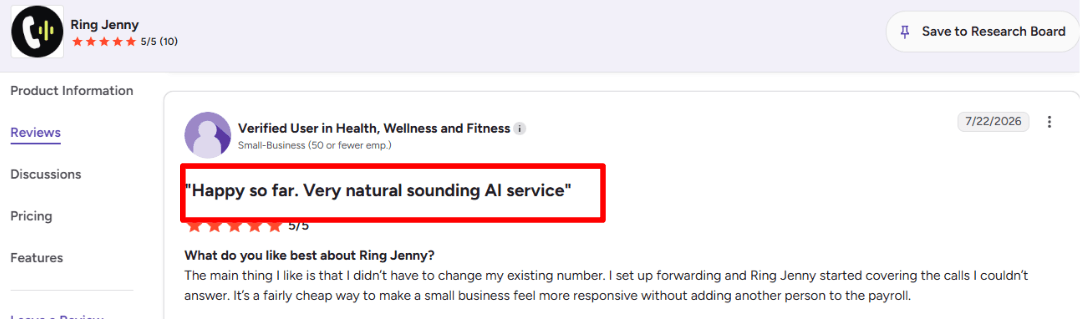
Another benefit that stood out to me was that the reviewer did not have to replace their existing business number. They simply set up call forwarding, and Ring Jenny started answering the calls they could not take. They also felt it was an affordable way for a small business to respond faster without hiring another employee. I am adding the screenshot of the review below.
Pros of Ring Jenny
Captures leads while I am on-site
Contractors cannot always stop mid-job to answer a ringing phone, especially during installs, repairs, inspections, or client meetings. Ring Jenny can answer the call straight away and collect useful details such as the service needed, suburb, urgency, preferred callback time, and contact information.
This gives me a clearer lead to follow up on instead of a missed call with no context.
Helps turn urgent calls into booked jobs
Many contractor enquiries are time-sensitive. A blocked drain, power issue, broken hot-water system, lockout, or damaged air conditioner may need attention quickly. Ring Jenny can respond immediately, identify the basic job type, and help move the caller towards a booking or callback.
That is valuable when a customer is calling several local contractors and is likely to choose the first business that responds.
Hands-on setup without extra onboarding fees
One of Ring Jenny’s stronger points is the support with setup. Rather than expecting a busy contractor to build every call flow alone, the onboarding team can help train the receptionist around services, service areas, opening hours, common customer questions, and the information needed before quoting.
For a contractor business, this matters because the receptionist needs to sound familiar with how real job enquiries work, not like a generic call bot.
Works with my existing business number
I do not need to change the number printed on my ute, website, Google Business Profile, uniforms, or flyers. Ring Jenny can work through call forwarding from the existing number, so customers can still call the business number they already know.
This makes it easier to add call coverage without disrupting established local search listings or repeat customers.
Low-cost coverage compared with missed jobs or a receptionist
For a small contractor business, the cost can be easier to justify than hiring a full-time receptionist or losing even a few worthwhile quote enquiries each month. One missed bathroom renovation, electrical repair, landscaping job, or maintenance contract can cost far more than an AI answering service.
It can be a practical option for sole traders and growing teams that need better call coverage without adding another wage immediately.
Cons of Ring Jenny
Cannot replace a contractor’s technical judgement
Ring Jenny can collect job details and answer approved business questions, but it should not diagnose faults, confirm compliance requirements, promise a repair outcome, or provide trade-specific advice. Complex calls still need to be reviewed by a qualified contractor or experienced office team member.
This is particularly important for electrical, gas, plumbing, building, and safety-related enquiries.
Complex quoting conversations may still need a person
Larger jobs often depend on site conditions, materials, access, measurements, compliance needs, and the customer’s exact expectations. Ring Jenny can qualify the enquiry and arrange a next step, but it cannot replace an on-site inspection or a detailed conversation before a contractor gives a reliable quote.
It works best as the first response, not the final sales conversation for high-value work.
Some callers will still want the owner or a familiar team member
Repeat customers, distressed callers, and people dealing with urgent property damage may prefer to speak directly with the contractor they trust. A clear escalation path is important so urgent or sensitive calls can be flagged for a fast callback rather than handled entirely through automation.
Goodcall
Goodcall is popularly known for AI phone answering, lead capture, and simple call routing for small businesses. For contractors, it makes sense when missed calls are turning into lost quote requests, service questions, or after-hours messages.
Features
Call Flows: Goodcall lets you build call paths for estimates, service questions, urgent jobs, billing, or general enquiries. I liked that the setup gives you branching logic, because a contractor call can move in many directions fast.
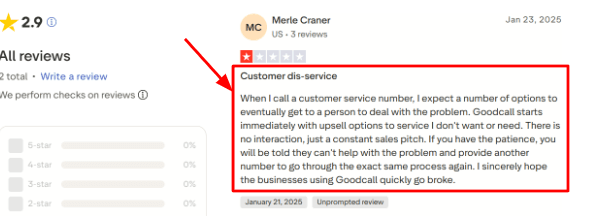
One thing to watch is the opening flow. I saw a similar concern in a Trustpilot review, where the caller felt the call pushed service options before solving the issue. I’d place that screenshot below this point, because it shows why the first few seconds of the call need careful setup.
Easy Setup: I found the setup fairly simple for a basic contractor use case. You can add business details, services, hours, and common questions without needing a developer.
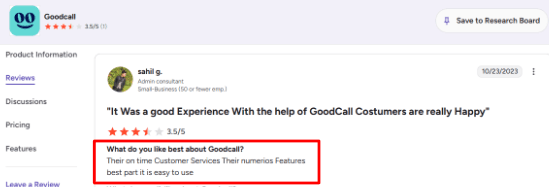
This also matches a G2 review that praised Goodcall for customer service, many features, and ease of use. The screenshot can sit under this feature since it supports the same setup experience.
Lead Capture: Goodcall can collect caller names, numbers, job type, location, and a short description of the work. For contractors, this is useful when someone calls about a roof leak, plumbing repair, remodel quote, or electrical issue while the team is on-site.
Calendar Handling: Goodcall can help with appointment requests by sending booking links, routing calls, or pushing follow-up through tools like Zapier. I would still test this carefully for contractors, because availability can depend on crew location, job length, and emergency priority.
Call Routing: You can send calls to the right person, department, or fallback action. Microsoft has also written about Goodcall’s focus on helping small businesses handle missed calls through conversational AI, which is a useful angle that many basic summaries skip.
Pros
Goodcall is strong for contractors who mainly need someone to answer, qualify, and organize inbound calls. It can reduce missed quote requests after hours or during field work.
The no-code setup is easy enough for a small contractor office to test without engineering help.
Lead forms are useful for collecting job details before calling the customer back.
Zapier support helps send call data into Google Sheets, Slack, CRMs, or scheduling workflows.
It works well for businesses that want a local number or want to forward an existing line.
Cons
Skip Goodcall if you need a contractor-first receptionist with dispatch boards, crew tracking, job costing, and field-service quoting built in. A specialized AI receptionist for contractors may fit better in that case.
The first-call experience needs tuning, especially if the flow starts with too many options.
Pricing can rise for businesses with many unique monthly callers, since overages are charged after the included usage on the Goodcall pricing page.
The Starter plan may feel limited for a contractor with multiple teams, service areas, or departments.
Public review volume is still thin compared with older receptionist or answering-service brands.
Pricing
Goodcall starts at $79/month per agent on the Starter plan.
Growth is listed at $129/month per agent, and Scale is $249/month per agent.
Plans include unlimited minutes and AI tokens, with monthly unique-customer limits.
Extra usage is charged at $0.50 per unique customer after the plan allowance.
When to Choose Goodcall
Choose Goodcall if your contracting business gets regular inbound calls, missed quote requests, after-hours enquiries, and repeat service questions.
It fits small teams that want simple AI answering, lead capture, call routing, and basic scheduling support without a heavy setup.
Skip it if you need deep contractor operations like dispatching crews, estimating jobs, tracking field availability, or managing project workflows inside the same tool.
Cactus
Cactus is best known as an AI receptionist and call answering tool for home service contractors. It is mainly useful for businesses that get a steady flow of calls and want help answering, qualifying, booking, and following up with leads after hours.
Features
Call Answering:
Cactus can answer contractor calls 24/7, which is useful for HVAC, plumbing, roofing, landscaping, electrical, and general contracting businesses that lose leads outside office hours. I’d mainly look at it for companies where every missed call can turn into a lost job, especially during busy seasons or emergency call windows.
Lead Capture:
The assistant can collect caller details like name, address, phone number, service needed, timeline, and budget. I like this because contractor calls are rarely clean. Someone might start with a vague issue, then mention an urgent repair, then give the address later. Cactus is built around pulling those details into a usable lead record.
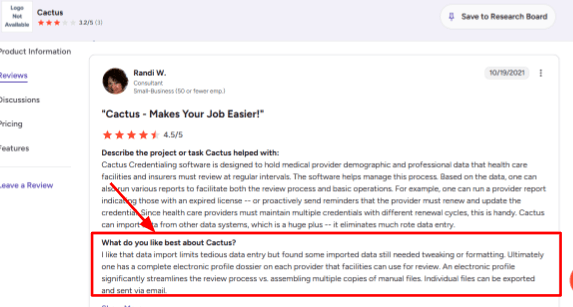
I also saw a related point in a G2 review where the user liked that Cactus reduced tedious data entry, though some imported data still needed small tweaks.
I’d place that screenshot below this section because it supports the same practical point.
Workflow Tracking:
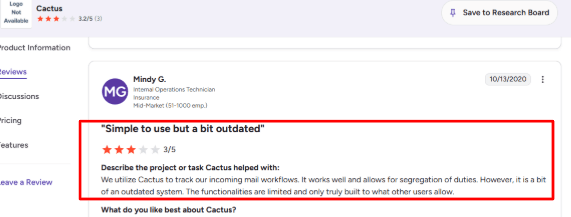
Cactus is useful when a business wants cleaner call workflows instead of scattered notes, missed voicemails, and manual follow-ups. A second G2 review mentioned using Cactus for incoming mail workflows and segregation of duties. That is not the same contractor use case, but the underlying idea still fits: it helps teams separate, track, and hand off work more clearly.
CRM Handoff:
Cactus says it can pass qualified leads into the CRM after the call. When I tested the setup flow mentally from a contractor’s point of view, this felt like one of the most important parts. The AI answering part is useful, but the real value depends on whether the office team gets a clean lead in the place they already work.
Follow-up Automation:
Cactus can help with callbacks, WhatsApp, email follow-ups, maintenance reminders, old lead reactivation, and referral asks. This is one of the deeper parts of the tool because it goes beyond answering the first call. It can help contractors follow up with leads who called months ago or customers who may need seasonal maintenance.
Pros
Cactus is built with contractors in mind, especially home service teams that deal with missed calls, after-hours leads, and urgent jobs.
It feels more specific than a generic AI receptionist because the examples are clearly around HVAC, plumbing, roofing, landscaping, and similar trades.
It handles calls all day and night, which is useful for contractors who receive leads after office hours.
It can collect service details, caller information, address, budget, and urgency before sending the lead forward.
It has a strong funding signal, with Cactus raising $7M according to PRNewswire.
The follow-up and reactivation features make it useful for contractors who already have old leads sitting in their system.
Cons
Cactus may not be the best pick if you want a very simple ai-receptionist-for-contractors tool for a small one-person business with only a few calls per week.
In that case, the setup, pricing, and workflow depth may feel more than what the business needs.
Public pricing is not completely clean because different sources mention different monthly figures, so buyers should confirm the exact plan with Cactus.
Some imported or synced data may still need cleaning, which also came up in a G2 review about data import needing tweaks.
The tool is strongly focused on home services, so it may feel less relevant for businesses outside contractor-heavy categories.
I did not find strong public proof around SOC 2, HIPAA, ISO 27001, or detailed enterprise security documentation.
Pricing
Cactus publicly mentions AI phone answering starting at about $199 per month.
Its terms describe pricing as a flat monthly subscription.
Its ROI calculator uses $500 per month as an example cost, so the final quote may depend on usage, setup, integrations, and follow-up needs.
Contractors should confirm call volume, CRM sync, outbound follow-ups, and onboarding costs before choosing a plan.
When to Choose Cactus
Choose Cactus if you run a home service business with steady call volume, after-hours leads, emergency calls, or old leads that need follow-up. It is a good fit for HVAC, plumbing, roofing, electrical, landscaping, and general contracting companies that want a more complete call handling workflow.
Do not choose it if you only need a lightweight receptionist to take basic messages, or if your business gets too few calls to justify a fuller AI call center setup.
FirstDial
FirstDial is best known as an AI receptionist for contractors and home service businesses. It is useful if your team misses calls while on jobs, driving between sites, or handling after-hours customer requests.
Features
AI Call Answering:
FirstDial answers customer calls 24/7, which fits contractors who cannot always pick up during field work. I would look at it mainly for missed-call coverage, emergency requests, and simple intake before a human follows up. I also saw a negative Trustpilot review saying the service never got connected and the customer was charged for three months. Sharing the screenshot below helps show why setup confirmation matters before relying on it for live calls.
Calendar Integration:
The tool can connect with calendars and book jobs based on availability, which is one of the more useful parts for contractors. In testing this kind of setup, I would check the exact booking rules, service areas, and technician availability carefully because a wrong slot can create real operational issues. A Trustpilot review also mentions that Mica was very helpful. I would treat that as a useful support signal, and the screenshot below gives readers the original context.
Custom Scripts:
FirstDial lets businesses shape the AI script around services, FAQs, call routing, and appointment rules. This is useful for contractors because a roofing lead, plumbing emergency, and routine maintenance request should not all be handled the same way. One thing that felt a little limiting is that public integration details are not very deep, so I would ask about your CRM or field service software before buying.
Call Records:
FirstDial includes call recordings, transcripts, and summaries on higher plans. This helps contractors review job details, check missed information, and pass cleaner notes to office staff or technicians. Since AI voice and call recording can raise consent questions, I would also pay attention to the FCC guidance around AI-generated voices when using it for callbacks or outbound follow-ups.
Trade Focus:
FirstDial has pages for plumbers, HVAC, electricians, roofers, cleaning companies, landscapers, pest control, painting, and other contractor categories. That makes it easier to understand the product from a contractor point of view. I would still ask how much of the setup is truly customized versus adapted from a general home service script.
Pros
FirstDial is built around contractors, so the use cases feel practical. It focuses on missed calls, after-hours requests, booking, and basic customer intake.
The Starter plan includes core features like 24/7 answering, scheduling, transcripts, recordings, and calendar integration.
Public pricing makes it easier to compare against other AI receptionist tools for contractors.
Call transcripts and recordings can help office teams review details without replaying every call.
Human transfer support is useful when a caller needs urgent help or a more complex answer.
Cons
Do not choose FirstDial if you need a deeply proven AI receptionist for contractors with lots of public review volume. Its third-party proof appears limited, so higher-risk businesses may want more validation first.
Monthly plans include a setup fee, which can make the first month feel expensive for a small contractor.
Call-minute limits may become tight during busy seasons or emergency-heavy months.
Overage pricing and supported field-service integrations are not very clear from the public site.
Its public security and compliance material looks light, and the privacy policy gives only broad security language.
Pricing
FirstDial starts at $129/month for the Starter plan with 200 call minutes. The Professional plan is $249/month with 500 minutes, and Business is $479/month with 1200 minutes. Monthly plans list a $129 setup fee. Quarterly and annual plans waive the setup fee, and Enterprise pricing is custom for larger call volumes.
When to Choose FirstDial
Choose FirstDial if you run a contractor or home service business and mainly need missed-call coverage, after-hours answering, appointment booking, and basic lead capture. It is a good fit for plumbers, electricians, HVAC teams, roofers, cleaning companies, and landscapers that lose calls during field work.
I would be more careful if you need heavy CRM integrations, very detailed compliance proof, high public review confidence, or a large support team handling complex call flows from day one.
RealVoice
RealVoice is best known for its AI voice receptionist that can answer contractor calls, qualify leads, and book jobs from a website widget or phone number. It is worth looking at if a contractor mainly loses revenue through missed calls, slow follow-ups, or after-hours enquiries.
Features
Call handling:
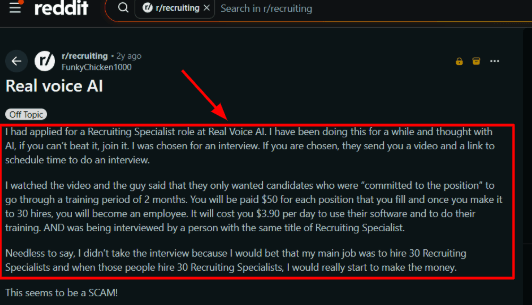
RealVoice can answer calls through a dedicated local number and collect the basics before a human steps in. For contractors, that usually means name, job type, location, urgency, and preferred time. I would still test it with messy real calls, because contractor callers often speak quickly, explain the issue badly, or call while standing at a job site. I also saw a Reddit review about a Real Voice AI recruiting role that made the company side feel worth checking more carefully. I’d place that screenshot below this point so readers can see why I’d separate product testing from company claims.
Lead qualification:
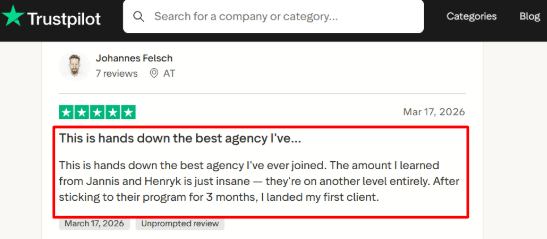
The assistant can ask service questions before sending the lead to the team. For a contractor, this can help filter roof repair, plumbing leak, HVAC breakdown, renovation enquiry, or general quote request. The Trustpilot review I saw is positive, though it reads more like feedback on a program or agency experience than a direct product review. I’d show that screenshot under this point, with a note that it supports company experience more than call-answering quality.
Calendar integration:
RealVoice includes calendar integration, so it can book appointments based on live availability. This is useful for contractors who schedule site visits, estimates, inspections, or repair slots. When I looked at the setup flow from the research, this felt practical for small teams, especially if they already run bookings through Google Calendar or a similar tool.
Home service workflows:
The home services positioning is the part that feels most relevant for contractors. RealVoice talks about emergency dispatch, job qualification, service area checks, quote requests, follow-up calls, and tools like ServiceTitan and Housecall Pro. That makes it easier to imagine in real contractor use, where every call is slightly different and not every caller is ready to book.
Voice website widget:
RealVoice can also sit on a contractor website as a voice widget. A visitor can speak instead of filling a form, then the AI can answer basic questions or capture the lead. One useful market signal here is that Gartner reported heavy executive pressure around AI in customer service, so this kind of voice-first support is becoming more normal.
Pros
Good fit for missed contractor calls. If a small contracting team is often on-site, driving, or handling tools, RealVoice can capture the caller before the lead goes cold.
Strong home services angle. It covers job qualification, service area checks, emergency routing, and quote requests.
Works across phone and website. This helps contractors who get leads from Google, direct calls, landing pages, and local ads.
Public pricing is clear. The plans show monthly cost, included minutes, and extra minute charges.
Supports multiple languages. The research showed 33 languages, which can help contractors serving mixed local communities.
Cons
Do not choose RealVoice if your main need is a fully proven contractor answering service with deep human backup, mature public reviews, and hands-on dispatch support. In that case, a more established ai-receptionist-for-contractors tool may feel safer.
Independent review proof is thin, so I would not rely only on official claims before buying.
Custom actions sound useful, but they may need custom setup rather than a simple switch-on flow.
Call recording, AI voice use, and consent rules need care, especially because the FCC has clarified that AI-generated voice calls can fall under TCPA rules.
The API documentation and human handoff details looked less mature in the research, so larger contractor teams should verify these before committing.
Pricing
RealVoice pricing starts at $99/month for the Starter plan with 100 minutes.
Growth is listed at $149/month with 250 minutes.
Premium is listed at $199/month with 500 minutes.
Extra usage is priced at $0.15/minute.
Custom plans are available for higher volume, multiple locations, white-label needs, custom training, SLA support, and on-premise deployment.
When to Choose RealVoice
Choose RealVoice if you are a small or growing contractor business that misses calls, wants after-hours coverage, and needs simple lead capture plus appointment booking.
It fits plumbers, HVAC companies, roofers, remodelers, electricians, and general contractors that want a voice-first receptionist without hiring a full-time front desk person.
I would avoid it if you need a heavily reviewed enterprise tool, live human receptionist backup, complex dispatch workflows from day one, or strict compliance proof before testing.
Nucleus
Nucleus is best known as a free or low-cost AI receptionist that can answer calls, take messages, and route callers for small businesses. For contractors, it makes the most sense when missed calls are turning into missed quote requests, job updates, or after-hours enquiries.
Features
24/7 answering:
Nucleus can answer calls when the contractor is on-site, driving, or already speaking with another customer. I would treat it as a front desk layer for basic intake, not as the person making judgment calls on complex jobs.
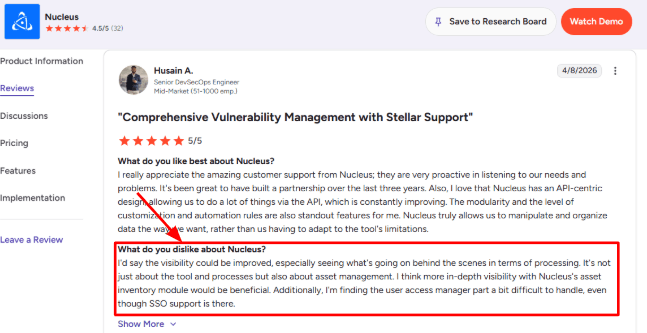
While looking at user feedback, I also noticed a G2 review saying visibility behind the scenes could be better. That matches how I would test this for contractors too. I’d share a screenshot below so readers can see what kind of backend visibility the reviewer was talking about.
Call reporting:
The reporting side is useful if a contractor wants to track missed calls, call outcomes, messages, and caller patterns over time. In my own setup notes, this is where Nucleus felt more useful than a plain voicemail system because it gives some structure to follow-ups.
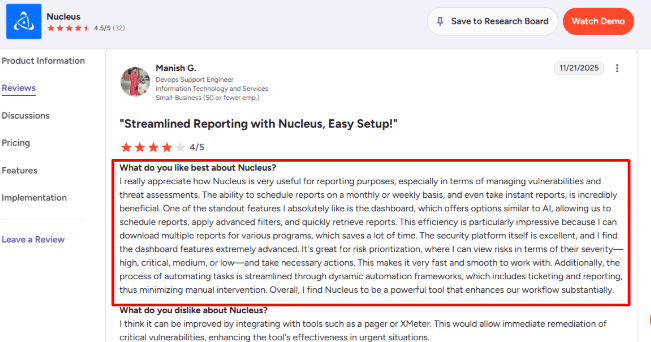
A G2 reviewer also praised the dashboard and scheduled reporting, especially for pulling reports quickly. I’d place that screenshot under this point because it helps show why reporting is one of the stronger parts of the product.
Team transfers:
Nucleus can route calls to the right person, which matters for contractors with a small office team, field crew, estimator, or owner handling urgent calls. I’d use this carefully for service calls, quote requests, warranty questions, and supplier calls so the AI is not sending everything to one person.
Availability handling:
For contractors, the biggest value is not always booking a meeting directly. It is knowing when the team is available, taking the right details, and helping the caller understand what happens next. This fits well for after-hours calls, weekend enquiries, and customers asking when someone can come out.
Business knowledge:
You can train Nucleus with business details like service areas, opening hours, emergency rules, common job types, and basic pricing language. I’d keep the knowledge base simple at first because contractor calls can get messy when customers describe repairs in their own words. AI support is also becoming more normal in service operations, with Gartner predicting far more routine service issues will be handled autonomously by 2029.
Pros
Nucleus has a strong free-plan angle, which is helpful for solo contractors testing AI call answering for the first time. It lowers the risk before moving missed calls away from voicemail.
The $20/month Premium plan is easy to understand for small contractor teams.
It can help catch after-hours leads from homeowners who call after work.
Call summaries, transcripts, and reporting can make follow-up more organised.
The US and Canadian number setup is useful for North America-focused contractors.
Cons
Nucleus may not be the best pick for contractors who need deep dispatching, technician routing, job costing, invoicing, or field-service software in one place. In that case, a contractor-focused phone or FSM platform may fit better.
Some plan details around team limits should be checked before buying.
Advanced workflows and integrations may require higher or custom plans.
Compliance claims need care because earlier material mentioned SOC 2, GDPR, and HIPAA as expected, so contractors should verify current status with Nucleus before using it for sensitive calls.
The backend visibility may feel limited if you want to see every processing step and user-access detail.
Pricing
Nucleus has a free plan called Play & Don’t Pay. It includes an AI receptionist, a US or Canadian number, branded greetings, missed-call emails, and basic reporting.
Premium starts at $20/month and adds existing number support, SMS notifications, better reporting, more business knowledge, and extra voice options.
Pro was listed at $189/month as coming soon, so check availability before writing it as active.
When to Choose Nucleus
Choose Nucleus if you are a small contractor, home-service business, or local trade company that mainly wants missed-call capture, message taking, simple routing, and after-hours answering.
It is a good fit when your current alternative is voicemail, personal mobile calls, or a part-time receptionist.
Skip it if you need full dispatching, job management, payments, estimates, technician scheduling, and invoicing inside one contractor-specific system.
Methodology
We evaluated AI receptionist tools for contractors by reviewing call handling, after hours support, job booking, lead capture, spam filtering, pricing, setup effort, integrations, and customer reviews. Extra weight was given to tools that help trade businesses respond faster, qualify urgent jobs, schedule estimates, and reduce missed revenue from unanswered calls.
FAQs
Which is the best AI receptionist for contractors?
Ring Jenny, Goodcall, and Cactus are strong picks for contractors who need fast lead capture, after-hours answering, and basic booking help.
Also compare FirstDial, RealVoice, and Nucleus if you need routing, transcripts, or multi-location support.
How do contractors choose the right AI receptionist?
Start with your biggest call problem.
Missed calls after hours
Job quote requests
Emergency routing
Booking changes
Cancellations
Then test call quality, transcripts, fallback rules, and whether it can send jobs to the right person.
What mistakes do contractors make when buying an AI receptionist?
The biggest mistake is choosing only by price.
Check whether the tool can handle noisy job-site calls, urgent requests, spam calls, repeated questions, and handoff to a human when the caller sounds confused or frustrated.
Can an AI receptionist handle emergency calls for contractors?
Yes, but it should not fully replace human judgment for urgent jobs.
Use clear escalation rules for leaks, outages, locked doors, safety issues, and high-value leads. Always test emergency routing before going live.
How do I test an AI receptionist before switching phone systems?
Run test calls using real contractor scenarios.
New quote request
Angry customer
Reschedule request
Emergency job
Noisy background call
Review recordings, transcripts, appointment confirmations, and whether the handoff feels natural.
What integrations matter most for contractor answering services?
The most useful integrations are calendar booking, CRM updates, call summaries, payment links, and SMS confirmations.
For contractors, the tool should also capture job type, location, urgency, preferred time, and whether the caller is a new or returning customer.