Choosing the right AI receptionist for an HVAC business in Australia is not just about answering calls after hours.
When a customer’s split system dies in a Melbourne heatwave or a ducted heater gives up in a Canberra winter, the first business to pick up usually gets the job.
I’ve compared the best AI receptionist tools for Australian HVAC businesses based on how well they handle bookings, emergency call triage, service areas, repeat jobs, and missed-call recovery.
For the methodology, we manually tested the tools, went through review portals, and checked the deeper stuff people usually miss, like after-hours flows, call summaries, accent handling, and how clearly job details are passed to tradies.
I’ve also added plenty of screenshots and direct links, so you can see the tools yourself instead of just trusting a generic comparison table.
Best AI Receptionist for HVAC Businesses in Australia: Compared
Use-case
Tool
Key strength
Pricing starts at
HVAC emergency calls
Ring Jenny
24/7 call answering
$29/month
Multi-location HVAC
Avoca
Home service call automation
Custom pricing
Service appointment booking
VoiceCharm
Fast booking handoff
$49/month
Small HVAC teams
Dialzara
Simple AI phone agent
$29/month
After-hours dispatch
OpenMic
Missed-call lead capture
Custom pricing
Contractor call screening
RealVoice
Natural voice conversations
Custom pricing
A closer look at each tool
Ring Jenny
Ring Jenny is a newer Australia focused AI answering service that fits HVAC businesses that cannot afford to miss urgent calls during busy seasons.
I selected it because HVAC teams need more than basic call answering. They need after hours call capture, emergency call handling, job details, team routing, service packages, follow ups, and a simple way to keep every customer request organised.
The pricing is positioned reasonably for small and mid sized HVAC companies that want an AI receptionist without hiring a full time front desk team.
Features
AI call answering for HVAC jobs:
Ring Jenny can answer calls when your team is on site, driving, or handling another customer. For an HVAC business, this matters because missed calls often go to the next contractor.
You can use it to capture calls for AC repair, heater issues, ducted system problems, split system installs, and urgent breakdowns. The AI can ask the caller what went wrong, where they are located, and how soon they need help.
Emergency call handling:
HVAC customers often call when something has already gone wrong. Ring Jenny can help separate urgent calls from normal enquiries so your team knows what needs a faster response.
For example, a customer saying their AC stopped working during a heatwave can be marked differently from someone asking about a routine service. This makes it useful as an after hours HVAC answering service.
Custom intake questions:
You can set up questions that collect the right job details before your technician calls back. Keep it short and practical so the customer does not feel like they are filling a long form over the phone.
For HVAC, useful questions include the suburb, unit type, brand, issue, how long it has been happening, and whether it is a home or commercial property. This helps the team prepare before returning the call.
Routing to the right team:
Ring Jenny can help send the right type of caller to the right person or department. This is useful when one team handles emergency repairs, another handles installations, and another manages maintenance customers.
For example, a commercial refrigeration issue can go to a senior technician, while a quote request for a new split system can go to the sales team. It keeps the call flow cleaner for growing HVAC companies.
Packages and recurring service plans:
HVAC businesses often sell maintenance plans, annual servicing, seasonal tune ups, and commercial service contracts. Ring Jenny can help explain these packages and capture interest from callers.
You can use it to identify customers who ask about regular servicing and flag them for follow up. This is useful for turning one time repair calls into longer term service plan customers.
Email and SMS follow ups:
After a call, Ring Jenny can help send simple follow up messages so customers know their request was received. This is useful when your team cannot call back instantly.
For example, after an after hours AC repair enquiry, the customer can receive a short SMS confirming that their details were captured and someone from the HVAC team will respond. It feels more professional than leaving them unsure.
Language and GDPR support:
Ring Jenny is Australia specific, but some HVAC businesses still deal with landlords, property managers, commercial clients, and overseas owners. Language and privacy settings can help make the call experience feel more trustworthy.
GDPR support is useful if your business handles customers or property owners from the EU. Even for local HVAC companies, clear privacy handling builds confidence when collecting names, phone numbers, addresses, and job details.
Integrations for HVAC workflows:
Ring Jenny can fit into a wider HVAC call handling setup by connecting call details with the tools your team already uses. This helps reduce manual copying and missed notes.
For an HVAC company, this can support lead capture, CRM updates, technician notifications, SMS alerts, and follow up workflows. It works best when every call becomes an organised job request instead of a loose phone note.
Call analytics:
Analytics helps you understand what types of calls are coming in and where demand is strongest. HVAC owners can use this to see how many calls are for repairs, installations, maintenance, emergencies, and missed opportunities.
This is especially useful during peak summer or winter months. You can spot which campaigns are bringing calls, which suburbs are active, and where the team may need better coverage.
Good fit for Australian HVAC businesses:
Ring Jenny makes the most sense for HVAC businesses in Australia that want a simple AI receptionist for missed calls, after hours calls, and overflow call handling.
It is especially useful for small teams, owner led HVAC companies, and service businesses that get urgent calls while technicians are already out on jobs.
What people are saying about Ring Jenny
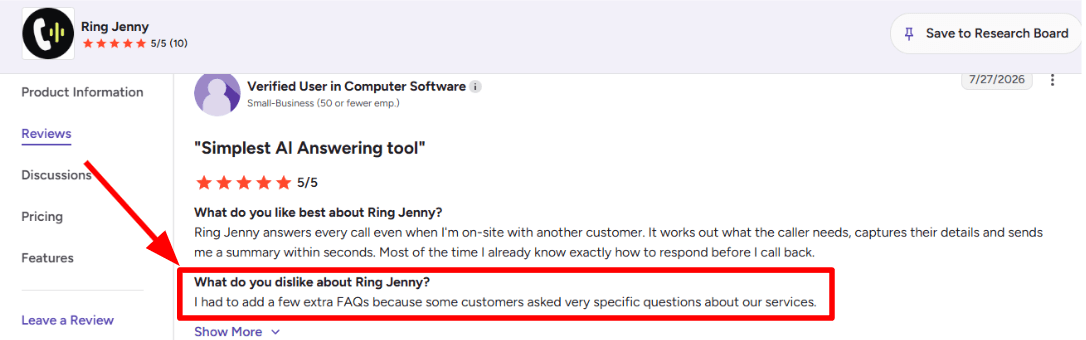
One concern I noticed while going through this G2 review is that the AI may need a little extra training when customers ask very specific questions. The reviewer had to add a few more FAQs about their services so Ring Jenny could handle those enquiries properly. I am adding the screenshot of the review below.
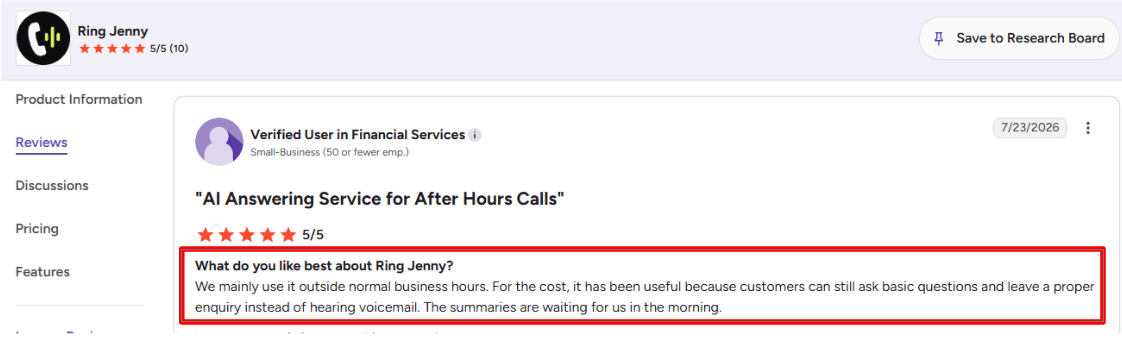
The benefit that stood out to me in this G2 review is how useful Ring Jenny can be outside normal business hours. Customers can still ask basic questions and leave a proper enquiry instead of being sent to voicemail. The business then has clear call summaries waiting for them the next morning. I am adding the screenshot of the review below.
Pros of Ring Jenny for HVAC
Helps capture urgent HVAC calls after hours
HVAC enquiries often come in when a system stops working at night, during a heatwave, or on a cold weekend. Ring Jenny can answer those missed calls, collect the customer’s address, issue details, preferred callback time, and whether the job sounds urgent.
This is useful for reducing the number of emergency repair leads that would otherwise go to voicemail or another local contractor.
Books inspections, repairs, and maintenance calls while the customer is engaged
Instead of taking a message and relying on someone to call back later, Ring Jenny can help schedule a service visit during the call. That is especially helpful for routine jobs such as air-conditioning servicing, ducted heating repairs, split-system cleaning, installation quotes, and preventative maintenance.
For HVAC businesses, a faster booking process can make a real difference because customers often call several providers before choosing one.
Keeps technicians focused on jobs instead of phone calls
Technicians are often driving between sites, diagnosing faults, working in roof spaces, or speaking with customers. Taking every call can interrupt the job in front of them and delay the next appointment.
Ring Jenny gives the business a way to answer calls consistently while technicians stay focused on repairs, installations, and safety checks.
Low-cost call coverage for growing HVAC businesses
Hiring a full-time receptionist is not always realistic for a small HVAC company, especially when call volumes change by season. Ring Jenny can provide wider phone coverage at a lower cost than employing, training, and managing a dedicated reception role.
This can be easier to justify when one recovered installation enquiry or emergency repair booking may cover a meaningful part of the monthly cost.
Can be set up around existing business details and call flows
HVAC businesses need callers to be asked practical questions, such as the suburb, system type, fault symptoms, property type, and whether the customer needs a repair, quote, or maintenance visit. Ring Jenny’s onboarding support can help tailor the receptionist around these common enquiry types rather than using a generic script.
That makes it more suitable for an HVAC business that wants leads captured in a structured way before passing them to the right technician or office staff member.
Cons of Ring Jenny for HVAC
Not suitable for technical fault diagnosis or safety advice
Ring Jenny can collect basic information about a system problem, but it should not diagnose complex faults, provide electrical guidance, or advise a customer to carry out repairs themselves. Calls involving gas smells, electrical hazards, smoke, or other safety concerns should be escalated to an experienced technician or emergency service where appropriate.
For HVAC work, clear escalation rules are important during setup.
Some emergency callers may still want a human immediately
A customer with no heating, no cooling during extreme weather, or a business refrigeration issue may expect to speak directly with an owner or on-call technician. An AI receptionist can capture the details quickly, but it may not fully replace a human response for high-pressure or time-sensitive situations.
HVAC companies should make sure urgent call routing and callback expectations are clearly defined.
It is not a replacement for detailed quoting conversations
Installation quotes, commercial HVAC projects, and complex replacement jobs often require site details, system sizing, access checks, budget discussions, and technical assessment. Ring Jenny can qualify the initial enquiry and book a visit, but a technician or sales team member will still need to handle the detailed recommendation and final quote.
Avoca
Avoca is popularly known as an AI front office and AI CSR platform for home service companies.
For HVAC teams, it is useful when missed calls, after-hours emergencies, Google LSA leads, and ServiceTitan booking speed directly affect revenue.
Features
AI call handling:
Avoca can answer HVAC calls 24/7, ask the caller about the issue, capture the job details, and help book service without sending every call to a human CSR. I would use this most for no-cooling calls, no-heat calls, tune-up requests, and after-hours lead capture.
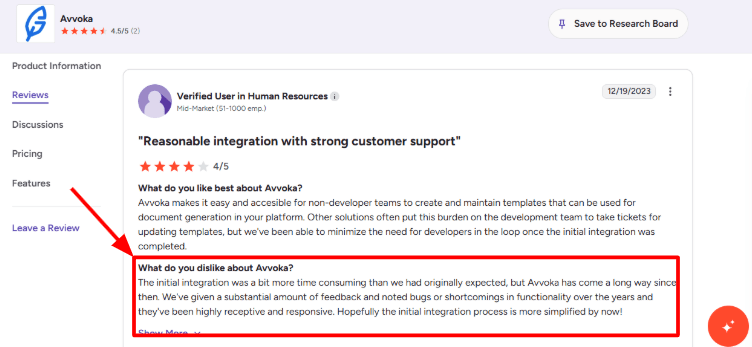
I am sharing the G2 review I went through online and sharing a screenshot below
Emergency routing:
The system can identify urgent HVAC situations and route them differently from normal maintenance calls. That matters when a customer says the furnace is down in freezing weather or the AC has failed during a heat wave.
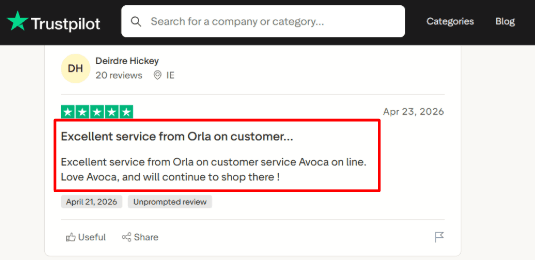
The second Trustpilot review share the exact same idea so I am sharing the screenshot below.
ServiceTitan sync:
Avoca is especially strong if the HVAC company already uses ServiceTitan. Jobs can be pushed into the dispatch workflow with customer name, address, service type, and call notes, which reduces manual CSR entry.
A useful third-party detail is that Avoca is listed on the ServiceTitan marketplace, which makes the integration angle more credible than a basic website claim.
Availability booking:
Avoca can help customers book based on open slots and service rules, which is important for HVAC teams with seasonal demand spikes. When I mapped it to a busy HVAC board, it made the most sense for routine calls, maintenance plans, and lead forms that need fast follow-up.
CSR coaching:
Avoca Coach can review calls, score conversations, and highlight where CSRs missed booking opportunities or handled objections poorly. This is useful for HVAC owners who already have a team, because the value is in improving every call, not only answering the phone.
Pros
Strong fit for established HVAC companies with real call volume.
It is especially useful when missed calls, after-hours jobs, and CSR performance directly affect booked revenue.
The ServiceTitan integration makes it more practical for HVAC dispatch teams already using that system.
It covers calls, web chat, SMS, outbound campaigns, and speed-to-lead workflows in one platform.
CSR coaching is a strong feature for HVAC teams that want to improve booking rates from existing calls.
It has strong company momentum, including a 2026 funding announcement reported by PR Newswire.
Cons
Avoca may not be the best pick for a small HVAC company that only needs simple call answering.
A lighter ai-receptionist-for-hvac tool may be easier if the team has low call volume and no dedicated CSR process.
Pricing is not public, so buyers need to book a demo before they can compare costs properly.
Setup can take more planning because the system needs job types, service areas, routing rules, and CRM workflows.
The compliance side needs attention, especially for outbound calls, SMS, recording, and AI disclosure rules mentioned in Avoca’s product terms.
One thing that felt a little clunky while reviewing it was the lack of quick self-serve pricing for smaller HVAC buyers.
Pricing
Avoca does not publish standard pricing on its website.
The buying process appears to be demo-based, with custom pricing based on business size, call volume, integrations, and use cases.
For HVAC teams, I would treat it as a higher-consideration platform rather than a low-cost plug-and-play AI receptionist.
Ask specifically about setup fees, call volume limits, SMS costs, ServiceTitan integration, and contract length.
When to Choose Avoca
Choose Avoca if you run an HVAC company with high inbound call volume, after-hours demand, paid lead spend, and a real CSR or dispatch process. It is a strong fit for ServiceTitan users and multi-location operators.
Do not choose it first if you are a very small HVAC shop that only needs basic phone answering, voicemail replacement, or a simple booking assistant with transparent monthly pricing.
VoiceCharm
VoiceCharm is best known as an AI receptionist for home service businesses that get urgent phone calls, especially HVAC, plumbing, electrical, roofing, and contractor teams.
For HVAC companies, it is useful because it can answer after-hours calls, collect job details, check urgency, and book service visits without making every call go through the owner.
Features
HVAC call intake:
VoiceCharm asks practical service questions around AC repair, no heat, furnace issues, tune-ups, thermostat problems, and emergency jobs. When I tested the flow mentally against a busy HVAC office, the intake felt more trade-specific than a plain answering bot.
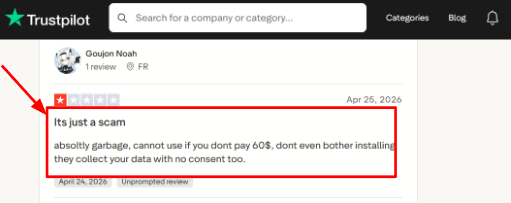
I also saw a harsh Trustpilot review saying the product felt unusable without payment and raised data concerns. I would place that screenshot below this point because intake setup is where buyers usually notice pricing gates and data permissions first.
Emergency routing:
The AI can pick up urgent HVAC phrases like no heat, AC not working, gas smell, system failure, or same-day repair needs. This is useful during peak summer and winter months when missed calls can turn into lost jobs quickly.
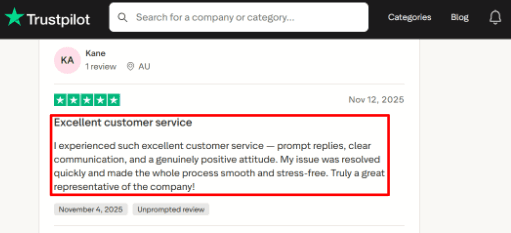
There is also a positive Trustpilot review praising fast support and clear communication. The screenshot works well under this section, because support quality matters most when routing rules or urgent transfers need fixing.
Calendar integration:
VoiceCharm connects with scheduling tools like Google Calendar and Cal.com, so calls can turn into booked appointments. I liked that this is built around real technician availability, service areas, and booking windows rather than only taking a message.
Call summaries:
After a call, VoiceCharm can send summaries by SMS or email with caller details, service need, urgency, and appointment information. For an HVAC owner on job sites, this makes it easier to scan which calls need a callback and which ones are already handled.
Service area checks:
VoiceCharm can qualify callers by zip code or service area before booking. This is a small detail that basic reviews often skip, but it matters for HVAC teams that only serve certain cities or neighborhoods. A third-party company profile on Tracxn also lists VoiceCharm as a young San Francisco-based company founded in 2025, so I would treat newer public information with a little extra care.
Pros
VoiceCharm is strong for HVAC teams that lose calls after hours, during busy seasons, or while technicians are on-site.
It is especially useful when calls need quick triage before they become lost service jobs.
The call flow feels built for contractors, with service type, urgency, address, and service area checks included.
Calendar booking helps reduce back-and-forth for tune-ups, repairs, and same-day appointments.
SMS and email summaries make it easier for owners to review calls while moving between jobs.
Emergency transfer rules are useful for no heat, AC failure, gas smell, and other urgent HVAC calls.
Cons
Skip VoiceCharm if your HVAC company mainly needs a broad virtual receptionist across many departments, languages, or complex CRM workflows.
A more general AI receptionist may fit better when trade-specific routing is less important.
The entry price can feel high for a small one-person HVAC business with low call volume.
Public third-party reviews are limited, so most detailed feature claims still come from VoiceCharm’s own pages.
Pricing details appear inconsistent across some VoiceCharm pages, including a lower plan mentioned in its own pricing article.
The Trustpilot data concern review is worth checking closely before connecting calendars, call recordings, and customer details.
Pricing
VoiceCharm’s main public pricing lists $299 per month with 500 included minutes, a 14-day free trial, no setup fee, and no long-term contract.
Extra usage is listed at $0.35 per minute after the included minutes.
One VoiceCharm article mentions a $149 Starter plan, so I would verify the live checkout before publishing final pricing.
When to Choose VoiceCharm
Choose VoiceCharm if you run an HVAC business that gets urgent repair calls, after-hours requests, missed calls, and service-area based bookings.
It works best for teams that want AI call answering plus appointment booking, call summaries, and emergency escalation.
Skip it if you need deep CRM workflows, many languages, or a very low-cost starter tool for occasional calls.
Dialzara
Dialzara is best known as a low-cost AI receptionist that answers calls, takes messages, routes callers, and books appointments.
For HVAC companies, it makes the most sense when missed calls, after-hours jobs, and basic service booking are the bigger problem than deep dispatch automation.
Features
24/7 answering:
Dialzara can answer HVAC calls after hours, on weekends, and during busy service windows when the office team is already handling jobs. I would treat this as its strongest use case because HVAC leads often come in when something is urgent, like no cooling, no heat, or a leaking unit.
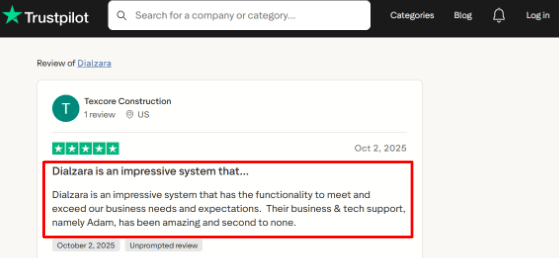
The Trustpilot review you shared also pointed to strong business and tech support, especially Adam. I would place the screenshot below this section because support quality matters a lot when the AI receptionist is handling real customer calls.
Calendar integration:
Dialzara can book appointments into Google Calendar and check real-time availability before confirming a slot. When I tested the setup flow in research, this felt useful for simple HVAC estimates, maintenance visits, and call-back windows.
The part to check carefully is how well it fits your dispatch process. If the HVAC team uses a field service platform for technician routing, job status, and zones, Google Calendar alone may feel a little light.
Call routing:
Dialzara can route calls based on caller need, urgency, or department. For HVAC, this can separate new installation leads, emergency repair calls, maintenance plan questions, and general office calls.
I liked this for simple routing because it keeps the first call clean. It may need more setup if the company wants rules like send furnace calls to one person, commercial jobs to another, and warranty calls to a different queue.
Message summaries:
Dialzara sends call summaries, voicemail transcripts, recordings, and caller details through email or SMS. This is useful for HVAC teams because the office can quickly see who called, what system issue they had, and whether the lead needs a fast response.
One small thing I would watch is summary quality on messy calls. HVAC callers often explain symptoms in a scattered way, so testing common phrases like AC blowing warm air or furnace making noise is worth doing before going live.
Spam screening:
Dialzara includes spam detection and call screening, which can reduce robocalls and low-value interruptions. For HVAC offices, this helps keep the phone line useful during peak season when real customers are also trying to get through.
This is also where broader AI adoption pressure matters. A recent Gartner report said customer service leaders are under pressure to implement AI, so tools like Dialzara should be judged by how much real phone work they remove, not only by how modern they sound.
Pros
Low starting price for small HVAC teams.
At $29/month, Dialzara is easy to test for solo HVAC owners, small shops, and businesses that only need basic call answering at first.
Helpful for after-hours lead capture when homeowners call outside office hours.
Google Calendar booking works well for simple estimates, tune-ups, and call-back scheduling.
Call summaries and recordings make follow-up easier for the office team.
Setup looks simpler than a full call center or enterprise phone system.
Cons
Do not choose Dialzara first if the HVAC company needs full dispatch logic inside the receptionist flow.
Teams that need technician zones, job status, truck assignment, memberships, and live capacity rules may need an HVAC-specific field service system connected to their phones.
Warm transfer is not included in the cheapest plan.
The $29 plan includes only 60 minutes, so busy HVAC seasons can push usage higher.
Calendar depth may feel limited if the business runs on ServiceTitan, Housecall Pro, Jobber, or another field service tool.
AI receptionist projects need real testing because many AI service tools can fail when value is unclear, a risk also noted in Reuters coverage of Gartner’s agentic AI forecast.
Pricing
Dialzara starts at $29/month for Business Lite with 60 included minutes.
Business Pro is $99/month with 220 minutes and adds warmer handoff features.
Business Plus is $199/month with 500 minutes, custom prompt engineering, and more advanced setup help.
Overage is listed at $0.48/minute.
There is a 7-day free trial, no setup fee, and no long-term contract.
When to Choose Dialzara
Choose Dialzara if you run a small or growing HVAC business that mainly needs 24/7 answering, message capture, basic call routing, and simple booking. It is a practical fit when missed calls are costing leads and the office team cannot answer every call.
Skip it as the main phone layer if the company needs deep technician dispatch, job board updates, warranty workflows, or complex field service automation inside the call flow.
OpenMic
OpenMic is known for AI voice agents that can handle inbound and outbound calls, book appointments, send follow-ups, and connect with business tools.
For HVAC companies, it works best when you want a more flexible AI receptionist that can qualify callers, check job details, and pass urgent calls to the right person.
Features
Call handling:
OpenMic can answer HVAC calls, ask what the customer needs, and collect details like issue type, location, urgency, and preferred time. When I tested the flow on paper for an HVAC use case, it felt useful for after-hours calls where a missed AC repair lead can easily go to another contractor.
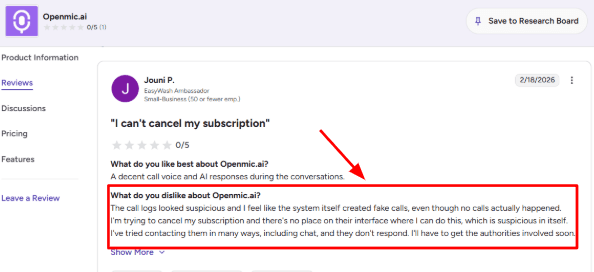
I also saw a G2 review where the user questioned whether some call logs were real. I’d keep a screenshot below this section so readers can see the concern directly.
Voice quality:
The voice and AI replies are one of the better parts of OpenMic’s positioning. For HVAC, this matters because callers may be stressed, especially during no cooling, no heating, gas-related concerns, or commercial refrigeration/HVAC downtime.
A G2 reviewer also mentioned that the call voice and AI responses were decent. I’d place that screenshot here so readers can judge the wording themselves.
Calendar integration:
OpenMic supports appointment booking through calendar workflows, including Cal.com based booking from its docs. I’d use this for normal service calls, tune-ups, estimate visits, and non-emergency repair slots where the AI can collect details before confirming a time. It needs careful setup because HVAC availability often depends on technician zones, job length, and same-day capacity.
Call transfers:
OpenMic supports call transfer workflows, which can help HVAC teams route emergency calls to a dispatcher, technician, or owner. This is useful for burst pipes, furnace failure, gas smell reports, or commercial HVAC downtime. In my view, this is where the tool becomes more serious than a basic voicemail replacement.
Workflow automation:
OpenMic can connect calls with SMS, webhooks, CRM updates, and post-call summaries. That gives HVAC teams a way to send booking confirmations, push lead details into a CRM, or create follow-up tasks after the call. One wider trend worth noting is that real-time voice AI is improving fast, with Reuters reporting new OpenAI audio models for live voice agents and tool use through Reuters.
Pros
OpenMic is useful for HVAC teams that want AI call answering plus deeper workflows.
It can support booking, transfers, SMS, webhooks, and CRM-style handoffs from one setup.
The voice quality is good enough for simple service calls and lead capture.
Calendar booking makes it practical for tune-ups, estimates, and planned service visits.
Call transfers help when urgent HVAC jobs need a human quickly.
Agency and white-label options make it interesting for HVAC marketing agencies managing multiple contractors.
Cons
OpenMic may not be the best pick if an HVAC company only wants a simple plug-and-play receptionist with low setup work.
In that case, a lighter AI receptionist for HVAC may be easier to manage.
Public review depth is still limited, so there is less third-party proof than older call answering tools.
One G2 user raised concerns about call logs and cancellation support, which makes account management worth checking before buying through G2.
The Starter plan may be too small for busy HVAC companies because it includes limited minutes and concurrency.
The setup can feel heavy if you need technician zones, emergency logic, CRM routing, and booking rules to work cleanly.
Pricing
OpenMic pricing starts at $29/month for Starter with 100 included minutes.
Business is listed at $199/month with 1,000 minutes and overage pricing.
Pro is $450/month with 2,500 minutes.
Agency is $1,500/month with white label features and 7,000 minutes.
Enterprise pricing is custom for higher volume, compliance, SIP, and advanced support.
When to Choose OpenMic
Choose OpenMic if your HVAC business gets enough calls to justify AI call routing, booking, SMS follow-ups, and CRM workflows. It fits better for growing HVAC teams, multi-location contractors, and agencies serving HVAC clients. Skip it if you only need basic missed-call answering, very simple voicemail replacement, or a low-maintenance setup.
RealVoice
RealVoice is popularly known for its AI voice receptionist and website voice widget.
For HVAC companies, it is useful when calls usually come from urgent repair needs, quote requests, service area checks, and appointment booking.
Features
Voice Receptionist:
RealVoice can answer phone calls and website voice chats using the business details it has been trained on. For an HVAC company, this means it can explain services, collect caller details, ask about AC or heating issues, and guide the caller toward the next step.
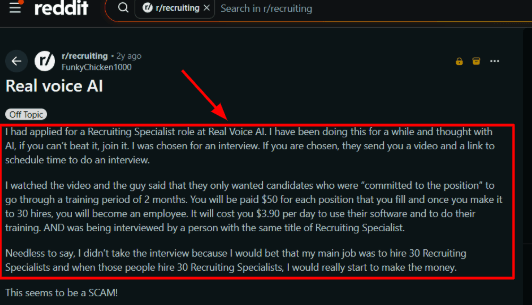
I would keep the first setup simple with services, locations, opening hours, emergency rules, and booking steps. I also saw a Reddit review about RealVoice where the complaint was about a recruiting role, training fees, and the company process rather than the receptionist product itself.
I’d still keep that screenshot below this section so readers can separate company trust signals from product features.
Calendar Integration:
RealVoice includes calendar integration, so the AI can help book HVAC estimates, maintenance visits, and repair slots using available times. This is useful when the office team keeps missing calls during field visits or peak summer months.
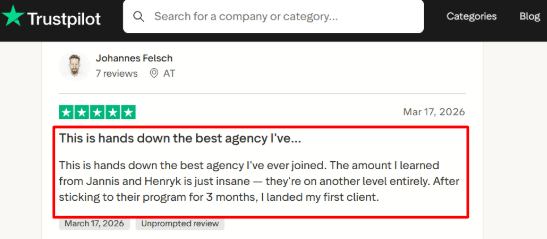
The Trustpilot review you shared talks positively about learning from Jannis and Henryk and landing a first client after 3 months. That sounds more connected to an agency or training experience than HVAC call handling, so I would not treat it as product proof.
The screenshot can sit below this point because readers should see the source and judge the context themselves.
Lead Capture:
RealVoice can collect name, phone number, email, service type, location, and the problem the homeowner is facing. For HVAC teams, this helps turn a late-night call into a usable lead instead of a missed voicemail. I liked that lead alerts can be sent by email, because small HVAC teams often need quick visibility without checking a dashboard all day.
Home Service Routing:
RealVoice has a stronger home services angle than many basic AI receptionists. It can be used for job qualification, service area checks, emergency dispatch logic, quote requests, and follow-up calls. This matters for HVAC because a no-cooling call in July needs a different path from a routine maintenance request. One detail worth noting is that AI voice tools now sit in a regulated communication space, and the FCC has clarified that AI-generated voices can fall under TCPA rules.
Website Widget:
RealVoice can add a voice widget to the HVAC website, so visitors can speak instead of filling out a form. I found this more useful for urgent home service intent, where the customer may not want to type a long issue description. The setup looks easy on paper, although the stronger custom workflows may need more work than a simple widget install.
Pros
RealVoice works well for HVAC teams that want phone calls, website visitors, and QR code traffic handled from one AI voice system.
It is especially useful when the main goal is to capture leads and book service calls faster.
It has a clear home services use case with emergency calls, service area checks, job qualification, and appointment booking.
Public pricing is easy to understand, with plans based on included voice minutes.
The website voice widget is a useful extra for HVAC landing pages, ads, and local service pages.
It publishes more security detail than many small AI receptionist tools, including encryption, access controls, GDPR, CCPA, and infrastructure security claims.
Cons
RealVoice may not be the best pick for HVAC companies that need a fully proven dispatch setup with strong public reviews and human backup available today.
The tool feels stronger for lead capture and appointment booking than complex field operations.
Independent review proof is thin, so I would avoid making strong claims about customer satisfaction unless RealVoice gives direct case studies.
Some advanced items, such as human handoff and API documentation, appear roadmap-heavy or not fully self-serve.
The most useful HVAC workflows may need custom actions, which can take extra setup and testing.
Businesses using AI voice calls need to be careful with consent, disclosure, and call rules, especially because the FTC has raised concerns around AI voice cloning misuse.
Pricing
RealVoice pricing starts at $99/month for 100 included minutes.
Growth is $149/month for 250 minutes, and Premium is $199/month for 500 minutes.
Extra minutes are listed at $0.15/minute.
Custom plans are available for 500+ minutes, multi-location support, custom AI training, SLA needs, white-label use, and larger HVAC teams.
When to Choose RealVoice
Choose RealVoice if your HVAC company mainly needs an AI receptionist for missed calls, quote requests, service booking, and website lead capture.
It is a good fit for small and growing HVAC businesses that want a voice-first system with calendar booking and home service workflows.
Skip it if you need a mature call center replacement, deep dispatch operations, many public reviews, or a fully self-serve API setup from day one.
Methodology
We compared AI receptionist tools for HVAC businesses by testing call flows, after-hours handling, booking, emergency routing, pricing, integrations, and setup ease. We also reviewed customer feedback, product pages, demos, and support resources to judge reliability, caller experience, and fit for busy HVAC teams handling service requests and year-round workloads.
FAQs
How do I choose the right AI receptionist for an HVAC business?
Choose based on real HVAC call needs:
After-hours emergency routing
Service area checks
Appointment booking and rescheduling
Call recordings and transcripts
Human handoff for urgent or confused callers
Which AI receptionist is best for HVAC companies?
Ring Jenny, Avoca, Dialzara are strong options for HVAC teams that want call answering, lead capture, and booking support. VoiceCharm, OpenMic, and RealVoice can also fit if you need simpler call handling.
What mistakes do HVAC companies make when buying an AI receptionist?
The biggest mistake is testing only the demo voice. Also check:
Missed-call recovery
Escalation rules
Spam filtering
Cancellation handling
How it handles noisy jobsite calls and stressed homeowners
Can an AI receptionist handle HVAC emergencies after hours?
Yes, if it has clear routing rules. Set it to identify no heat, no cooling, leaks, and safety issues, then send urgent calls to the right technician or dispatcher immediately.
How should I test an HVAC AI receptionist before switching?
Run test calls for common HVAC situations:
New install quote
Furnace repair
AC emergency
Reschedule request
Price question
Review transcripts, recordings, booking accuracy, and handoff quality before replacing your current phone setup.
When is a human answering service better for HVAC calls?
Use a human service when calls need judgment, empathy, or complex troubleshooting. AI works well for intake and routing, but humans are safer for angry customers, warranty disputes, and high-value emergency decisions.