Choosing the best AI answering service in New Zealand is not just about picking the tool with the nicest website. For Kiwi businesses, every missed call can mean a lost booking, quote request, urgent job, or customer who simply calls the next company.
And with Stats NZ reporting 617,330 enterprises in New Zealand in 2025, the market is crowded enough that slow replies are a real disadvantage.
I wrote this comparison to help NZ businesses find an AI answering service that can handle local callers, after hours enquiries, bookings, messages, and follow ups without sounding robotic. I looked at the tools the way a business owner in Auckland, Wellington, Christchurch, Hamilton, Tauranga, Queenstown, or regional New Zealand would actually judge them.
Can it handle Kiwi accents, Māori place names, noisy callers, urgent jobs, after hours enquiries, booking changes, and real customer questions? That is the real test.
We manually tested the tools, checked review portals, reviewed pricing pages, and looked closely at the details people usually miss, like call quality, local caller fit, setup effort, pricing traps, handoff quality, and how well each tool passes information to your team. I have also added screenshots and links throughout, so you can check the tools properly and decide for yourself instead of relying on a generic list.
Best AI Answering Services in New Zealand Compared
Tool
Best for
Starting price
Main weakness
Ring Jenny
ANZ small businesses
US$49/month
Needs more public review proof
Smith.ai
AI plus human backup
US$95/month
US-focused service model
Abby Connect
AI plus human escalation
US$99/month
Can get expensive with usage
Ruby
Premium live answering
US$250/month
US-based receptionist team
AnswerConnect
24/7 live answering
US$350/month
Less NZ-specific positioning
RingCentral AI Receptionist
Multi-location teams
US$39/month
Heavier setup
How I Compared These AI Answering Services
Test area
What I checked
NZ caller fit
Kiwi accents, Māori place names, local suburb names, and caller expectations
After-hours answering
Whether calls were handled outside normal business hours
Lead capture
Whether caller details were collected clearly
Booking support
Whether it could handle appointments, callbacks, and service requests
Human handoff
Whether urgent or complex calls could reach a real person
Call summaries
Whether transcripts and summaries were useful for follow-up
Pricing
Monthly plans, minute limits, call limits, overages, and currency
Setup effort
Whether a small business owner could set it up without a long project
Best AI Answering Service by New Zealand Use Case
Use case
Best pick
Best for NZ small businesses
Ring Jenny
Best for AI plus human backup
Smith.ai
Best for solo clinics
Abby Connect
Best for premium live reception
Ruby
Best for 24/7 human answering
AnswerConnect
Best for multi-location teams
RingCentral AI Receptionist
A detailed look at each tool
Ring Jenny
Ring Jenny is a strong starting point for New Zealand businesses that cannot afford to miss calls after hours, during jobs, or while the team is busy. I selected Ring Jenny because it fits the real needs of small service businesses: answer calls, capture leads, route enquiries, send summaries, and help the team follow up faster.
Ring Jenny is built for ANZ businesses, which makes it more relevant for New Zealand callers than many US first receptionist tools. It is a good fit for tradies, clinics, salons, real estate teams, consultants, agencies, legal offices, and local service businesses where one missed call can turn into lost revenue.
Features
AI call answering
Ring Jenny answers incoming calls when your team is busy, unavailable, or closed for the day. This is useful for New Zealand tradies, clinics, salons, property managers, and service businesses that lose leads when calls go to voicemail. For example, a plumbing business in Auckland can let Ring Jenny answer after hours emergency calls, collect the job details, and pass serious calls to the right person.
Custom intake questions
You can set the questions Ring Jenny should ask during a call. This helps you collect useful details before calling the customer back, instead of wasting time asking the same basic questions again. For example, a dental clinic in Christchurch can ask if the caller is a new patient, what suburb they are in, whether the issue is urgent, and whether they need the earliest available appointment.
Call routing
Ring Jenny can help send the right type of call to the right person or workflow. This matters for New Zealand businesses where one phone number may handle sales, support, bookings, urgent jobs, and general questions. For example, a property management company in Wellington can route tenant repair issues differently from new landlord enquiries.
Packages and service setup
Ring Jenny can be set up around different service packages, so callers get a more relevant experience based on what they need. This is useful when your business sells multiple services instead of one generic offer. For example, a home services business can separate urgent repairs, quote requests, maintenance plans, and general enquiries, so every caller gets handled properly.
Integrations and summaries
Ring Jenny can connect call details with the tools your team already uses, so leads and messages do not sit forgotten in a call log. The main value is that every call can turn into a clear summary, task, or follow up. This is especially useful for small NZ teams using email, CRM tools, spreadsheets, or messaging apps to manage enquiries.
Pros
Strong fit for NZ and ANZ small businesses.
Useful for after hours calls, missed calls, lead capture, and routing.
More affordable than many live answering services.
Works well for service businesses with repeatable call flows.
Call summaries make follow up easier.
Good option for small teams that do not want to hire extra reception staff.
Cons
Public review volume may be thinner than older answering service brands.
Not a full CRM or call centre platform.
Complex routing needs careful setup.
Sensitive or emotional calls may still need a human.
More public case studies would make the decision easier.
Teams still need to review summaries and follow up quickly.
Pricing
Ring Jenny pricing starts at US$49 per month. New Zealand businesses should check what is included in each plan, especially call volume, SMS alerts, appointment booking, integrations, routing rules, and whether usage affects the monthly price.
When to Choose Ring Jenny
Choose Ring Jenny if you want an affordable AI answering service for missed calls, after hours enquiries, lead capture, summaries, and routing. It is a good fit for NZ small businesses that want better phone coverage without hiring another receptionist. Skip it if every caller needs a human immediately or if you need a full enterprise contact centre.
Smith.ai
Smith.ai is best known for combining AI call answering with live human receptionists. It is useful when a business wants fewer missed calls, stronger intake, and human backup without hiring a full time receptionist. For New Zealand businesses, Smith.ai can work well, but you should test local caller fit carefully because the service is more US focused.
Features
AI call answering
Smith.ai can answer calls 24/7, ask basic questions, screen leads, block spam, and pass complex calls to a human receptionist when needed. For New Zealand businesses, this is useful if calls come in after 5 pm, on weekends, or from overseas prospects in a different time zone. The setup flow is fairly clear, but the quality depends a lot on how detailed your call instructions are.
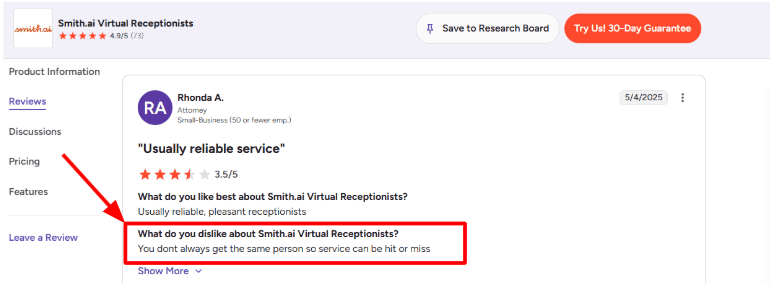
I also saw this in a G2 review of Smith.ai Virtual Receptionists, where a user said, “You dont always get the same person so service can be hit or miss.” I have placed the screenshot below because it explains the biggest trade-off with pooled receptionists.
Human handoff:
The AI receptionist is not left alone for every call. Smith.ai says difficult calls can be escalated to a live agent, which is helpful for industries where callers may not explain things clearly the first time. For example, a roofing company in Auckland could use AI to capture the caller's suburb, urgency, roof type, and issue. If the caller says water is leaking through the ceiling, the call can be routed to a real person or the on call staff member.
Lead qualification
Smith.ai lets you define what makes a caller a good lead, such as location, budget, service type, urgency, or customer status. This is useful for New Zealand tradies, law firms, accountants, clinics, agencies, and consultants who do not want every inquiry treated equally. The intake is more structured than a basic answering service. The weak point is that businesses with many services or locations need to spend time writing clear call rules.
Client communication
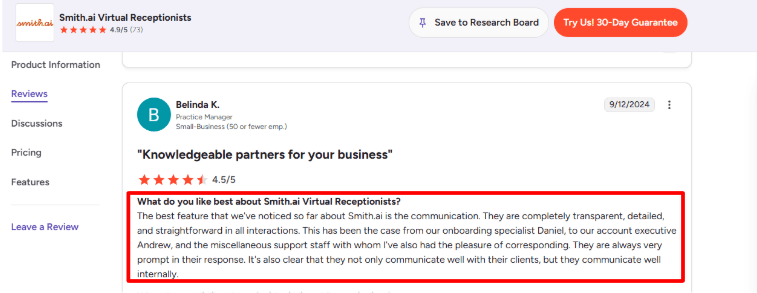
Smith.ai sends call summaries and updates through tools like email, Slack, Teams, CRM systems, and Zapier. This matters for small NZ teams because the person receiving the call summary may not be the same person doing the job, quote, consultation, or follow up. One positive pattern I noticed in a G2’s Smith.ai reviews is that users often praise the communication. One review specifically mentions transparent onboarding, prompt replies, and good internal communication. I partly agree with that because the product gives more visibility than a traditional message-taking service. Still, you need to check call logs regularly in the first few weeks.
Appointment booking:
Smith.ai can book appointments during the call and push caller details into connected tools. For an AI answering service in New Zealand, this is useful for quote requests, consultation calls, property viewings, clinic callbacks, and service appointments. This should not be confused with a full scheduling platform. It works best when your booking rules are simple and your calendar setup is already clean.
Call records
Smith.ai offers call summaries, recordings, transcripts, and dashboard visibility. This is useful when a caller disputes what was said, when a staff member misses a transfer, or when you want to review whether leads are being qualified correctly. I would treat call review as part of onboarding, not something you only check after a mistake happens.
Pros
Strong fit for service businesses that depend on phone enquiries.
Combines AI answering with human backup.
Good for after hours coverage and international caller windows.
Lead screening, intake, call summaries, and CRM updates are more useful than simple message taking.
Spam call handling can reduce wasted time for small teams.
Communication and onboarding are commonly praised in user reviews.
Cons
Receptionist consistency can vary because callers may not always get the same person.
Pricing is in USD, so NZ businesses need to account for exchange rate and tax handling.
More complex call flows require careful setup and testing.
Some useful features may add costs depending on the plan.
Not ideal if you need a dedicated New Zealand receptionist voice or local cultural nuance on every call.
Medical, dental, therapy, and wellness businesses should check how call recordings, transcripts, and patient details are handled under New Zealand privacy rules.
Pricing
Smith.ai’s AI Receptionist self-service plan starts at $95/month, billed monthly, for simple call flows.
Done-for-you AI Receptionist plans start at $500/month, billed annually, with setup, customization, and optimization included.
Live Virtual Receptionist plans start at $300/month for 30 calls, with overage pricing if you go above the call limit.
Pricing is listed in USD, so New Zealand businesses should convert costs into NZD before comparing it with local answering services.
When to Choose Smith.ai
Choose Smith.ai if you want AI answering with live human backup, structured intake, call summaries, and stronger lead qualification. It is a good fit for businesses where every lead has meaningful value. Skip it if you want a local NZ receptionist feel, NZD pricing, or a very simple AI only message taking tool.
Ruby
Ruby is best known for live virtual receptionists backed by AI tools. New Zealand businesses usually look at Ruby when they want a real person answering calls, but still want call screening, intake, routing, transcripts, and after hours coverage. Ruby is not a pure AI answering service. It is a people powered answering service with AI support.
Features
Live call answering:
Ruby’s core strength is still human answering. On its official Ruby feature page, Ruby describes itself as “people-powered, AI-enhanced business call answering,” which is important because it is not a pure AI phone bot.
For a New Zealand clinic, tradie, legal office, or local services firm, this can feel more natural than a fully automated AI answering service. Callers get a live person, while the business gets message capture, call transfers, and intake notes.
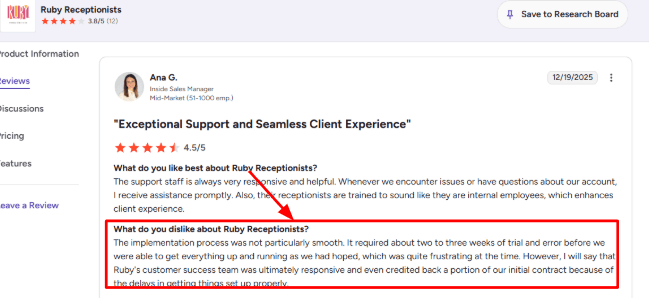
The setup does need careful call-flow writing. I saw the same issue in a G2 Ruby Receptionists review, where a user said implementation took two to three weeks of trial and error before it worked properly. I would place the screenshot below this section because it shows the main risk clearly: Ruby can work well, but vague instructions can create early call handling issues.
Call routing rules:
Ruby lets you forward calls, transfer urgent calls, take messages, and update call handling instructions from the app or dashboard. That matters for New Zealand teams where owners are often on site, driving, treating clients, or handling jobs. For example, a plumbing business in Auckland can ask Ruby to answer missed calls, check whether it is an emergency leak, collect suburb and job details, then transfer urgent work while sending non urgent jobs by message.
Lead intake capture
Ruby can collect caller details, qualify leads, take messages, and support intake workflows. For an AI answering service New Zealand article, this is one of Ruby's stronger use cases. It suits businesses where every missed call can become lost revenue, like dentists, accountants, real estate agents, lawyers, home service teams, and private healthcare providers.
Office interruption cover
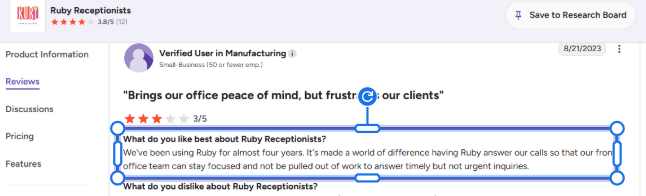
Ruby is useful when a small front office team needs fewer interruptions during the day. A G2 seller review for Ruby said Ruby made a “world of difference” because the front office could keep working instead of stopping for timely but non-urgent calls.
I agree with that use case. Ruby is not just for missed calls after hours. It can also act as an overflow layer during busy periods, lunch breaks, public holidays, staff leave, or Monday morning call spikes.
For New Zealand businesses with lean teams, this is probably the clearest fit. The main question is whether the cost makes sense compared with your monthly call volume.
AI-assisted support:
Ruby uses AI enhancements such as transcription, sentiment analysis, information gathering, and robocall filtering, according to its Ruby official website. This gives it some AI answering service value, even though the front line experience is still human led. That hybrid model is useful for businesses that do not want a fully automated voice agent speaking to customers.
Chat and integrations
Ruby also offers managed live chat, website lead capture, CRM integrations, app notifications, and a shared dashboard. Its pricing page mentions 5,000 plus integrations, which helps if you want phone and website enquiries tracked in one workflow. For New Zealand businesses running ads, this can be useful because phone calls and web chats often come from the same campaigns.
Pros
Strong fit for businesses that want live answering instead of a fully automated AI receptionist.
Good for small NZ teams that miss calls during jobs, appointments, lunch breaks, or after hours.
Can handle call transfers, messages, intake, lead capture, payment collection, and appointment scheduling.
AI enhancements help with screening, transcription, information gathering, and reducing robocalls.
Useful overflow layer for front office teams that need fewer interruptions.
Better for callers who expect a real person.
Cons
Not a pure AI answering service.
Setup depends heavily on clear call scripts, routing rules, and business instructions.
Pricing can be high for low volume NZ businesses once USD conversion is considered.
English and Spanish support are highlighted, but it is not positioned as a New Zealand local receptionist service.
Less ideal for businesses needing very custom AI workflows, local accent control, or complex bot training.
Per minute pricing can climb during busy periods.
Pricing
Ruby’s official pricing page lists virtual receptionist plans from $250/month for 50 minutes.
Higher phone plans include 100 minutes for $395/month, 200 minutes for $720/month, and 500 minutes for $1,725/month.
Prices appear to be in USD, so New Zealand businesses should account for exchange rate, GST treatment, and overage usage before comparing it with local providers.
Ruby says all plans include the same main feature set, with the difference mainly based on receptionist minutes and chat volume.
When to Choose Ruby
Choose Ruby if you want a live receptionist experience with AI supported notes, transcripts, routing, and overflow coverage. It is a good fit for businesses where caller experience matters and where a human voice is worth paying more for. Skip it if you want a low cost AI only answering service.
AnswerConnect
AnswerConnect is best known as a 24/7 live answering service. It is mainly used by businesses that want real receptionists to pick up calls, qualify leads, take messages, and book appointments when their in house team is busy or closed. AnswerConnect is not a pure AI answering service. It is a human receptionist layer with useful workflows around scripts, routing, messages, and integrations.
Features
24/7 live answering:
AnswerConnect is not a pure AI answering service. It is more of a human receptionist layer for New Zealand businesses that do not want missed calls after 5 pm, during weekends, or while the team is on-site with customers.
For a local trade business, clinic, legal office, or property manager, this can be useful when callers still expect a real person. The public site says AnswerConnect answers calls with “real people, 24/7” on its AnswerConnect pricing page, which is a clear fit for businesses that value tone and judgement over full automation.
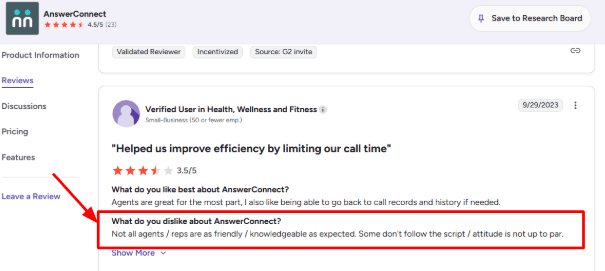
The tradeoff is consistency. I saw the same issue in a G2 AnswerConnect review, where the reviewer said not all agents were as friendly or knowledgeable, and some did not follow the script properly. I’d place the screenshot below this point because it matters most when comparing human answering against AI answering.
Custom call scripts:
The script setup is one of the stronger parts of AnswerConnect. You can shape how receptionists greet callers, what details they collect, when they transfer calls, and how they handle common questions. For example, a plumbing company in Hamilton could ask callers for suburb, job type, urgency, photos if needed, and whether it is a same day job. That makes the handoff cleaner and avoids long back and forth later.
Call routing
AnswerConnect can route calls, forward messages, and adjust handling based on caller type or timing. Its virtual receptionist page mentions call forwarding, routing, messages, lead qualification, and appointment booking. This is useful for New Zealand teams where the owner, admin, and technicians may all handle different call types. Sales enquiries can go to one person, urgent jobs to another, and general messages can stay in the app. One thing I’d check carefully is how transfers work for NZ numbers and local caller expectations. The public site is strong on US and UK positioning, but less clear for New Zealand-specific phone setup.
Script improvement support:
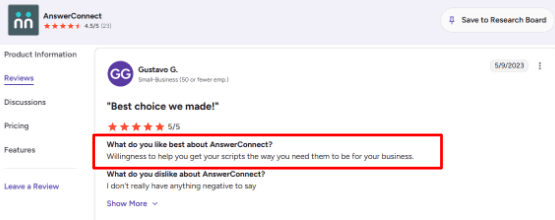
After using the product materials and reading reviews, I’d say AnswerConnect is strongest when you treat it like an outsourced front desk that needs training, not a plug-and-play AI bot. This matches a G2 AnswerConnect review where a user liked the team’s “willingness to help you get your scripts the way you need them to be for your business.” I agree with that review because script support is important for New Zealand businesses with local phrases, suburb names, service areas, and urgency rules.
The only catch is that setup still needs effort from your side. If the script is vague, the caller experience will also be vague.
App and messages:
AnswerConnect gives users access to messages, call history, and account details through its app and portal. The AnswerConnect mobile app page says users can see call history, manage contacts, and return calls from the app. This works well for small New Zealand teams that are not sitting at a desk all day. A builder, clinic owner, or agency founder can check who called, what they asked, and whether the lead needs a fast reply. The slight issue is that this still relies on the business following up. AnswerConnect can capture the call, but it will not fix slow internal response times.
Integrations and booking:
AnswerConnect supports appointment scheduling, CRM integrations, live chat, and tools like Salesforce, Zoho, Zendesk, Slack, and Zapier. This is helpful if a New Zealand business already uses a CRM or booking tool and wants call notes to move into the right system. For an AI answering service comparison, I would position AnswerConnect as a hybrid option. It gives more human handling than AI first tools, but it may feel heavier and more expensive if you only need simple call summaries, FAQs, and appointment capture.
Pros
Real receptionists can sound more natural than AI for sensitive or high value calls.
Strong fit for after hours answering, overflow calls, lead capture, and appointment booking.
Script customisation is useful for businesses with different caller types.
App access makes it easier to follow up while away from the desk.
Integrations help connect call data with CRM, chat, and scheduling tools.
Better suited to businesses that want a human led answering service.
Cons
Not a true AI answering service.
Public positioning is stronger for the US and UK than New Zealand.
Human agent quality can vary.
Pricing is higher than many AI receptionist tools.
Setup depends heavily on how clearly you write and maintain scripts.
Less ideal if you want low cost automation first call handling.
Pricing
AnswerConnect’s public pricing starts at $350/month for 200 minutes, plus a $49.99 setup fee, according to the AnswerConnect pricing page.
The Growth plan is listed at $395/month for 300 minutes with no setup fee, and includes customizable scripting, CRM integrations, desktop and mobile app access, and live chat.
The Standard plan is listed at $575/month for 400 minutes, with additional minutes shown at $1.85/minute on the public page.
Pricing is minute-based, not call-based. AnswerConnect says minutes include call handling and after-call work, so New Zealand businesses should estimate real call length before choosing a plan.
When to Choose AnswerConnect
Choose AnswerConnect if you want 24/7 human answering, call scripts, routing, messages, booking, and live chat. It is best for businesses where caller experience matters more than low cost. Skip it if you want a simple AI receptionist with lower pricing and faster self-serve setup.
RingCentral
RingCentral is best known as a business phone and contact centre platform. New Zealand teams usually look at it when they want AI call answering, routing, SMS follow ups, live agent handoff, call records, and analytics in one system. RingCentral AI Receptionist is more powerful than a basic missed call bot, but it can also feel heavier to set up.
Features
AI Receptionist
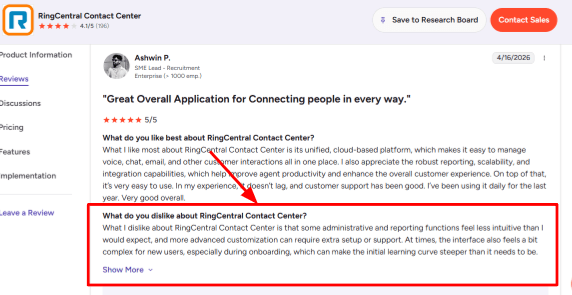
RingCentral's AI Receptionist is built for 24/7 call handling. It can answer common customer questions, collect lead details, book appointments, and send follow up texts when your team is busy or closed. For a New Zealand trade, clinic, real estate office, or service business, this helps with after hours calls where the customer may not wait until the next morning. I liked that it can be trained from your website and business details, but the admin side needs careful checking before going live. I saw the same concern in a G2 RingCentral Contact Center review, where the reviewer said admin, reporting, and advanced customisation can feel less intuitive during onboarding. I’d place the review screenshot below this point because it matches what a new user may notice during setup.
Call routing:
RingCentral can route callers by names, departments, locations, keywords, or call context, then pass a summary to the right person. This matters for New Zealand businesses with small teams because one missed or badly routed call can mean a lost quote, booking, or urgent support request. For example, a caller asking about an Auckland job can be routed to one person, while a billing question goes to another.
Knowledge setup
RingCentral lets you add business information, FAQs, services, policies, documents, and website content so the AI can answer routine questions. This is useful for businesses that get the same calls every day, like opening hours, service areas, appointment availability, pricing basics, or what to bring before a visit. The setup is not hard, but it is not something I would leave untouched after auto creation. You need to test local wording, Kiwi accents, branch names, emergency handling, and what the AI says when it does not know the answer.
Omnichannel inbox
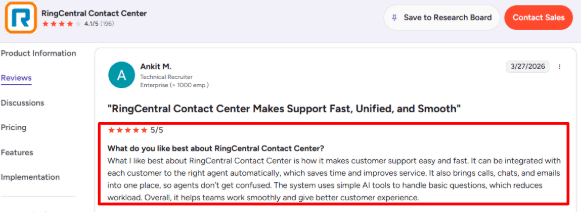
RingCentral Contact Center brings calls, chat, email, SMS, and social channels into one place. This is better suited to teams that want more than just an AI phone answering service. A G2 review praised the way RingCentral brings calls, chats, and emails together and uses simple AI tools for basic questions. I agree with that for larger service teams, but for a very small NZ business that only wants missed-call coverage, the full contact centre layer may feel heavier than needed.
Analytics and transcripts:
RingCentral provides call recordings, transcripts, call volume data, routing outcomes, resolution rates, and conversation insights. For an AI answering service in New Zealand, this is useful when you want to know why people call, what questions the AI fails to answer, and which leads need faster follow up. The gap is that reporting can take time to understand. It is powerful, but not always simple for a non technical owner who just wants to see missed calls, booked jobs, and caller intent quickly.
Integrations
RingCentral can connect with CRM systems, calendars, messaging tools, and business apps. This makes it stronger for teams that want the AI receptionist to do actual work after the call, not just take a message. For example, a New Zealand clinic could use it to capture a new patient enquiry, route urgent calls, send a confirmation text, and log the caller in the CRM.
Pros
Strong choice for businesses that need AI answering plus a proper phone and contact centre stack.
Good for after hours coverage, lead capture, routing, call summaries, and routine customer questions.
Supports multiple channels, so calls, SMS, chat, and email can sit closer together.
Useful for growing NZ teams with multiple staff, departments, or locations.
Call transcripts and analytics help improve scripts, routing, and unanswered questions over time.
Better fit for structured teams than simple solo businesses.
Cons
Can feel too heavy if you only need a simple AI receptionist for missed calls.
Admin, reporting, and advanced customisation may need extra setup or support.
Pricing can become less simple when you add phone users, AI receptionist licences, SMS, contact centre features, or extra minutes.
Needs careful testing for local business rules, accents, escalation paths, and emergency calls.
Best value comes when your team will actually use the wider RingCentral platform.
New Zealand buyers should confirm current regional availability and pricing.
Pricing
RingCentral lists AI Receptionist as starting at $39/month on its pricing page, but availability and final pricing can vary by region and package.
RingCentral says AI Receptionist is available as a standalone or add-on licence in some regions, including the UK, Australia, and EU, but New Zealand buyers should confirm current local availability with sales.
Contact centre pricing is usually quote-based, so RingCX is better evaluated through a demo if you need omnichannel routing, reporting, workforce tools, or multiple agents.
For a New Zealand small business, the real monthly cost may include the AI receptionist, phone plan, extra users, SMS usage, contact centre features, and additional AI call minutes.
When to Choose RingCentral AI Receptionist
Choose RingCentral AI Receptionist if your business already uses RingCentral or needs a broader phone system with AI answering, routing, analytics, SMS, and team workflows. It is best for multi location teams or businesses with more structured call operations. Skip it if you only need a simple AI answering service for missed calls.
Abby Connect
Abby Connect is best known as a premium human plus AI answering service. Businesses use it when they want polished call handling, AI support, and the option to fall back on trained human receptionists. For New Zealand businesses, Abby Connect can work, but it is clearly a US based service, so local fit needs testing.
Features
Human call answering
Abby Connect still leans heavily on live receptionist quality. This is useful for New Zealand businesses where a missed call can mean a lost quote, booking, patient enquiry, or legal lead. The receptionists can answer, take messages, route calls, and follow custom instructions. For a NZ trade business, this could mean separating urgent leak calls from general quote requests before sending the right message to the owner. The main thing to check is how natural the caller experience feels for local NZ callers. Abby is a US based service, so test pronunciation of New Zealand suburb names, Māori names, and local business terms before relying on it fully.
Call notes
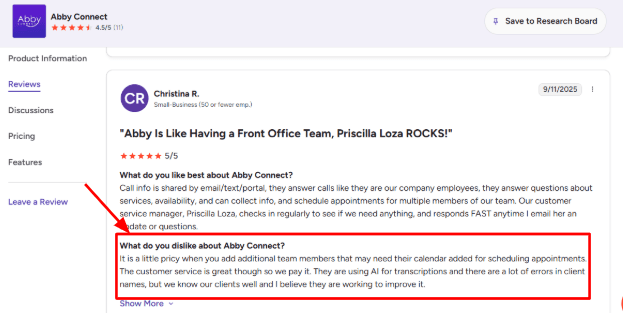
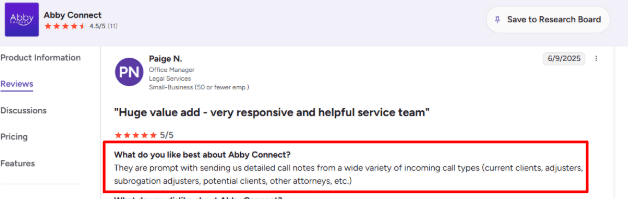
Abby gives call summaries, transcripts, recordings, caller sentiment, and follow up details inside its app and portal. This is useful if your NZ team is out on jobs or in client meetings and needs a quick summary instead of listening to the whole recording. One issue I noticed in research is that AI transcription is not always clean. A G2 review of Abby Connect mentioned errors in client names, especially around AI transcriptions. I would place the review screenshot below this section because name accuracy matters a lot for clinics, law firms, real estate agents, and service businesses.
.
AI receptionist:
Abby's AI receptionist can answer FAQs, route calls, take messages, schedule appointments, and handle custom workflows. For an AI answering service New Zealand article, this is the more relevant part than pure scheduling. The AI can work after hours, answer repeated questions, and collect caller details when the owner is unavailable. The positive surprise is human backup. If the AI cannot handle a situation, Abby says it can transfer the caller to a human receptionist.
Setup process
Abby is fairly easy to start with because onboarding is structured around business information, FAQs, call handling rules, and transfer instructions. The setup does not feel like a heavy call centre project. You need to think through caller types, emergency rules, team availability, and what counts as a qualified lead. This matched a G2 review where the user said it was “easy to set up and get going.” I agree with that for basic answering, but NZ businesses should still spend extra time on local phrases, service areas, and escalation rules.
Call routing:
Abby supports call announcement, transfer, custom call handling, and routing instructions. This matters for NZ businesses with small teams. A plumbing company may want emergency calls sent to the on call technician, while quote requests go to the office manager. A law firm may want new enquiry calls screened before they reach a solicitor. The gap is that complex routing can become expensive or operationally heavy if you need multiple calendars, team members, or custom workflows.
Privacy fit
Abby mentions HIPAA availability and domestic US data storage on its own pages, but New Zealand businesses should still check local privacy requirements before using it for sensitive calls. For healthcare, dental, therapy, and allied health businesses, call recordings and patient messages may fall under New Zealand's Health Information Privacy Code 2020. General customer data may also need to be handled under the Privacy Act 2020. So Abby can work well for professional call answering, but I would ask directly about NZ data handling, call recording consent, retention periods, and whether information is stored or processed outside New Zealand.
Pros
Strong human plus AI answering mix.
Good fit for after hours calls, overflow calls, lead capture, and professional first impressions.
Useful app and portal with call recordings, summaries, transcripts, caller details, and feedback options.
Human backup makes the AI receptionist feel safer for complex or emotional calls.
Setup appears simple for basic call answering and FAQ based workflows.
Good fit where caller experience matters more than lowest cost.
Cons
Pricing is on the higher side compared with many AI first answering services.
US based service may need testing for New Zealand accents, local place names, Māori names, and industry specific language.
AI transcripts may need manual review, especially when client names or addresses are important.
Calendar and team based scheduling can add complexity and cost.
Businesses handling health, legal, or financial information should check NZ privacy and data storage requirements before going live.
Not the simplest option if you only want low cost AI answering.
Pricing
Abby’s AI Receptionist plans start at $99/month for up to 50 minutes, based on the Abby Connect pricing page.
AI Receptionist plans also list $165/month for 100 minutes, $299/month for 200 minutes, and $690/month for 500 minutes.
Human Receptionist plans start at $329/month for 100 minutes, with higher plans at $599/month and $1,380/month.
For New Zealand businesses, the key pricing check is not just the monthly fee. Ask about overage minutes, NZ call forwarding, human backup usage, calendar add-ons, and whether pricing changes if multiple team members need call routing.
When to Choose Abby Connect
Choose Abby Connect if you want AI answering with human receptionist backup and a polished caller experience. It is a good fit for clinics, law firms, consultants, finance teams, and service businesses where the first call matters. Skip it if you want low cost AI only answering or a New Zealand local receptionist feel.
Conclusion
The best AI answering service in New Zealand depends on how your business handles calls today.
Ring Jenny is the strongest starting point for small NZ businesses that want affordable AI call handling, lead capture, routing, and summaries. Smith.ai is better if you want AI with live human backup, but NZ businesses should check local caller fit, pricing, and time zone handling carefully.
Ruby, AnswerConnect, and Abby Connect are better when you want a more human led answering experience. They are useful for sensitive, premium, or high value calls, but pricing can rise with call volume.
RingCentral AI Receptionist makes the most sense for businesses that already use a structured phone system or need routing across teams and locations.
Before switching, test each tool with real NZ call scenarios: a noisy caller, Māori place names, after hours enquiry, urgent job, cancellation, booking request, and spam call. The right tool should answer quickly, collect clean details, route urgent calls properly, and make follow up easier. Do not choose based only on the demo voice. The real test is whether the answering service can handle the calls your business actually gets.
FAQs
What is the best AI answering service for New Zealand businesses?
Ring Jenny, Smith.ai, Abby Connect, Ruby, AnswerConnect, and RingCentral AI Receptionist are all worth comparing. Ring Jenny is the strongest starting point for small NZ businesses. Smith.ai is useful for AI plus human backup. Ruby, AnswerConnect, and Abby Connect suit businesses that want a more human led experience. RingCentral works best for structured teams that need routing and phone system depth.
How do I choose an AI receptionist for a New Zealand business?
Start with your biggest phone problem. That may be missed leads, no shows, cancellations, after hours calls, urgent jobs, or booking requests. Then check call recordings, transcripts, fallback routing, appointment confirmation, pricing, call summaries, and how the tool handles local caller details.
Can AI answering services understand New Zealand accents?
Most good AI receptionists can handle common accents, but you should test with real callers before switching fully. Try noisy calls, fast speech, Māori place names, regional accents, industry terms, and mixed Kiwi and overseas accents. Also check how the transcript handles names and addresses.
What mistakes should I avoid when buying an AI answering service?
Do not buy only on price or demo quality. Common mistakes include weak escalation rules, no spam filtering, poor booking logic, missing call summaries, no human fallback, and no way to review failed conversations. Also check whether pricing is in USD or NZD.
When is a human answering service better than AI?
Use a human answering service when calls need empathy, judgement, or sensitive discussion. Ruby, AnswerConnect, and Abby Connect may fit better where legal, medical, high value, or emotional calls need a real person. AI works better for repeatable tasks like lead capture, simple booking, call summaries, FAQs, and after hours coverage.
What should I ask before buying an AI answering service?
Ask about local number support, call forwarding setup, included calls or minutes, overage pricing, human handoff, calendar booking, call recordings, transcript accuracy, data storage, NZ privacy requirements, after hours routing, and whether pricing is in USD or NZD.