Australian accounting firms do not lose clients only because of slow tax work. They lose them when calls go unanswered during BAS season, EOFY, payroll deadlines, ATO follow ups, and busy client review periods.
That is why choosing the right AI receptionist for accountants in Australia matters. It is not just about finding a cheap call answering tool. The right tool should answer missed calls, capture clean client details, route urgent enquiries, book appointments, and help your team follow up faster.
CPA Australia's Business Technology Report 2025 shows how quickly AI is becoming part of business operations. For accounting firms, the practical question is simple: can AI help with admin and client communication without creating more risk?
I compared these tools by manually testing setup flows, checking review portals, reviewing pricing pages, and looking closely at the small things most people miss. That includes how well each tool handles tax time urgency, client intake, appointment booking, missed call recovery, after hours calls, call summaries, and handoff to a real accountant or admin team. I have also added screenshots, pricing notes, and direct links throughout, so you can check everything yourself before choosing one.
How I Compared These AI Receptionists for Accountants
Test area
What I checked
Tax-time call handling
Whether the tool could handle BAS, EOFY, payroll, GST, and ATO-related enquiries
Client intake
Whether it captured caller name, business type, service needed, urgency, and callback details
Appointment booking
Whether it could book consultations or callbacks cleanly
Human handoff
Whether urgent or sensitive calls could reach a real person
Call summaries
Whether summaries were clear enough for accountants to act on
Privacy fit
Whether the setup avoided collecting TFNs, bank details, passwords, or sensitive tax details
Pricing
Monthly cost, call limits, minute limits, overages, and setup fees
Best AI Receptionist by Accounting Use Case
Use case
Best pick
Entry-plan note
Best for Australian accounting firms
Ring Jenny
Free forever; compare paid features
Best for AI plus human backup
Smith.ai
See product pricing
Best for premium client calls
Ruby
See product pricing
Best for 24/7 live answering
AnswerConnect
See product pricing
Best for small accounting offices
My AI Frontdesk
See product pricing
Best for multi-office firms
RingCentral AI Receptionist
See product pricing
What an AI Receptionist Can and Cannot Do for an Accounting Firm
An AI receptionist can answer routine calls, collect client details, identify the service needed, book consultations, send reminders, route urgent enquiries, filter spam, and provide clear call summaries.
It should not give tax advice, assess a client’s tax position, interpret an ATO notice, collect TFNs, request passwords, take bank details, access myGov credentials, or make decisions that require professional judgement.
For accounting firms, the safest setup is to use AI for intake, FAQs, appointment requests, routing, and follow-up. A registered tax agent, accountant, bookkeeper, payroll specialist, or authorised staff member should handle advice and sensitive financial details.
Deep dive into individual tools
Ring Jenny
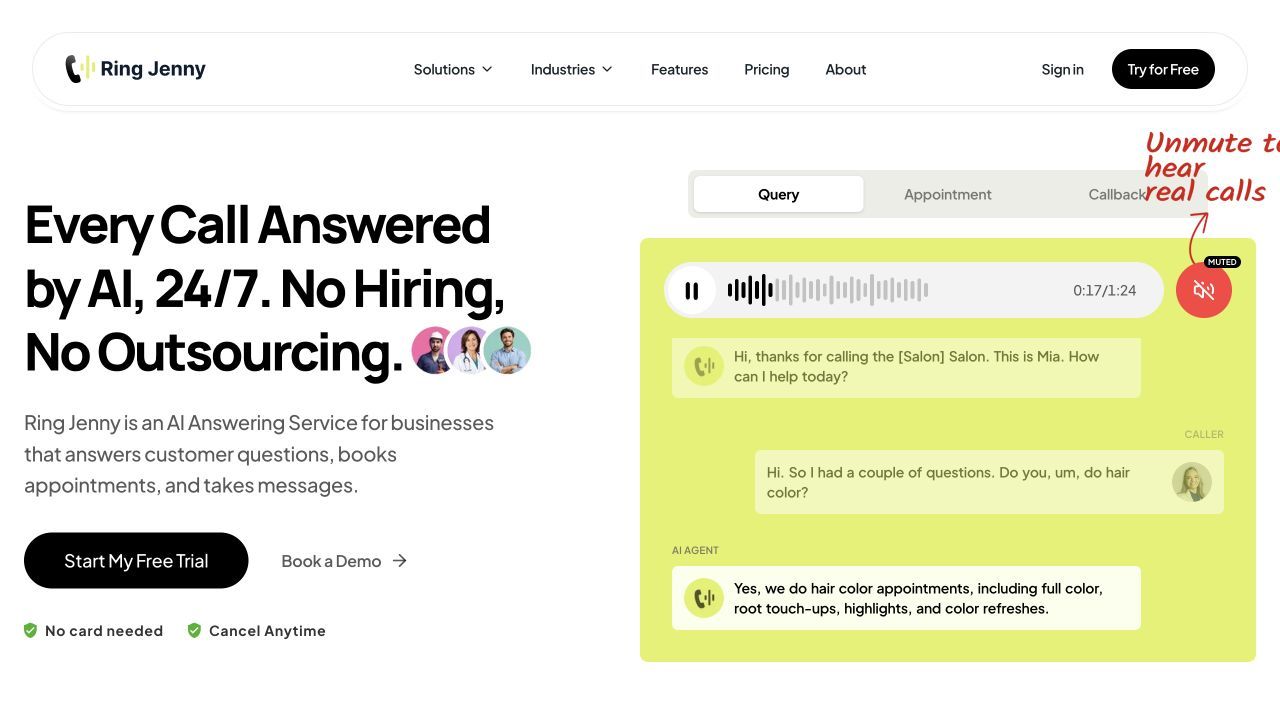
Ring Jenny is one of the stronger options to shortlist for Australian accounting firms that need missed-call recovery, client intake, call routing, and after-hours answering. For accounting firms, that matters because many calls are urgent, seasonal, or context heavy. A client may be asking about BAS deadlines, tax return documents, payroll issues, GST registration, or an ATO notice. The receptionist needs to capture the right details before passing the call to your team.
It also feels practical for Australia based accounting practices because the setup can be tailored around local workflows, after hours calls, GST queries, EOFY pressure, and compliance led conversations. Since Ring Jenny is still a newer tool, I would verify pricing and public reviews directly. But the feature set is clearly aimed at firms that want a more reliable front desk without hiring a full time receptionist.
Features
After hours call handling
This is the first feature I would use for an accounting firm because clients often call outside office hours, especially during tax season. You can set Ring Jenny to answer missed calls, collect the caller's name, phone number, business name, and reason for calling. For example, if a client calls about a BAS deadline at 8 pm, the firm can still receive a clean summary the next morning instead of finding a vague voicemail.
Ring Jenny can be set up to ask structured questions before the call is passed to your team. For accountants, I would keep this focused. Ask whether the caller needs tax returns, bookkeeping, payroll, BAS, GST registration, company setup, or advisory help. This saves time because the accountant does not start every call from zero.
Call routing by service
This is useful when your firm has different people handling different work. A payroll query can go to the payroll specialist. A new business enquiry can go to the partner or client manager. Basic document follow ups can go to admin. It keeps urgent client calls from sitting in the wrong inbox.
Call summaries and notes
I like this for accounting firms because small details matter. Ring Jenny can capture what the client said and send a short summary after the call. For example, if someone says they uploaded invoices but forgot the payroll report, your team gets that context without replaying the full conversation.
Privacy aware setup
For accountants, trust is part of the product. Keep TFNs, bank details, passwords, and sensitive tax details out of the AI call flow. Use the AI for intake, routing, summaries, and appointment requests, then let the accountant handle anything that requires professional judgement. This is especially important for firms handling payroll, tax returns, BAS, business advisory, and financial documents.
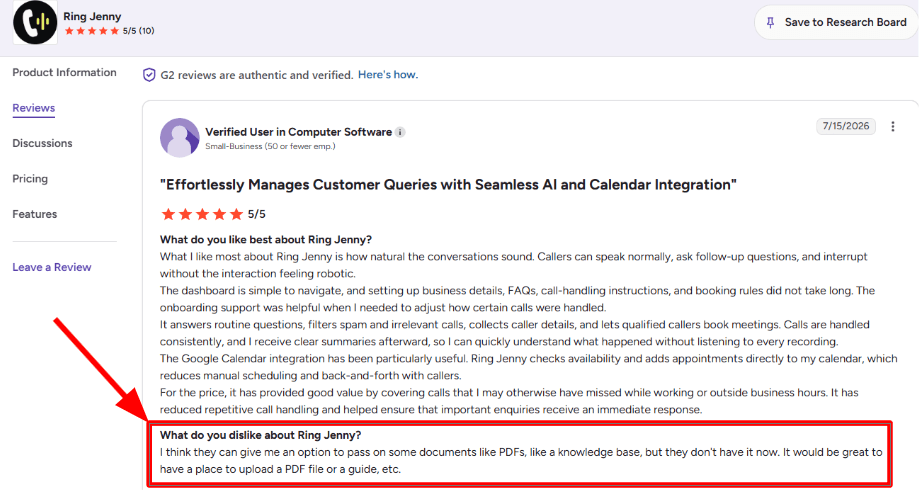
One concern I noticed in this G2 review is the lack of an option to upload PDFs, guides, or other documents as a knowledge base. The reviewer felt this would make it easier to give the AI more detailed business information.
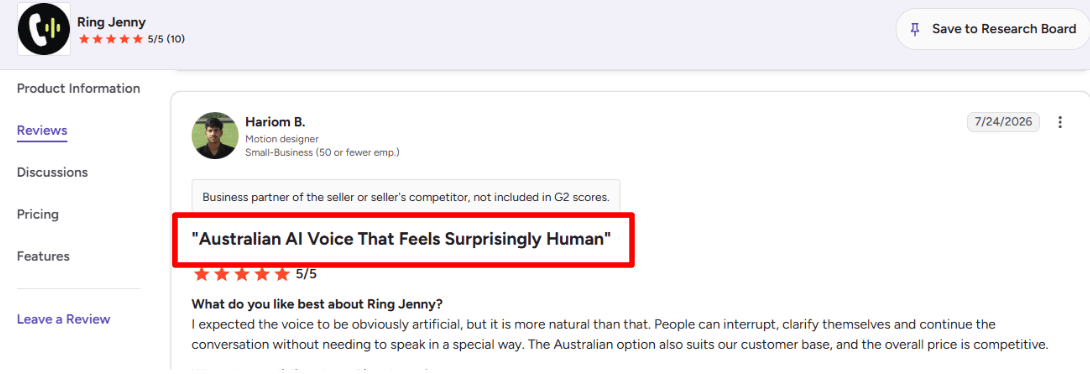
On the positive side, this G2 review highlights how natural the voice sounds during real conversations. The reviewer liked that callers could interrupt, clarify themselves, and continue speaking normally. They also found the Australian voice suitable for their customers and felt the pricing was competitive. I am adding the screenshot below.
Pros of Ring Jenny
Lower cost than hiring reception staff
For an Australian accounting practice, a full time receptionist can be difficult to justify outside peak periods such as BAS deadlines, tax time, and end of financial year. Ring Jenny can provide call coverage at a much lower monthly cost while helping ensure new client enquiries are not lost to voicemail.
Books consultations while the caller is engaged
A caller looking for help with an individual tax return, BAS, bookkeeping, SMSF administration, or business advisory work can be offered a suitable consultation slot during the same call. This is useful when a prospective client is comparing several accounting firms and may move on if nobody responds quickly.
Handles routine accounting practice questions
Ring Jenny can be trained to answer approved front desk questions about office hours, services, consultation availability, document requirements, locations, and whether the firm works with individuals, sole traders, companies, or trusts. This gives callers a clear first response without taking accountants away from client work.
Keeps the phone covered during busy periods
Australian accountants often receive a surge of calls around BAS lodgement dates, payroll questions, EOFY planning, and tax return season. Ring Jenny can answer calls after hours, during client meetings, and when the team is focused on preparing returns or responding to the ATO, rather than letting enquiries go unanswered.
Easy to set up with an existing business number
An accounting firm can usually keep the phone number already listed on its website, Google Business Profile, invoices, and stationery. Calls can be forwarded when staff are unavailable, which makes it easier to add AI call answering without disrupting existing client communication.
Cons of Ring Jenny
It should not give tax, financial, or compliance advice
Ring Jenny should only provide firm approved general information and capture the caller’s details. Advice on tax deductions, BAS treatment, superannuation, company structures, ATO notices, or financial decisions should always be handled by a qualified accountant or authorised adviser.
Complex client matters still need a human conversation
Calls involving overdue lodgements, ATO disputes, cash flow concerns, audits, sensitive financial situations, or urgent compliance issues may require judgement and reassurance that an AI receptionist cannot provide. In these cases, the best role is to collect context and arrange a prompt callback.
Some high value prospects may expect direct access to a partner or accountant
Business owners looking for ongoing advisory work, tax planning, or a new accountant may want to speak with a senior person early in the process. Ring Jenny can qualify the enquiry and schedule that conversation, but it is not a replacement for relationship based advice and trust building.
Pricing: free forever and paid packages
Ring Jenny is the sole company here with a free forever plan, which gives accounting firms a starting point without a recurring subscription. Use the initial setup for service enquiries, contact details and consultation requests. Assess the reception workload again before a busy tax period. Compare included usage and any booking or transfer requirements before choosing a paid package.
Ring Jenny's paid packages start at $49 per month. Accounting firms should check what is included in each plan, especially call volume, SMS alerts, appointment booking, routing rules, call summaries, integrations, and whether higher usage changes the monthly price.
When to Choose Ring Jenny
Choose Ring Jenny if you want an affordable AI receptionist for missed calls, after hours enquiries, client intake, routing, and summaries. It is a good fit for small and growing Australian accounting firms that want better phone coverage without hiring another receptionist. Skip it if every client call needs a human immediately, or if you need deep native integration with your practice management system from day one.
Smith.ai
Smith.ai is popularly known for mixing AI call answering with live receptionist backup. That is why many firms use it when they want 24/7 coverage without hiring a full time front desk person. For accounting firms, this can be useful during BAS periods, EOFY, payroll deadlines, lunch breaks, and month end close when calls keep coming in but the team is busy with returns, bookkeeping, client reviews, or payroll work.
Smith.ai can work for Australian accounting firms, but it is more US focused. So I would test the setup carefully for local tax terms, Australian caller expectations, and whether the service feels natural for your clients.
Features
AI plus human coverage
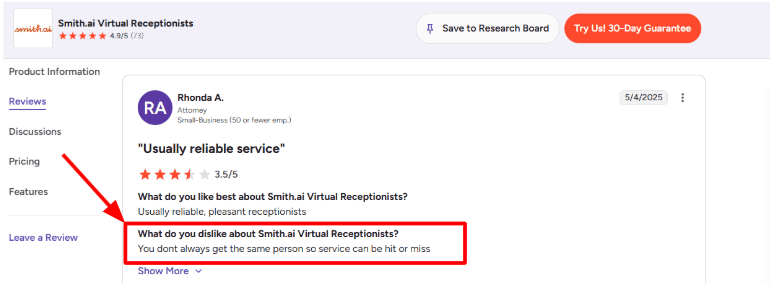
Smith.ai's AI Receptionist is backed by live agents, so complex or sensitive calls can be moved to a human instead of forcing every caller through automation. For accounting firms, that matters because some calls are simple, like booking a consultation or asking about document uploads. Others need more care, like ATO notices, payroll errors, or an upset client asking why a lodgement has not been completed. The trade off is consistency. You do not always get the same receptionist voice or style, so the caller experience can vary.
I saw the same point in a G2 review of Smith.ai Virtual Receptionists, where the reviewer said, “You dont always get the same person so service can be hit or miss.” I would place that G2 screenshot below this section because it explains the biggest practical gap well.
Custom call playbooks:
Smith.ai lets you build call handling rules for different caller types, so new prospects, existing clients, vendors, ATO notice calls, and spam calls do not all get treated the same way. This matters for accountants because the receptionist needs to ask the right intake questions without giving tax advice. For example, a new caller can be asked whether they need tax returns, bookkeeping, payroll, BAS, GST registration, cleanup work, or advisory support. An existing client asking about document uploads can be routed differently from someone asking for urgent ATO help. The playbook idea is useful, but it needs clear instructions. If the firm writes vague rules, the answering quality will also be vague.
Lead intake
Smith.ai can qualify callers, collect details, and send summaries after calls. For accountants, this works best when the intake questions are simple and practical. Good fields would include business type, service needed, tax year, urgency, current accounting software, monthly transaction volume, whether the caller uses Xero, MYOB, or QuickBooks, and whether they already have a registered tax agent. The positive surprise is how structured the call summaries can be when the intake rules are written well. Instead of "client wants tax help," the team can get a cleaner summary with caller name, phone, service type, urgency, and next action.
Team communication
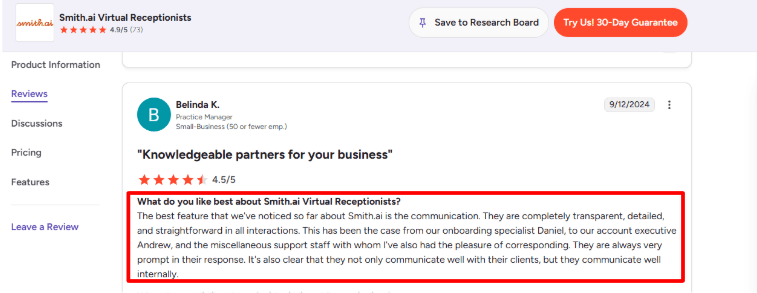
Smith.ai highlights real time syncing, call summaries, and system integrations across its how it works page.
This matched a positive G2 review of Smith.ai Virtual Receptionists, where the reviewer praised the team’s transparent, detailed, and prompt communication. I mostly agree with that angle. For an accounting firm, this matters because small call-handling changes can make a big difference, such as changing who receives payroll calls, which callers are marked urgent, or how tax-season inquiries are tagged.
The only thing I would watch is that better communication does not automatically mean better call consistency. You still need to review call logs regularly and correct the playbook when callers are being tagged too broadly.
Integrations and summaries:
Smith.ai connects with CRM, calendar, phone, and workflow tools, and says it supports thousands of integrations through native options, Zapier, and Make. Its G2 profile also mentions integrations with tools like Clio, MyCase, HouseCall Pro, ServiceTitan, LawPay, Calendly, Zapier, and Make.
For accountants, the main value is not just “integration.” It is whether the call summary reaches the right place. A bookkeeping lead should go to sales or the owner. An existing payroll client should go to the payroll manager. A tax notice call may need faster routing.
I liked that Smith.ai can send summaries through email, text, dashboard, and tools like Microsoft Teams. Its Microsoft Teams integration page says call summaries and transcripts can be delivered to Teams, which is useful for firms that already manage internal work there.
Pros
Strong fit for accounting firms that need 24/7 call answering, lead intake, and overflow support during busy seasons.
AI plus live agent backup makes it safer than a basic AI only receptionist for sensitive client conversations.
Call summaries, transcripts, routing, and integrations can reduce admin work for small accounting and bookkeeping teams.
Useful for firms where new client enquiries have high value.
Spam handling can reduce wasted time from robocalls, sales pitches, and irrelevant vendor calls.
Good for firms that want structured intake rather than simple message taking.
Cons
More US focused than Australia specific answering services.
Caller experience can vary because the same receptionist may not answer every time.
Per call pricing can become expensive if the firm gets many low value calls.
Setup needs careful call playbooks. Weak instructions can lead to weak intake.
Not accounting specific out of the box, so firms must define tax, payroll, BAS, bookkeeping, and advisory call rules clearly.
AI should not be trusted for tax guidance. It is better for intake, routing, FAQs, and scheduling.
Smith.ai’s AI Receptionist pricing starts at $95/month for self-service month-to-month plans, with per-call pricing listed from $1.90/call on the entry plan.
Done-for-you AI Receptionist plans start at $500/month billed annually, with setup, customization, optimization, live agent backup, and deeper system connections included.
Smith.ai’s Virtual Receptionist pricing starts at $300/month for 30 calls. Higher plans include more calls, more transfer destinations, and lower overage rates.
For accounting firms, the pricing works best when call volume is predictable. If tax season creates a sudden spike, watch overages closely and review whether the AI plan or human receptionist plan fits better.
When to Choose Smith.ai
Choose Smith.ai if you want AI answering with human backup, structured intake, call summaries, and strong routing rules. It is useful for accounting firms where every qualified lead is valuable and where missed calls during busy periods create real revenue loss. Skip it if you want an Australia first service, AUD pricing, or a tool that feels fully local to Australian accounting workflows without extra setup.
Ruby
Ruby is best known as a live virtual receptionist service with AI support. Accountants usually consider it when they want real people answering client calls, screening routine questions, and protecting staff time during busy periods. Ruby is not a pure AI receptionist. It is closer to a premium live answering service with AI supported notes, transcripts, and call insights.
Features
Live call answering
Ruby's strongest feature is human answering, not a fully automated AI voice bot. Its receptionists answer calls, take messages, transfer calls, screen spam, and collect lead details, with AI used more as support in the background. For accounting firms, this works well when clients call about document deadlines, tax return status, bookkeeping packages, payroll questions, or whether the firm is accepting new clients. The tone is more polished than a basic answering service, but it depends heavily on how well the call rules are set up.
Setup and scripting
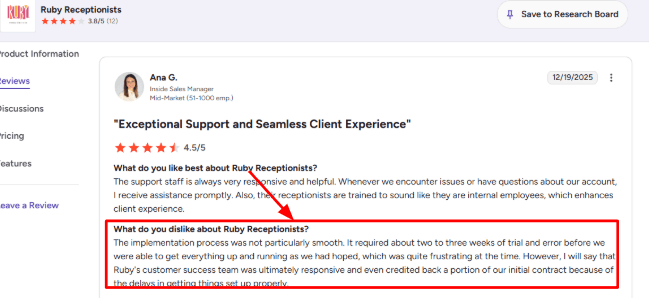
The call handling setup needs careful work. For an accounting firm, you need to think through greetings, new client intake, existing client rules, urgent payroll calls, BAS related enquiries, and who should receive which message. That part is important because a generic script can make an accounting firm sound less precise. I saw the same issue in a G2 Ruby Receptionists review, where a reviewer said implementation took two to three weeks of trial and error before it worked properly. Ruby’s customer success team did respond and credited part of the contract, but this is still worth noting before tax season. I’d place the screenshot below this point:
Call routing rules:
Ruby lets you decide which calls go to staff, which ones become messages, and which ones Ruby should handle without interrupting the team. This is useful for accountants because not every call deserves the same urgency.
Example: a new business owner asking about monthly bookkeeping can be captured as a lead, while an existing payroll client with a same-day issue can be routed to the right person. I liked that the routing logic was flexible, but it still needs clean internal rules. If staff roles change often, updating the instructions can become extra admin.
Staff focus support:
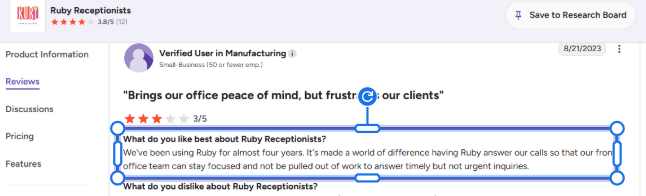
This is where Ruby fits accounting firms best. A G2 Ruby Receptionists review said Ruby helped their front office stay focused instead of being pulled away by timely but non-urgent calls. I agree with that use case.
For accountants, that means fewer interruptions during reconciliations, tax returns, advisory calls, or payroll runs. Ruby is not a replacement for a trained admin who understands every client file, but it can reduce call noise and keep routine communication organized.
AI call insights:
Ruby now offers AI-supported features like call transcripts, voicemail transcripts, sentiment analysis, robocall filtering, and Call Nav, according to the Ruby AI page. The positive surprise was the transcript layer, because it makes call review much easier than relying only on short receptionist notes.
For an accounting firm, transcripts help spot repeat questions like where to upload documents, when tax organizers are due, or how to book a consultation. The limitation is that AI supports the receptionist, it does not turn Ruby into a fully autonomous AI receptionist.
Integrations and messages:
Ruby offers AI supported features like call transcripts, voicemail transcripts, sentiment analysis, robocall filtering, and Call Nav, according to the Ruby AI page. The transcript layer is useful because it makes call review easier than relying only on short receptionist notes. For an accounting firm, transcripts can help spot repeat questions like where to upload documents, when tax organisers are due, or how to book a consultation. The limitation is that AI supports the receptionist. It does not turn Ruby into a fully autonomous AI receptionist.
Integrations and messages
Ruby connects with tools like Zapier, HubSpot, Salesforce, Slack, Microsoft Teams, Google Calendar, and other business apps through its integrations page. For accounting firms, this can help push new caller details into a CRM, notify the team in Slack, or create follow up tasks. I would not treat it like a deep accounting workflow tool. If your firm needs Xero, MYOB, QuickBooks, Karbon, TaxDome, Canopy, or a client portal workflow, check the integration path carefully before relying on it.
Pros
Strong live answering experience for accounting firms that want a human voice instead of a pure AI bot.
Good for reducing interruptions from routine calls, spam calls, and basic client questions.
Useful call routing, lead capture, voicemail, transcripts, and after hours answering.
AI features add visibility through transcripts, sentiment analysis, and robocall filtering.
Works well for small firms that need receptionist coverage without hiring full time front office staff.
Better for premium clients who expect a polished phone experience.
Cons
Not a pure AI receptionist, so it may not fit firms looking for low cost automated call handling.
Setup can take time if the firm has complex client types, partners, departments, or seasonal rules.
Pricing can rise quickly as call minutes increase.
Receptionist quality depends on scripts, call instructions, and ongoing account updates.
Accounting specific workflow depth is limited unless connected through Zapier or other tools.
Less suitable if the firm wants full AI automation and instant self serve call flow changes.
Pricing
Ruby’s current virtual receptionist plans start at $250/month for 50 receptionist minutes, based on the Ruby pricing page.
Other listed plans include $395/month for 100 minutes, $720/month for 200 minutes, and $1,725/month for 500 minutes.
Ruby says core features are included across plans, with the main difference being the number of receptionist minutes.
For accountants, the safest way to estimate cost is to check call volume during normal months and tax season separately, because overuse can make the plan feel expensive quickly.
When to Choose Ruby
Choose Ruby if you want a premium live receptionist experience with AI supported transcripts, call notes, and routing. It is a good fit for accounting firms where caller experience matters and where routine calls are interrupting billable work. Skip it if you want a low cost AI only receptionist or deep accounting workflow automation.
AnswerConnect
AnswerConnect is best known as a 24/7 live answering service, and accounting firms use it when they want real receptionists handling tax-season overflow, after-hours calls, and new client enquiries instead of sending people to voicemail.
Features
Live call answering:
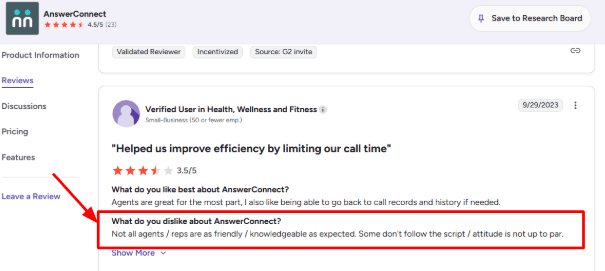
AnswerConnect is more human led than most AI receptionist tools. That can be useful for accountants because many callers are stressed, confused, or calling about money sensitive issues. A client asking about an ATO notice, BAS deadline, PAYG issue, payroll deadline, or missing document may not need technical tax advice on the call. But they do need a calm answer, the right message taken, and quick routing to the correct person. The gap is consistency. I saw this in a G2 review on AnswerConnect, where a user said some agents were not always as friendly or knowledgeable as expected and did not always follow the script. You’ll find a screenshot of that review below:
Custom call scripts:
The script setup is one of the more important features for accounting firms. You can shape how receptionists answer new client calls, existing client calls, vendor calls, and urgent tax time issues. I liked that the script is not treated like a one time setup. In the portal, you can update call flows, business hours, and scripts, which matters when BAS deadlines, EOFY, payroll dates, or lodgement schedules change. Still, it takes work. A vague script will create vague call notes. For accountants, the script should clearly ask whether the caller is an individual, sole trader, company, trust, partnership, bookkeeping client, payroll client, or new prospect.
Call routing: AnswerConnect can route callers based on time, urgency, department, or availability. For a small accounting firm, this helps separate routine admin from calls that need a partner, senior accountant, or payroll specialist. For example, a new business owner asking about monthly bookkeeping can be captured as a lead. A payroll issue can be escalated faster. A client asking for portal login help can be handled without breaking an accountant's focus. This is useful, but it is not magic. You need to define what counts as urgent. Otherwise, too many calls may still get transferred when a message would have been enough.
Appointment booking
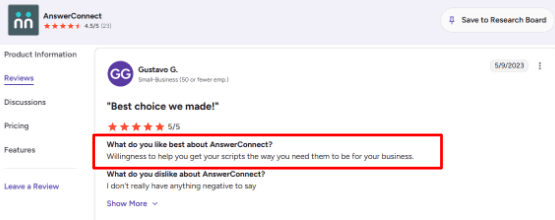
AnswerConnect offers appointment scheduling through Setmore, and its accounting firm page mentions that clients can call, email, or chat to set up meetings. This works well for firms that still get many phone bookings from older clients, local business owners, or referrals who do not want to use an online calendar. I agree with the positive G2 review on AnswerConnect that praised their willingness to help get scripts right for the business. Scheduling only works properly when the receptionist knows which calls deserve a consultation, which ones need a document reminder, and which ones should not be booked at all.
Message and call records:
The AnswerConnect portal lets you view messages, call history, usage, recordings, contacts, reports, billing, and account settings. That is helpful for accountants because missed details create follow up problems. If a client says they already called about payroll, a BAS question, or a missing invoice file, the team can check the notes instead of guessing. The mobile app also helps when the owner is away from the desk. You can view messages, replay call recordings, call or text clients, add notes, and forward interactions to team members.
CRM and app integrations:
AnswerConnect integrates with tools like Salesforce, Zoho, HubSpot, Pipedrive, Slack, Microsoft Teams, Google Sheets, Zendesk, Freshdesk, Outlook, and Zapier. For accounting firms, Google Sheets or CRM syncing can be useful for new lead intake. A receptionist can capture name, business type, service needed, deadline, and callback preference, then push it into a follow up workflow. The limitation is that AnswerConnect is still not a deep accounting workflow tool. It will not replace your tax software, client portal, proposal system, document collection process, or engagement letters.
Pros
Strong fit for accounting firms that want real humans answering calls 24/7.
Useful during BAS periods, EOFY, payroll deadlines, and after hours windows.
Good scripting support, and reviews suggest the team helps businesses refine call flows.
Useful portal and mobile app for reviewing messages, recordings, usage, and call history.
Appointment booking, live chat, bilingual answering, routing, and CRM integrations make it broader than basic voicemail.
Good for firms that value a human voice over AI only automation.
Cons
Not a pure AI receptionist, so firms looking for low cost AI only answering may find it expensive.
Agent quality can vary, and script discipline may need monitoring.
Per minute pricing can become costly during busy periods.
Setup quality depends heavily on how clearly you define caller types, urgency, and escalation rules.
It does not replace accounting specific workflows like document collection, secure client portals, tax organisers, or engagement letters.
Less flexible than AI native tools if you want fast self serve call flow changes.
Pricing
AnswerConnect does not make every plan easy to compare on its own website, so most firms will need to speak with sales before knowing the exact monthly cost.
AnswerConnect says pricing is based on monthly minutes, including the time needed to handle calls and after-call work.
For accounting firms, pricing should be checked against seasonal call volume. A plan that works in July may not work during tax season, extension season, or year-end payroll rush.
When to Choose AnswerConnect
Choose AnswerConnect if you want 24/7 human answering, appointment booking, call scripts, and message handling. It is a good fit for accounting firms that want live receptionists rather than AI only answering. Skip it if your main goal is low cost automation or if you want a self serve AI receptionist that you can adjust quickly.
RingCentral
RingCentral is best known for business phone systems and contact centre software. Accounting firms usually look at it when they want AI call answering without replacing their full phone setup. It is a stronger fit for multi office firms, growing teams, or firms that already need structured routing, analytics, and phone system controls.
Features
AI call answering
RingCentral AI Receptionist can answer calls 24/7, handle common questions, collect caller details, and route calls without sending everyone through a rigid phone tree. RingCentral says the AI can be trained using a firm's website, FAQs, uploaded documents, business hours, services, and policies on the RingCentral AI Receptionist page. For an accounting firm, this is useful for basic calls like office hours, document checklist questions, BAS appointment requests, pricing range questions, or "can I speak to payroll?" calls. I liked that the AI receptionist can sit on top of an existing phone system, so it feels less like a full migration project and more like adding a front desk layer.
Call flow setup
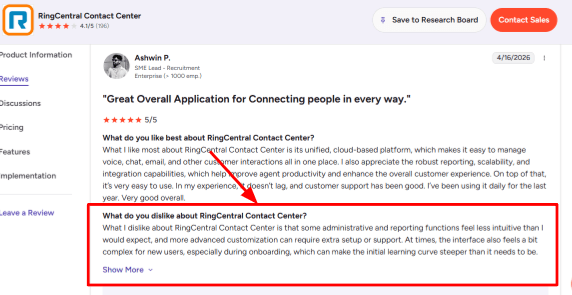
The setup is powerful, but it is not the lightest experience if you only want a simple AI answering service for a small accounting office. Routing, reporting, admin rules, queues, and escalation paths need careful setup. I saw the same concern in a G2 RingCentral Contact Center review, where the reviewer said some admin and reporting functions were less intuitive, and advanced customization could need extra support. This is a good place to add the G2 screenshot below because it matches the onboarding experience closely.
For a firm with two partners and one admin, it may feel like more system than needed. For a multi location accounting firm, the control is more useful.
Context-based routing:
RingCentral can route callers by names, locations, keywords, departments, and conversation context. That matters for accountants because not every caller should land with the same person. A new business asking about bookkeeping can go to sales or intake. A payroll client can go to the payroll specialist. An ATO notice call can be escalated faster. A caller asking for one partner by name can be routed directly. In real use, I would spend extra time building these routing rules before the busy season. Bad routing during EOFY or BAS periods can create more work than voicemail.
Omnichannel inbox
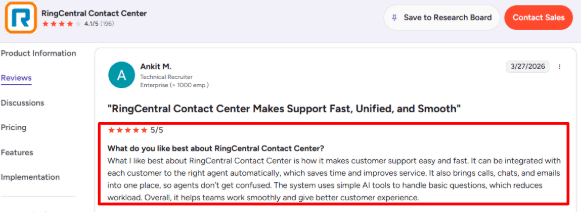
RingCentral Contact Center can bring calls, chats, and emails into one place, which is helpful for firms that already handle client communication across many channels. This lines up with another G2 RingCentral Contact Center review, where the reviewer liked that calls, chats, and emails were combined, and that customers could be routed to the right agent automatically.
I agree with that point for larger accounting teams. It reduces the chance that one staff member misses a call note while another is replying by email. For a solo accountant, this may be more than they need.
AI summaries:
RingCentral AI Receptionist can hand off calls with a summary, and the platform also supports transcripts, recordings, and call analytics. This is useful when an accountant is in a client meeting and cannot take the call live. Instead of only seeing "missed call from John," the team can see why John called. Maybe he needs a payroll correction, has a BAS deadline, or is asking if his tax return appointment has been booked. The part I liked most is that summaries can reduce repeat questions. The caller does not have to explain the same issue again after being transferred.
Security controls
RingCentral highlights encryption, permission based access, disaster recovery, and compliance coverage across several standards on its Contact Center features page. For accountants, this is important because calls may include payroll questions, revenue numbers, client addresses, payment issues, or tax related context. I would still be careful with setup. The AI should collect only what is needed, avoid sensitive tax details when possible, and route complex financial questions to a human instead of trying to answer them fully. Firms should also review access permissions, recording consent, retention rules, and escalation settings before going live.
Pros
Strong fit for accounting firms that already need business phone, call routing, and AI answering in one system.
Good for multi office firms, growing practices, bookkeeping teams, and firms with separate tax, payroll, advisory, and admin staff.
AI Receptionist can answer after hours calls, capture intent, send follow up texts, and reduce basic call interruptions.
Routing is deeper than basic answering tools.
Call summaries, transcripts, and analytics can help firms understand repeated client questions before a busy season.
Useful if the team already uses RingCentral or needs a broader communications platform.
Cons
Setup can feel heavier than simpler AI answering services, especially for solo accountants or very small firms.
Reporting and admin areas may take time to learn.
Advanced customisation may need support, which can slow down launch if the firm has complex call flows.
Pricing can become less clear if the firm needs a Contact Center, AI Receptionist, extra users, integrations, or higher call volume.
It may be overbuilt if the main need is just "answer missed calls and take messages."
Not the best option for firms wanting quick AI only setup.
Pricing
RingCentral AI Receptionist pricing starts at $39/month with 100 minutes included, according to the RingCentral AI Receptionist availability announcement.
Extra minutes are available in 100-minute bundles, so accounting firms should estimate call volume before choosing it for tax season.
RingCentral Contact Center pricing is usually sales-led, so larger firms may need to request a custom quote through RingCentral.
For an accounting firm, the main pricing question is whether you only need an AI Receptionist or whether you also need the full contact center layer for queues, omnichannel support, analytics, and team routing.
My AI FrontDesk
My AI Frontdesk is popularly known as a 24/7 AI receptionist for small businesses. It can answer calls, capture leads, reply by SMS, and book appointments without needing a human receptionist on every call. For small accounting firms, it is useful because it covers more than phone answering. It also includes SMS, chatbot, forms, CRM, tickets, notifications, and dashboards.
Features
24/7 call answering
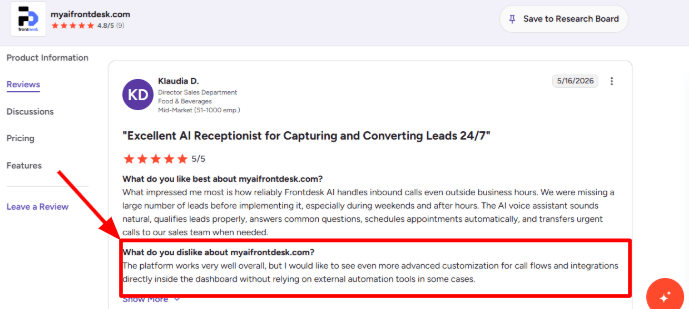
My AI Frontdesk works best when an accounting firm is missing calls after hours, during client meetings, or during busy periods when the front desk is overloaded. Its accounting firms page positions it around answering calls, scheduling consultations, handling tax deadline enquiries, and booking new clients. The setup does not feel heavy for a basic answering flow. You can train the AI with firm details, services, availability, and common questions, then let it answer routine calls like "Do you handle BAS?" or "Can I book a tax consultation?" The area that needs care is called flow depth. I saw this in G2 review of My AI Frontdesk, where the reviewer said they wanted more advanced customization for call flows and integrations directly inside the dashboard, instead of relying on external automation tools in some cases. I’d place the G2 screenshot below this point because it matches what accounting firms should check before using it for complex intake paths.
Client intake capture:
For accountants, this is more useful than just answering the phone. The AI can ask for name, phone number, business type, service needed, deadline, and basic context before the accountant calls back. A real example would be a business owner calling at 7 pm about a company tax return or BAS lodgement. Instead of sending them to voicemail, the AI can collect the entity type, urgency, preferred callback time, and whether they need bookkeeping, payroll, GST, or tax help. That makes the next human follow up much cleaner.
SMS follow up
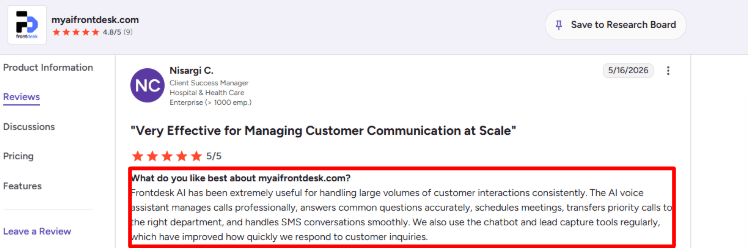
My AI Frontdesk can handle two way SMS conversations. This matters because many accounting clients do not want another phone call during work hours. For tax prep and bookkeeping enquiries, SMS is useful for confirmations, reminders, document nudges, and quick follow ups after missed calls. After reviewing the product and G2 feedback, I agree with the positive review that says the tool is useful for handling high volumes of customer interactions, answering common questions, scheduling meetings, transferring priority calls, and managing SMS conversations smoothly. That review came from G2’s My AI Frontdesk reviews, and it lines up with where the product is strongest.
For accountants, I would still keep SMS scripts simple. It is good for “Your consultation is confirmed” or “Please upload your documents before Friday.” I would not use it for sensitive tax advice or anything that needs a CPA’s judgement.
Call routing
The AI can transfer priority calls to the right person or team. This is helpful for firms where bookkeeping leads, tax clients, payroll questions, and existing client support should not all land with the same person. For example, a new tax lead can go to the owner or client manager, while an existing client asking about missing documents can create a ticket or notify the assigned accountant. This is where accounting firms should spend time before going live. The AI receptionist is only as useful as the routing logic behind it.
Website chatbot
My AI Frontdesk is not only a phone answering tool. Its website chatbot can answer service questions, qualify prospects, and book consultations from the site. For accounting firms, this can catch visitors comparing tax returns, bookkeeping, payroll, company setup, or small business accounting late at night. The chatbot should not sound like it is giving tax advice. Keep it focused on intake, service matching, appointment booking, and collecting the right context for the accountant.
CRM and alerts
My AI Frontdesk includes a built-in CRM layer, smart tickets, notifications, and dashboards. For an accounting firm, this means calls, chats, texts, and forms can be stored in one place instead of being scattered across voicemail, email, and spreadsheets. This is useful during busy periods when missed context becomes expensive. A caller may first ask a question on the website, then call the next morning, then text later. Having that journey in one place helps the team respond without asking the same questions again. The dashboard side is useful, but accountants should still test how well it fits their existing stack. If the firm already uses Xero, MYOB, QuickBooks, Karbon, TaxDome, Canopy, HubSpot, or a client portal, check the integration path carefully before depending on it.
Pros
Strong fit for small accounting firms that miss calls during tax season, lunch hours, client meetings, and after hours periods.
Covers more than phone calls, including SMS, chatbot, forms, CRM, tickets, notifications, and outbound follow up.
Useful for basic intake, appointment requests, deadline questions, and lead qualification.
Free plan makes it easier to test before paying.
Pricing is more accessible than many human answering services.
Good for firms that want an AI receptionist first, not a full practice management system.
Cons
Advanced call flow customisation may need external automation or more setup work.
Complex accounting conversations still need human review, especially tax advice, billing disputes, payroll issues, and sensitive client questions.
Some G2 feedback mentions AI responses feeling slow or robotic in more complex conversations.
Integrations should be checked carefully if the firm already uses a specialist accounting CRM or client portal.
Minute and usage limits matter, especially during busy seasons.
It does not replace a trained receptionist for high trust or emotional client calls.
Pricing
My AI Frontdesk has a Free plan at $0/month with limited usage, including 20 voice minutes per month, 10 chatbot conversations, 40 SMS, and 50 email drafts, according to the My AI Frontdesk pricing page.
The main Business-in-a-Box plan is listed at $99/month, or $79/month when billed annually. It includes voice, chat, SMS, CRM, automations, 200 voice minutes, 100 chatbot conversations, 400 SMS, Zapier, and a verified outbound number.
Partner and Enterprise pricing is custom. This is more relevant for accounting groups, agencies, or firms with higher call volume, custom integrations, API needs, or multiple locations.
For accountants, the key pricing question is not just the monthly fee. Check expected call minutes, SMS volume, overage credits, and whether your tax season call spike will push you beyond the included limits.
When to Choose My AI Frontdesk
Choose My AI Frontdesk if you want an AI receptionist that also covers SMS, chatbot, forms, CRM, tickets, and basic automations. It is a good fit for small accounting firms that want more than call answering but do not want a full call centre platform. Skip it if your firm needs very polished human answering, deep accounting specific integrations, or complex intake workflows out of the box.
Conclusion
The best AI receptionist for accountants in Australia depends on how your firm handles calls during busy periods.
Ring Jenny is the strongest starting point for small Australian accounting firms that want affordable AI call answering, client intake, routing, and summaries. Smith.ai is better if you want AI with human backup, but Australian firms should check local fit carefully.
Ruby and AnswerConnect are better when callers need a real person, especially for premium clients, sensitive conversations, or firms that want a human led front desk. My AI Frontdesk is useful for small firms that want phone, SMS, chat, and simple automation in one place. RingCentral AI Receptionist makes the most sense for multi office firms or teams already using a structured phone system.
Before switching, test each tool with real accounting calls: BAS deadline questions, ATO notice calls, payroll issues, EOFY appointment requests, new business enquiries, document follow ups, and after hours calls. The right tool should capture clean details, avoid collecting sensitive information, route urgent calls properly, and make follow up easier for your team. Do not choose based only on the demo. Test the calls your accounting firm actually receives.
FAQs
What is the best AI receptionist for accountants?
Ring Jenny, Smith.ai, Ruby, AnswerConnect, My AI Frontdesk, and RingCentral AI Receptionist are all worth comparing. Ring Jenny is a strong starting point for Australian accounting firms that want AI first call handling. Smith.ai, Ruby, and AnswerConnect are better when you want human backup. My AI Frontdesk is useful for firms that want phone, SMS, chat, and automation together. RingCentral suits firms already using its phone system.
How should an accounting firm choose an AI receptionist?
Start with your call flow, not the brand name. Check whether the tool can handle BAS season, EOFY, appointment changes, payment questions, urgent callbacks, spam calls, and smooth handoff to a partner, bookkeeper, payroll specialist, or admin team. Also check whether it can avoid collecting sensitive details like TFNs, bank details, passwords, and private tax information.
Can an AI receptionist handle after-hours calls for accountants?
Yes, but only if you set clear rules. Use it for lead capture, FAQs, appointment requests, document reminders, and call summaries. For ATO notices, payroll problems, angry clients, sensitive financial questions, or urgent tax matters, route the call to a human.
When is a human answering service better than an AI receptionist?
A human service is better when calls need judgement, empathy, or complex intake. For example, Ruby, AnswerConnect, and Smith.ai may suit firms that want live receptionists for VIP clients, escalations, or sensitive financial conversations. AI works better for repeatable tasks like intake, routing, FAQs, booking, summaries, and missed call recovery.
Should an AI receptionist give tax advice?
No. An AI receptionist should not give tax advice, assess a client's tax position, or explain complex accounting rules. It should collect basic information, route the call, book appointments, send summaries, and help your team respond faster. Anything that requires professional judgement should go to a registered tax agent, accountant, bookkeeper, or payroll specialist.
What should accountants ask before buying an AI receptionist?
Ask about call limits, minute limits, overage pricing, SMS costs, appointment booking, human handoff, call recordings, transcript accuracy, data retention, local number support, integrations with Xero, MYOB, QuickBooks, Karbon, TaxDome, Canopy, HubSpot, or your client portal, and whether the AI can avoid collecting TFNs, bank details, passwords, and sensitive tax details.