Australian law firms cannot afford to treat missed calls like small admin mistakes anymore.
When someone is dealing with a divorce, conveyancing issue, injury claim, migration matter, employment dispute, or urgent criminal charge, they usually call the lawyer who responds first.
That is why choosing the right AI answering service for lawyers in Australia matters. The right tool should not just answer calls after hours. It should capture clean intake details, identify urgency, route sensitive calls properly, and help your team avoid messy follow ups.
Clio's 2026 Legal Insights Report says AI has moved from a talking point to a daily reality for Australian legal practices. But phone answering is one area where law firms need to be careful. AI should support intake, not replace a lawyer's judgment.
For this comparison, I looked at AI answering services and human backed receptionist services based on setup flow, legal intake controls, after hours handling, call summaries, pricing, integrations, review feedback, and how well each tool fits Australian law firms.
This article is for software comparison only. AI answering tools should not give legal advice, assess case merits, or replace a lawyer's professional judgment.
Best AI Answering Services for Lawyers in Australia: Compared
Tool
Best for
Starting price
Main weakness
Ring Jenny
Australian law firm call capture
Free forever entry; paid packages available
Needs more public review proof
Smith.ai
Legal intake with human backup
$95/month AI plan / $300 live plan
US-focused service model
Ruby
Premium human receptionist support
$250/month
Minute-based pricing
AnswerConnect
24/7 live answering
$350/month
Quality can vary by agent
Abby Connect
Bilingual legal answering
$329/month
Can become expensive
RingCentral AI Receptionist
Existing phone system users
$39/month
Heavy setup for small firms
How I Compared These AI Answering Services
Test area
What I checked
Legal intake
Whether the tool captured matter type, urgency, contact details, and callback needs
After-hours calls
Whether urgent calls were handled properly outside business hours
Handoff
Whether sensitive or complex calls could reach a human
Call summaries
Whether transcripts and summaries were clear enough for legal follow-up
Scheduling
Whether consultations or callbacks could be booked correctly
Privacy fit
Whether the tool gave clear controls around call data and recordings
Pricing
Monthly plans, call limits, minute limits, overages, and add-ons
Deep dive into individual tools
Ring Jenny
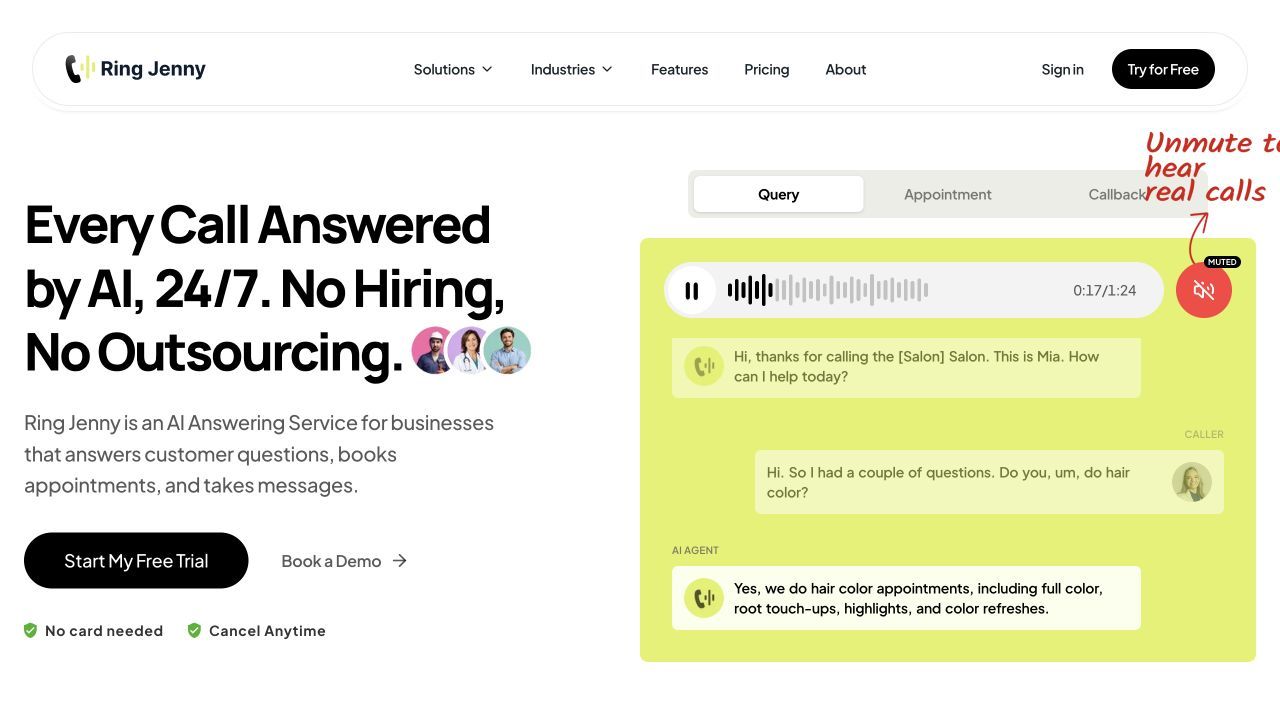
Ring Jenny is a strong fit for Australian law firms that want a simple AI answering service for missed calls, after hours enquiries, intake capture, appointment routing, and call summaries.
An AI receptionist call script should gather the reason for calling without attempting to give legal advice.
I selected Ring Jenny because it fits the exact problem many small and growing firms face. Potential clients call when lawyers are in court, in client meetings, handling paperwork, or closed for the day. If nobody answers, that caller may simply move to the next firm.
Ring Jenny is useful because it can answer calls, collect structured intake details, route enquiries, and send clean summaries to the right person. It is also more accessible from a pricing point of view than hiring another receptionist or using a premium live answering service.
Features
24/7 AI call answering
For law firms, the biggest value is not just answering the phone. It is making sure high intent callers do not disappear when your team is busy or offline. Ring Jenny can answer calls outside office hours and capture the reason for the call. For example, a personal injury firm can capture accident details at 8 pm instead of losing that lead to another lawyer.
Legal intake questions
Ring Jenny can ask short intake questions before passing the details to your team. This helps your firm quickly understand the matter type, urgency, location, and whether the caller needs a fast callback. For example, a family law firm can collect whether the caller needs help with divorce, parenting arrangements, property settlement, or urgent court orders. The key is to keep the questions short. A phone intake should not feel like a long legal form.
Not every legal call should go to the same person. Ring Jenny can route calls based on practice area, urgency, or caller type. A criminal law enquiry can be treated differently from a conveyancing question. A new client can go to intake, while an existing client can be passed to the right lawyer, paralegal, or admin team with context.
Call summaries and follow up notes
After every call, Ring Jenny can send a clear summary so your team knows what happened without listening to the full recording. For example, the summary can include the caller's name, phone number, legal issue, urgency, location, and requested next step. This makes follow up faster and reduces the chance of missing important details.
Privacy aware setup
Legal callers often share sensitive information, so law firms should avoid collecting unnecessary details through AI. Ring Jenny can be set up with structured intake flows that focus on basic information first: who called, what the matter is about, how urgent it is, and who should follow up. The firm should still control what the AI can and cannot ask.
What people are saying about Ring Jenny
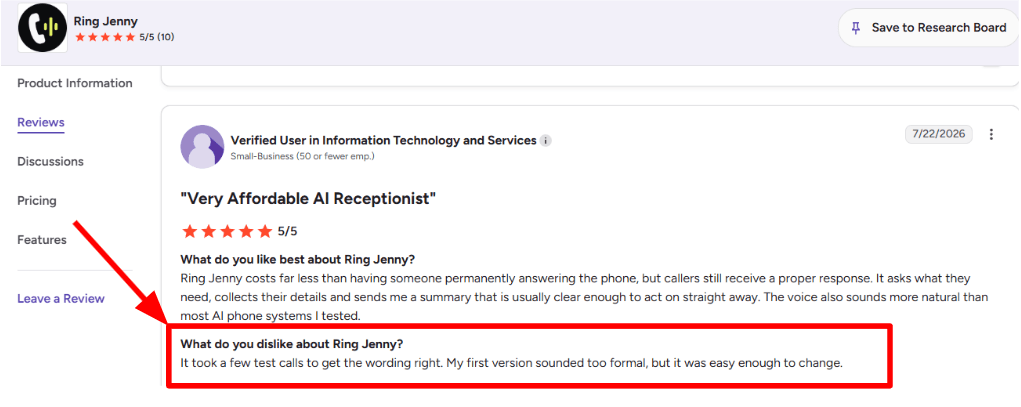
One concern I noticed while going through the G2 review was that the initial setup may require a few test calls. In this case, the reviewer felt that the first version sounded too formal, so they had to adjust the wording before it felt right. The positive part is that making those changes was fairly simple.
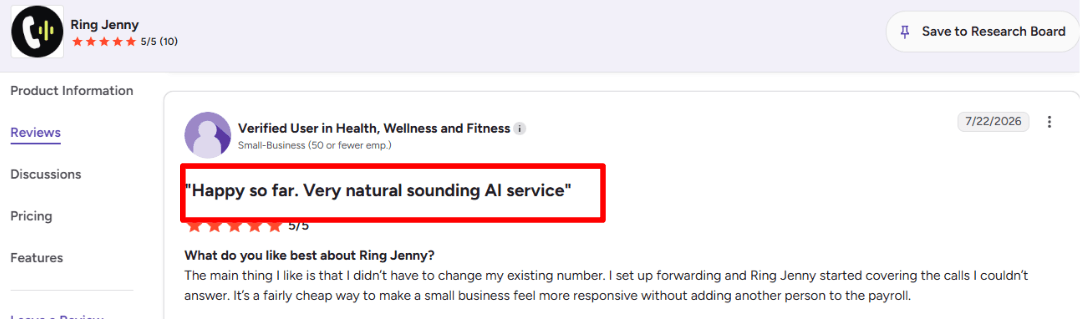
Another benefit that stood out to me was that the reviewer did not have to replace their existing business number. They simply set up call forwarding, and Ring Jenny started answering the calls they could not take. They also felt it was an affordable way for a small business to respond faster without hiring another employee. I am adding the screenshot of the review below.
Pros
Strong fit for Australian law firms that miss calls after hours.
Useful for basic intake, call routing, summaries, and appointment requests.
More affordable than many live receptionist services.
Can help small firms capture new leads without hiring extra reception staff.
Good for repeatable call flows like consultation requests, callbacks, and basic matter screening.
Call summaries help lawyers and intake teams follow up faster.
Public review volume may be thinner than older answering service brands.
Not a full legal intake system, CRM, or practice management platform.
Complex intake workflows still need careful setup.
Sensitive, emotional, or urgent calls may still need a human quickly.
The firm must make sure the AI does not give legal advice.
More public case studies and reviews would make the buying decision easier.
Set AI receptionist escalation rules for advice requests, sensitive information, and callers who need a lawyer.
Pricing: free forever and paid packages
The entry-cost comparison for Australian law firms should include Ring Jenny’s free forever plan, the only such option among these companies. Start with the caller’s contact details, the broad matter type and the right staff callback. Keep legal advice outside the reception brief. Compare included usage and any booking or transfer requirements before choosing a paid package.
Ring Jenny's paid packages start at $49 per month. For law firms, check what is included in each plan before choosing. Important details include call volume, routing rules, SMS alerts, appointment booking, integrations, transcripts, summaries, and whether higher usage changes the monthly cost.
When to Choose Ring Jenny
Choose Ring Jenny if you run an Australian law firm and want affordable AI call answering for missed calls, after hours enquiries, legal intake, routing, and summaries. It is best for firms that want to capture leads faster without building a complex call centre setup. Skip it if your calls are highly sensitive, require human judgment every time, or need deep legal CRM and conflict check workflows out of the box.
Ruby
Ruby is best known as a human virtual receptionist service, not a pure AI answering service. Law firms use it when they want callers to reach a real person instead of voicemail or a bot. This matters because new legal callers are often stressed, rushed, or unsure whether their issue is urgent.
Ruby positions itself around live answering, appointment support, call forwarding, lead capture, and AI enhanced support. That makes it closer to a premium front desk layer than a lightweight AI phone agent.
Features
Live call answering
Ruby gives law firms human call answering rather than bot only support. This is useful for legal intake because tone matters. A caller dealing with a family dispute, injury, business dispute, or criminal matter may not respond well to a cold automated flow. Ruby's live receptionist model can help firms sound more polished and available without hiring in house reception staff.
Legal intake setup
Ruby can collect caller details, screen the reason for the call, take messages, route calls, and support intake workflows. For a law firm, this can mean asking for practice area, opposing party, urgency, court date, callback number, and whether the caller is an existing client. The setup needs care. If the script is too broad, every caller sounds like a qualified lead. If it is too rigid, a good client may drop off.
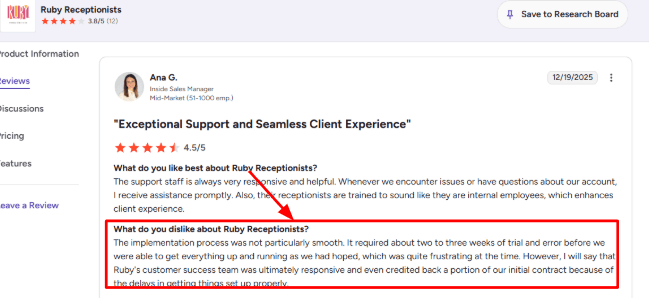
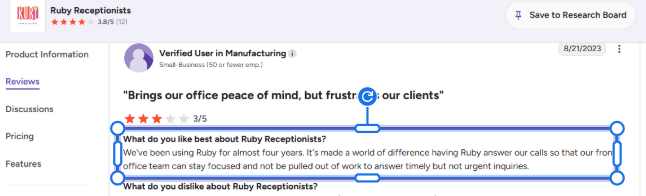
I saw this in a G2 Ruby Receptionists review, where the reviewer said implementation took two to three weeks of trial and error before things worked as expected. I’ve place that screenshot below:
Call routing rules:
Ruby lets firms forward calls flexibly, take messages, transfer live calls, and update call handling instructions. This is useful for solo lawyers and small firms where the lawyer may only want urgent calls during court, client meetings, or focused work. For example, a personal injury firm can route new accident leads during business hours, take detailed notes after hours, and send non urgent vendor calls to messages only. Ruby depends heavily on the quality of the instructions given to the receptionist team. It is not a legal judgment engine.
Front office relief
Ruby is strong when the main goal is to stop routine calls from interrupting legal work. That matched a G2 Ruby Receptionists review where a long-term customer said Ruby helped their front office stay focused instead of being pulled into timely but non-urgent calls. I agree with that use case. For lawyers, the value is not just answering calls, it is protecting billable time.
AI assisted notes
Ruby describes itself as people powered and AI enhanced. Its AI features include transcripts, sentiment analysis, AI assisted call flows, and information gathering. This is helpful for law firms that want better call summaries without trusting a fully automated AI receptionist with sensitive intake. The limitation is that Ruby's AI supports the human receptionist workflow. It is not a fully AI native receptionist.
Bilingual coverage
Ruby offers English and Spanish call answering. This can matter for migration, personal injury, family law, criminal law, and employment law firms serving mixed language communities. Australian firms should check whether the language support and legal scripts match their actual client base before choosing Ruby for bilingual answering.
Pros
Strong fit for firms that want a real human voice.
Good for reducing interruptions to lawyers, paralegals, and front office staff.
Useful mix of call answering, intake, routing, scheduling help, transcripts, and bilingual coverage.
Better suited to sensitive legal calls than a generic bot first phone system.
AI enhancements add structure without removing the human layer.
Good for firms that care about first impressions.
Cons
Not the cheapest option.
Setup may need several rounds of script changes.
Not a legal specific conflict check system.
Per minute pricing can become expensive if callers give long case histories.
Not ideal if you want fully automated AI qualification and follow up.
Australian law firms should confirm local coverage and support hours.
Pricing
Ruby's virtual receptionist plans start at $250 per month for 50 receptionist minutes. Higher plans include $395 per month for 100 minutes, $720 per month for 200 minutes, and $1,725 per month for 500 minutes. Live chat plans are listed separately. Ruby says all virtual receptionist plans include the same feature set, with the main difference being receptionist minutes. Law firms should confirm overage pricing, intake rules, bilingual handling, and recording policies before choosing a plan.
When to Choose Ruby
Choose Ruby if your firm wants a polished human receptionist service with AI supported notes and transcripts. It is a good fit for small and boutique firms where caller experience matters and where new leads may be emotional, urgent, or high value. Skip it if you want low cost AI only answering or fully automated legal intake.
AnswerConnect
AnswerConnect is known for human powered 24/7 answering, not AI first automation. Law firms use it when they want callers to reach a real receptionist instead of voicemail or a bot, especially after hours, on weekends, during overflow periods, or when internal staff are unavailable. It is relevant for this article because many law firms still prefer human answering for legal calls, even if they are exploring AI tools.
Features
Live legal answering
AnswerConnect's strongest fit for law firms is simple but important. A real person answers calls around the clock. Its legal page talks about client intake, call routing, and legal terminology, which makes it more relevant than a generic answering service for solo lawyers or small firms.
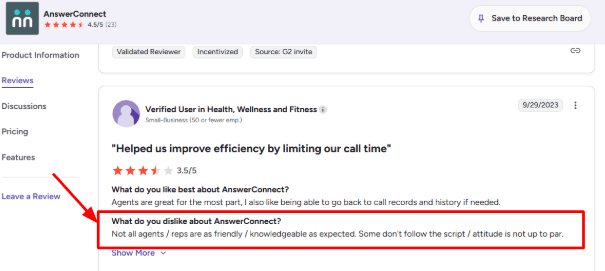
The gap is consistency. In a G2 AnswerConnect review, I saw a customer mention that some agents were not always as friendly, knowledgeable, or script-following as expected. That matters in legal intake because tone can affect trust in the first 30 seconds. I’d place the screenshot below this point:
Custom call scripts
Scripts are useful for lawyers because every practice area needs different intake questions. A personal injury firm may ask about accident date, injury type, insurance, and urgency. A family law firm may need opposing party details, court dates, suburb, and preferred consultation time. AnswerConnect's scripting tools give firms room to shape the call flow. The work is making the script detailed enough to capture useful information but short enough that callers do not feel trapped.
Lead qualification
AnswerConnect can capture and qualify callers instead of just taking messages. For law firms, this is useful when calls come from Google Ads, referrals, website forms, legal directories, or after hours search traffic. For example, a criminal law caller reaching out late at night can share name, charge type, location, court date, and urgency. The receptionist can then route the matter based on your firm's rules.
Script support
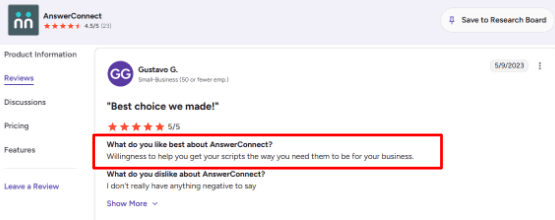
AnswerConnect appears to focus heavily on call flow design rather than forcing one fixed template. A G2 review also praised their willingness to help adjust scripts for the business.
I agree with that review for legal use. The service will only be as good as the intake design. If the firm gives vague instructions, callers may get a polite but shallow response. If the firm builds strong scripts, AnswerConnect has room to follow them.
Appointment scheduling
AnswerConnect includes appointment scheduling, which helps firms offering paid consultations, free case reviews, or callback slots. Its site mentions appointment scheduling and integrations, including Setmore, Salesforce, Zoho, Zendesk, Slack, and Zapier. This is useful, but it is still receptionist led scheduling. It is not a fully AI native legal intake engine that dynamically changes qualification logic.
Client notifications
AnswerConnect sends message updates through its app, SMS, or email. This is helpful when lawyers are in court, with clients, or away from the desk. I would still set strict internal rules for urgent matters. Potential restraining order issues, criminal matters, court deadlines, and high value injury leads should not sit in a general message queue.
Pros
Strong 24/7 live answering coverage.
Useful for firms that do not want voicemail or bot-only responses.
Legal specific positioning around intake, routing, qualification, and scheduling.
Good fit for solo and small firms without in-house reception.
Script customization is a strength if the firm invests time in intake design.
Live chat and CRM integrations make it broader than phone answering alone.
Cons
Not truly AI first.
Quality can vary by receptionist.
Legal intake depends heavily on scripts.
Pricing is minute based, so long intake calls can increase costs.
Entry plan scripting may be too light for legal workflows.
Sensitive or urgent matters still need firm defined escalation rules.
Pricing
AnswerConnect's public pricing starts at $350 per month for the Entry plan with 200 minutes, plus a $49.99 setup fee. The Growth plan is listed at $395 per month for 300 minutes. The Standard plan is listed at $575 per month for 400 minutes. Extra minutes are billed separately. Legal firms should estimate average call length carefully because intake calls can run longer than normal business calls.
When to Choose AnswerConnect
Choose AnswerConnect if your firm wants 24/7 human answering, legal style intake scripts, appointment scheduling, and live receptionist support. It is a good fit for firms that want better coverage than voicemail but are not ready to rely on AI only answering. Skip it if you want a lightweight AI phone agent with simple flat pricing.
Abby Connect
Abby Connect is known for high touch virtual receptionists, and law firms use it because it combines human answering, AI call handling, intake, scheduling, and legal focused call routing. It is a good option for firms that want an answering service with a polished first impression and bilingual support.
Features
Legal intake calls
Abby Connect is built more like a premium receptionist service than a pure AI bot. For lawyers, that matters because a caller may not explain their issue cleanly. They may say "custody issue," "car accident," "I got served," or "I need help with my visa." The answering flow needs to collect the right details without sounding cold. Abby says its legal answering service can handle enquiries, schedule appointments, and screen leads for law firms.
Call notes and transcripts
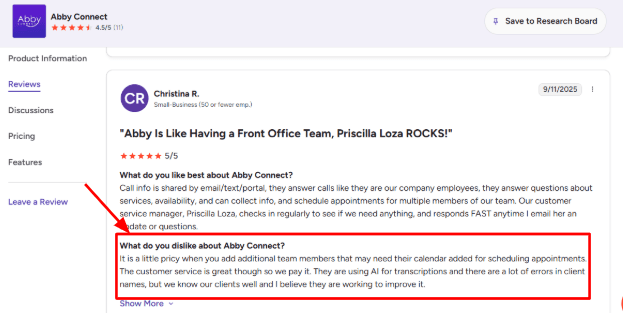
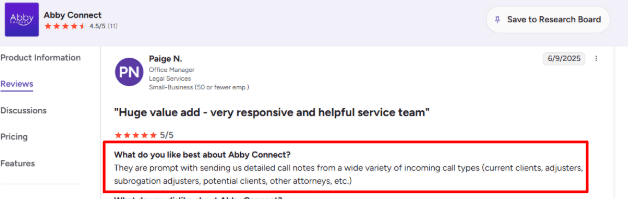
The portal gives access to call recordings, transcripts, summaries, tags, and sentiment scores. For a law firm, this can help separate urgent client calls from low fit leads without replaying every call. The weak spot is accuracy. I saw this in a G2 review of Abby Connect, where a user said the AI transcription made errors in client names. For legal intake, that is not a small detail. A misspelled name can slow down conflict checks, case lookup, and follow-up.
AI plus human backup
Abby's AI receptionist can answer FAQs, route calls, schedule appointments, and transfer calls. If the caller asks something the AI cannot handle, Abby says it can route the call to a human receptionist. This hybrid setup makes sense for law firms because not every call should be automated. A basic consultation request can be handled by AI, but a nervous existing client, court deadline question, or sensitive family law call may need a person.
Fast setup
Setup is one of the smoother parts. The flow is based on business information, FAQs, and call handling instructions, which can be updated later. A G2 review of Abby Connect where the user said it was easy to set up and get going. I agree with that, although the real work is not clicking through setup. It is writing clean intake rules.
Legal integrations:
Abby lists integrations for legal workflows, including Clio, Clio Grow, and Lawmatics. The Abby Connect Clio integration page says caller information can be sent into Clio Manage and Clio Grow. This is important for lawyers because missed or manually copied lead details create follow-up gaps. For example, if a personal injury lead calls after hours, the answering service should capture the accident type, date, injury details, contact info, and then push it into the firm’s intake system before the next morning.
Bilingual answering
Abby supports English and Spanish answering on its AI and human receptionist plans. For migration, personal injury, family law, criminal law, and employment law firms, bilingual answering can help capture more enquiries without hiring a bilingual front desk person. Australian firms should still test sample calls before relying on bilingual legal intake.
Pros
Strong fit for firms that want AI answering with human backup.
Legal specific pages mention intake, appointment scheduling, lead screening, and integrations.
Useful portal with call recordings, summaries, transcripts, tags, and caller insights.
Supports English and Spanish.
Good option for firms that care about a polished first impression.
Clio and legal workflow integrations are helpful.
Cons
Pricing can become expensive as minutes, calendars, users, and add ons increase.
AI transcription accuracy needs checking, especially for names and legal details.
Not the cheapest AI answering service for lawyers.
Legal intake scripts still need careful review.
Some advanced scheduling or workflow needs may require extra configuration.
Australian firms should confirm local coverage, time zones, and data handling.
Pricing
Abby's AI receptionist pricing starts at $99 per month after a 14 day free trial, with up to 50 minutes included. AI receptionist plans go up to higher monthly tiers for more minutes. Human receptionist plans start at $329 per month for 100 minutes. Higher human receptionist plans are available for larger call volumes. Law firms should check pricing carefully if they need multiple lawyer calendars, live transfers, after hours coverage, legal CRM integrations, or human backup.
When to Choose Abby Connect
Choose Abby Connect if your firm wants a polished receptionist experience with AI support, bilingual answering, legal intake, and CRM integrations. It is a good fit for firms that want more human backup than pure AI tools but also want transcripts, summaries, and automation support. Skip it if you need the cheapest AI answering service or if your firm does not need bilingual or human backed support..
RingCentral
RingCentral is best known as a cloud phone system and contact centre platform. Law firms usually look at it when they want reliable call handling, routing, call records, AI summaries, and phone system controls in one place. RingCentral AI Receptionist is not just a missed call bot. It makes more sense for firms that already have structured call operations, multiple lawyers, intake staff, or several practice areas.
Features
AI Receptionist
RingCentral's AI Receptionist can answer calls, handle FAQs, capture lead details, route calls with context, and work with an existing phone system. For a law firm, this is useful for calls like "Do you handle personal injury cases?" or "Can I speak to someone about a property dispute?" The AI can collect the caller's name, matter type, urgency, and location before passing the call to the right person. I would still keep legal answers narrow and controlled, especially around fees, timelines, and whether the firm can take a case.
Call routing
RingCentral supports AI assisted routing, IVR, call queues, skills based routing, simultaneous routing, fixed order routing, and other routing logic. For lawyers, this matters because not every missed call has the same value. A new criminal law enquiry, an existing client update, and a vendor call should not be treated the same way.
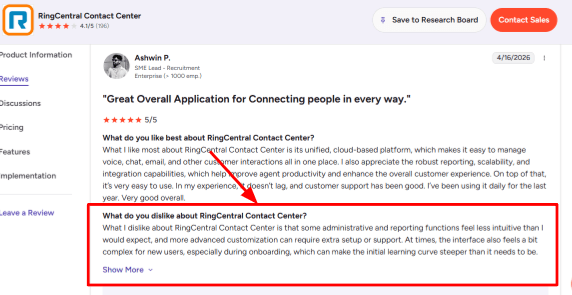
A G2 RingCentral Contact Center review, where the reviewer said administrative and reporting functions were less intuitive than expected, and that advanced customization needed extra setup or support. That matches the product feel. The routing can be powerful, but a small firm may need time to map intake rules properly.
Omnichannel inbox
RingCentral Contact Center brings voice and digital channels into one environment, including SMS, email, chat, and social channels. This can help firms that receive enquiries from phone calls, website chat, referral partners, and text messages. The main benefit is not just answering faster. It is seeing caller history before someone responds. For example, a family law firm could see that a lead first asked a question by chat, then called the next morning. The intake person does not have to ask everything again.
AI summaries
RingCentral includes AI tools across calls and contact centre workflows, including transcriptions, summaries, action items, agent assistance, and conversation intelligence. In a legal answering setup, this is useful after intake calls. A short call summary can show the caller's issue, urgency, preferred callback time, and next step.
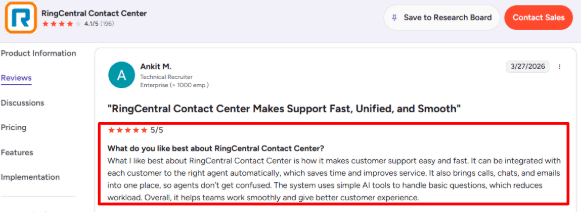
A positive G2 RingCentral Contact Center review that praised how calls, chats, and emails come together and how routing sends customers to the right agent. For law firms, that is the stronger side of RingCentral. It works better when a firm has a team handling calls, not just one attorney checking missed calls alone.
Analytics And Reporting:
RingCX offers dashboards, interaction analytics, quality management, and AI based review of customer interactions. RingCentral says its AI Quality Management can analyze 100 percent of customer interactions instead of only sampled calls on the RingCentral AI Quality Management page.
For law firms, this can show missed opportunities, long wait times, repeat questions, intake quality, and which call types are taking too much staff time.
The gap is ease of use. Reporting is useful, but it may be more than a solo attorney or two person firm needs. It makes more sense for firms with dedicated intake staff, multiple practice areas, or several office locations.
Security And Compliance:
RingCentral publishes compliance and trust resources for RingEX and RingCX, and says it maintains compliance certifications and attestations to protect customer data and communications on the RingCentral Compliance Site.
This is important for legal calls because callers often share sensitive facts before they even become clients. A law firm should still review retention settings, call recording consent rules, user permissions, and data access before turning on recordings or AI summaries.
One positive surprise was how much RingCentral has already built around enterprise controls. The tradeoff is that the setup feels more like a business communications platform than a plug and play AI answering service for a small law office.
Pros
Strong phone system foundation for firms that care about reliability, routing, call history, and admin control.
AI Receptionist can answer basic intake questions, capture lead details, and route calls with context.
Omnichannel support is useful when legal leads come from calls, SMS, chat, email, and website forms.
Good fit for law firms with intake staff, multiple attorneys, or different practice areas.
Stronger compliance posture than many lightweight AI answering tools.
Cons
Setup can feel heavier than needed for a small law firm that just wants missed call handling.
Advanced routing, reporting, and customization may need extra configuration or support.
Pricing is not as simple as many legal AI receptionist tools.
Legal teams still need to write tight scripts so the AI does not over answer sensitive legal questions.
More suitable for structured intake teams than solo attorneys who want a very simple AI phone agent.
RingCX Contact Center pricing is shown as a sales led plan on the RingCentral RingCX pricing page, so firms may need to contact sales for exact contact center pricing.
Add ons like Business SMS Booster, Call Queues Booster, and AI Conversation Expert are listed separately on the RingCentral plans page.
For a law firm, the real cost depends on whether you only need AI call answering or a full contact center with routing, analytics, SMS, and multiple agents.
When to Choose RingCentral AI Receptionist
Choose RingCentral AI Receptionist if your law firm already uses RingCentral or wants a structured phone system with AI answering, routing, SMS, call records, and analytics. It is a good fit for larger firms, multi practice firms, and firms with dedicated intake teams. Skip it if you want a simple AI answering service for a small firm with low call volume.
Smith.ai
Smith.ai is one of the better known answering services for law firms because it combines AI call answering with live receptionist support. It can handle legal intake, screen callers, route urgent matters, book consultations, take payments, run conflict checks, and send call summaries. That makes it stronger than a basic AI phone bot.
For Australian law firms, the main thing to check is local fit. Smith.ai is more US focused, so firms in Australia should confirm time zone coverage, local number support, data handling, and whether its legal workflows fit Australian practice areas.
Features
Legal call intake
Smith.ai is built to capture caller details before the lawyer or intake team gets involved. For law firms, that means the receptionist can ask about practice area, location, urgency, opposing party, and basic matter details before passing the lead forward. This is useful for personal injury, family law, migration, criminal law, employment law, and estate planning firms where every call is not automatically a good fit. Smith.ai talks about practice specific intake on its legal answering service page, but the setup still needs careful scripting.
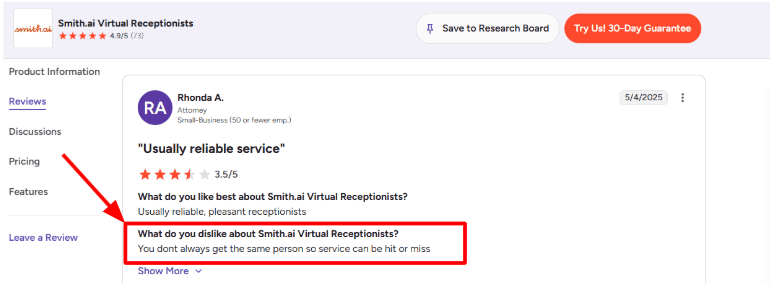
I also saw a consistency risk in a G2 review of Smith.ai Virtual Receptionists, where the reviewer said, “You dont always get the same person so service can be hit or miss.” That matters for lawyers because tone, wording, and intake discipline can change the caller’s confidence. I’d add the screenshot below this point.
Conflict checks
Smith.ai includes conflict checks as a legal specific feature, which is important because law firms cannot treat every new caller like a normal sales lead. In a real intake flow, the receptionist can ask for the caller's name, opposing party, company name, or related people before a consultation is booked. For example, a family law firm would not want to book a consultation until the spouse's name is checked against existing matters. This is a practical feature, but it only works well if your firm's contact and matter data is clean.
AI plus human backup
Smith.ai's AI Receptionist can answer first, while complex situations can be escalated to live agents. This hybrid setup is better for law firms than a pure bot because legal calls are often emotional, urgent, or hard to classify. A caller saying "my hearing is tomorrow" or "I was just charged" should not be treated like a simple FAQ. The escalation rules need to be very clear. Smith.ai explains on its AI Receptionist pricing page, it clearly explains that live agents can step in when the AI needs help.
CRM and legal integrations
Smith.ai can send call details into tools like Clio, HubSpot, Salesforce, Zapier, Actionstep, and other legal or business systems. For a legal team, this can mean a new lead is created after the call, notes are pushed into the CRM, and the intake team can follow up without retyping everything. Smith.ai lists legal and CRM tools on its integrations page, including legal tools like Actionstep and Assembly Neos.
Call summaries and recordings
Smith.ai gives call summaries, transcripts, recordings, and dashboard visibility. For lawyers, this is not just a convenience feature. Intake accuracy affects follow up quality. A good summary should show who called, what they need, whether they are a fit, how urgent it is, and what action was taken.
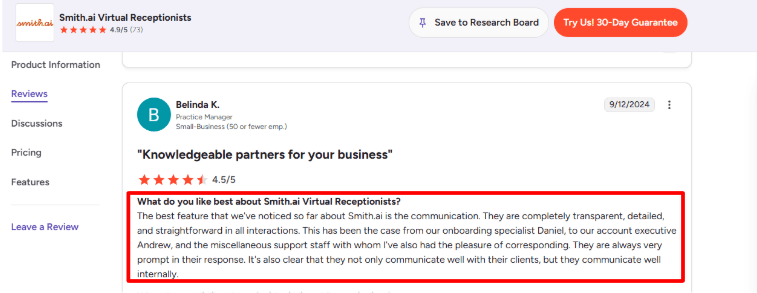
A second G2 for Smith.ai Virtual Receptionists matches this strength. The reviewer praised Smith.ai’s communication as transparent, detailed, straightforward, and prompt, and said the team seemed aligned internally. I agree with that point because call answering only works for lawyers if the handoff after the call is clear.
Scheduling and follow up
Smith.ai can book consultations, send follow up messages, and route qualified callers based on your rules. This helps law firms avoid the common problem where a good lead calls, gets voicemail, and then books with another lawyer. The setup is not completely plug and play. You need to define which practice areas are accepted, which jurisdictions you serve, whether consultations are free or paid, and when a lawyer should be interrupted.
Pros
Strong fit for law firms that need intake, screening, scheduling, and human backup.
Hybrid AI plus live agent model is safer than pure AI for sensitive legal calls.
Legal specific features like conflict checks, intake questions, payment collection, and routing are useful.
Integrations with legal and CRM tools reduce manual data entry.
Call summaries, transcripts, and recordings make intake easier to audit.
Good option for firms that get valuable phone leads and want more than voicemail.
Cons
More US focused, so Australian firms should check local fit carefully.
Service quality can vary if the same receptionist does not always answer.
Legal intake setup needs careful scripting.
Some useful features may cost extra.
AI first plans may not be enough for emotional or urgent legal calls.
Dashboard review can take extra time if your team audits many calls.
Pricing
Smith.ai’s AI Receptionist starts at $95/month for self-service monthly plans, with higher tiers listed at $270/month and $800/month on the Smith.ai AI Receptionist pricing page.
Done-for-you annual AI plans start at $500/month, with higher listed tiers at $1,000/month and $2,000/month. These include more customization, optimization, and no overages.
Smith.ai’s human Virtual Receptionist plans start at $300/month for 30 calls, then $810/month for 90 calls, and $2,100/month for 300 calls on the Smith.ai Virtual Receptionist pricing page.
Some law-firm-relevant features may cost extra on human receptionist plans, such as appointment booking, conflict checks, call recording, Spanish line, payment collection, and complex routing.
When to Choose Smith.ai
Choose Smith.ai if your law firm gets valuable phone leads and needs intake, qualification, consultation booking, call summaries, and human backup. It is a strong fit for firms where a missed call can become a lost client. Skip it if you need an Australia first provider, very low cost AI answering, or a simple bot that only takes messages.
Conclusion
The best AI answering service for lawyers in Australia depends on how sensitive, urgent, and complex your calls are.
Ring Jenny is the strongest starting point for Australian law firms that want affordable AI call answering, intake, routing, and summaries. Smith.ai is better if you want legal intake with human backup, but Australian firms should check local fit carefully. Ruby and AnswerConnect are better when callers need a real person. Abby Connect is useful for firms that need bilingual support and polished receptionist handling. RingCentral AI Receptionist works best for firms that already use a structured phone system or have a dedicated intake team.
Before switching, test each tool with real legal scenarios: a family law enquiry, conveyancing question, urgent criminal matter, migration call, existing client update, and after hours lead.
The right service should capture clean details, avoid giving legal advice, route urgent calls properly, and make follow up easier for your team. Do not choose based only on price or the demo voice. For law firms, the real test is whether the answering service protects trust in the first 30 seconds.
FAQs
What is the best AI answering service for law firms in Australia?
Ring Jenny, Smith.ai, Ruby, AnswerConnect, Abby Connect, and RingCentral AI Receptionist are all strong options for law firms. Ring Jenny is a good starting point for Australian firms that want affordable AI answering. Smith.ai is better for legal intake with human backup. Ruby and AnswerConnect are better when callers need a real person.
How should a law firm choose an AI answering service?
Start with the calls you lose most often. These may include new client enquiries, after hours calls, scheduling changes, cancellations, urgent callbacks, existing client updates, or court deadline questions. Then check call recordings, transcripts, fallback routing, appointment booking, call summaries, privacy controls, and whether sensitive calls can be handed to a human.
Can AI answering services handle legal intake calls?
Yes, but only if the setup is clear. The AI should collect basic details, confirm contact information, identify urgency, and avoid giving legal advice. For complex, emotional, or high risk matters, the caller should be routed to staff or a human receptionist.
What mistakes do law firms make when buying an AI receptionist?
The biggest mistake is choosing based only on price. Law firms should test call quality, escalation rules, spam filtering, appointment confirmation, transcript accuracy, and human handoff before switching. A cheap tool can become costly if good leads drop off or sensitive calls are handled poorly.
How do I test an AI answering service before replacing my phone setup?
Run test calls for common legal scenarios: new client lead, existing client update, urgent criminal matter, family law enquiry, conveyancing question, migration call, noisy background, caller with an accent, and reschedule request. Review the transcript, routing, missed call alert, call summary, and staff handoff before going live.
When is a human answering service better than AI for lawyers?
A human service like Ruby, AnswerConnect, or Abby Connect may fit better when calls are emotional, urgent, sensitive, or highly nuanced. AI works better for repeatable intake, after hours coverage, basic scheduling, call summaries, and quick lead capture.
Should AI answering services give legal advice?
No. AI answering services should not give legal advice, assess case merits, or tell callers what legal action to take. They should collect basic information, identify urgency, route calls, book consultations, and send summaries to the firm.