The selection of an AI receptionist for Australia and New Zealand is much more than choosing an AI that answers calls. As a local business owner, the ideal AI would be able to handle out-of-hours calls, understand local accents, not miss any potential clients, book appointments and still be able to handle all those people who prefer making calls before purchasing something.
Therefore, in this article, I decided to compare several leading AI receptionists while considering one main criterion – would I recommend this tool to answer calls for an Australian business at off-times?
Thus, for this guide, I manually tested each of the tools, evaluated user reviews and considered features that most comparisons omit, such as call flow configuration, accent understanding, possibility of human backup, integrations and transparent pricing plans.
In addition, I will share screenshots, direct links, and additional insights into each of these AI solutions.
Best AI Receptionist for Small Buisnesses in Australia: Compared
Use-case
Tool
Key strength
Pricing starts at
Small businesses
Ring Jenny
Simple 24/7 call answering
$49/month
Local service teams
Rosie AI
Bilingual AI receptionist
$49/month
Budget call coverage
Dialzara
Low-cost AI answering
$29/month
High-volume inbound calls
Goodcall
Unlimited minutes per agent
$79/month
Sales and intake teams
Smith.ai
AI plus human backup
$95/month
Multi-channel front desk
My AI Frontdesk
Calls, SMS, chat, CRM
$99/month
Deep Analysis of Each Tool
Ring Jenny
Ring Jenny is chosen since it is designed for small-scale Australian businesses that need all client phone calls to be answered without necessarily employing a receptionist.
It offers all the key features that an AI receptionist should possess, such as 24/7 call answering, lead capturing, call summaries, scheduling of appointments, routing of calls among members, follow-up, and GDPR-compliant data management.
Pricing remains affordable for local companies, which makes it ideal for clinics, tradesmen, salons, real estate agents, law firms, and various service providers who receive calls all day long.
24/7 AI call answering: Ring Jenny will answer incoming calls when your business is busy, not open, engaged elsewhere, or even after closing hours. I will leverage it to ensure that all incoming leads are attended to, particularly those that may lose potential customers due to being overlooked.
Custom caller questions: The AI system allows the configuration of caller question to determine whether or not you pass the inquiry to an employee or take action first. A plumber may want to know the suburb, urgency, nature of the issue, and the preferred callback time for the lead.
Smart call routing: Ring Jenny automatically routes calls to the correct employees depending on their needs. Multi-service businesses require that sales leads be routed differently from urgent or repeat customer calls.
SMS and email follow ups: After a successful phone call, Ring Jenny can provide follow-up SMS or emails. Examples include sending a dental clinic reminder on when to expect a callback, as well as sending booking links and quotes requests by a home services company.
Language and GDPR controls: Ring Jenny works great for business owners who receive information from clients through phones and need something to streamline their processes better. If you run a company that caters to Australians but at the same time receives inquiries from EU clients, GDPR compliance is key.
What people are saying about Ring Jenny
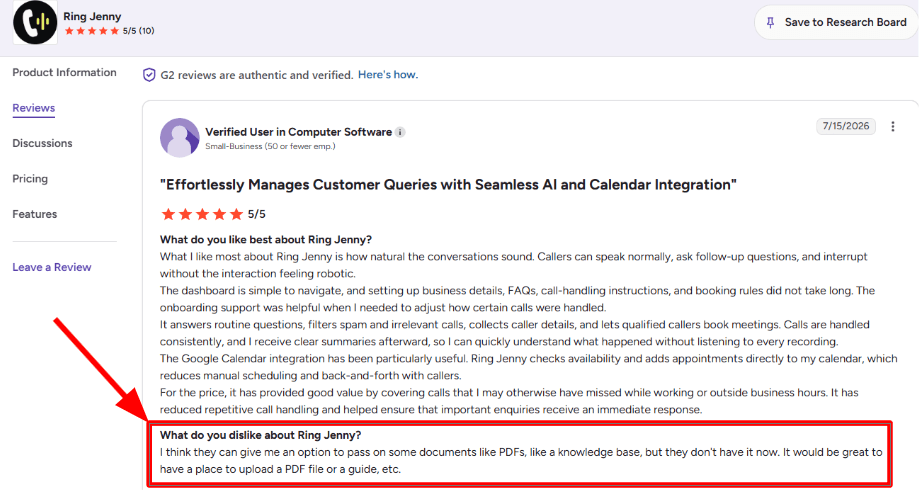
One concern I noticed in a G2 review is that Ring Jenny could improve how it handles uploaded business documents.
The reviewer mentioned that it would be useful to add PDFs, guides, or a proper knowledge base inside the tool. I think this is a fair point, especially for businesses that already have detailed service guides, policy documents, or internal FAQs.
I am adding the screenshot below so readers can see the exact concern in the reviewer’s own words.
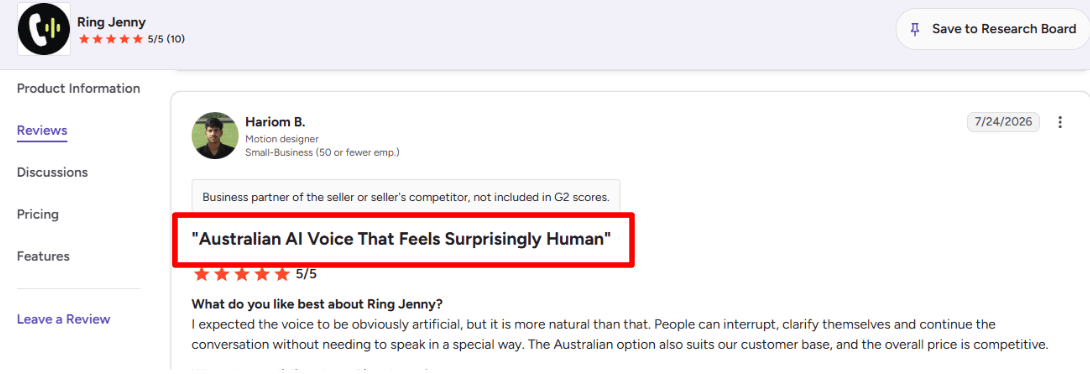
The stronger benefit I saw in another G2 review was around voice quality and natural conversation.
The reviewer said they expected the voice to sound clearly artificial, but it felt more natural than expected. Callers could interrupt, clarify what they meant, and continue the conversation normally. They also liked the Australian voice option and felt the pricing was competitive.
I am adding this screenshot below because it shows why Ring Jenny can work well for Australian businesses that want an AI answering service without making callers speak in a robotic way.
Pros of Ring Jenny for 24/7 Call Answering in Australia
24/7 coverage for missed Australian business calls
Ring Jenny can answer calls after hours, during lunch breaks, on weekends, and when the team is on-site with customers. This is useful for Australian trades, clinics, real estate agencies, salons, and service businesses where a missed call can easily become a lost quote or booking.
Low-cost alternative to full-time reception coverage
For a small business, paying for full-time reception staff is rarely practical just to cover every incoming call. Ring Jenny gives businesses a lower-cost way to answer routine enquiries, capture leads, and keep calls from going straight to voicemail.
Uses your existing business number
Businesses do not need to ask customers to save a new number or update listings across Google, social media, and directories. Calls can be forwarded from the existing Australian business number, making the switch easier for both the team and callers.
Helps book jobs while the caller is ready
Rather than taking a message and hoping someone calls back in time, Ring Jenny can help collect details and book an appointment during the conversation. This is especially valuable for urgent enquiries such as plumbing, electrical, cleaning, repair, and consultation requests.
Practical onboarding for businesses without technical teams
The setup can use information from a website or Google Business Profile, including services, hours, contact details, and common questions. That makes it more approachable for owner-operated businesses that need a receptionist quickly but do not have time to build complicated call flows themselves.
Cons of Ring Jenny for 24/7 Call Answering in Australia
Not ideal for highly technical or emotional calls
Ring Jenny is best for routine enquiries, lead capture, appointment requests, and common questions. Complex fault-finding, sensitive complaints, or emotionally charged situations should still be escalated to the business owner or an experienced team member.
Should not provide regulated professional advice
For legal, medical, financial, or other regulated services, the AI receptionist should collect the caller’s details and arrange a follow-up. It should not be positioned as a replacement for qualified advice from a licensed professional.
Not built for outbound sales campaigns
Ring Jenny is mainly suited to answering incoming calls and handling front-line enquiries. Businesses looking to run cold-calling campaigns, large outbound follow-up programs, or relationship-led sales conversations will still need a separate outbound calling process.
Smith.ai
Smith.ai is renowned for the AI receptionist feature along with live operators that help businesses attend to calls, qualify leads, and transfer conversations immediately without needing an entire front desk staff.
AI call answering: The Smith.ai AI Receptionist is designed as a front office application and not merely a voicemail. With this software, you can answer routine queries, extract information from the caller, qualify leads, and initiate further action based on your guidelines. When I set up the application, the business logic really counts as having a broad script makes your call robotic while a detailed one helps the software understand better what needs to be done.
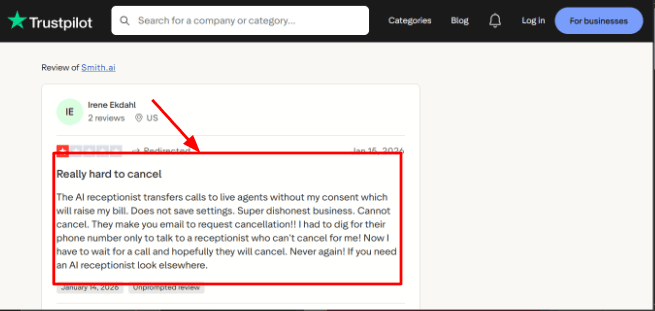
One thing to watch is consistency when calls move from AI to humans. A Trustpilot review said, “You don’t always get the same person, so service can be hit or miss.” That is worth showing as a screenshot below this point because it explains a real tradeoff in hybrid answering.
Lead qualification: Smith.ai can sort calls according to specific criteria, like needs, location, budget, type of the service required, or any other parameters that can be established. This feature would be valuable for companies dealing with too many irrelevant calls and only requiring those that match certain requirements.
For instance, a company providing various services at homes could ask the caller what exactly they needed (emergency repair, quote, or general information). It will receive information on their address and the type of work required before submitting the report.
The problem, however, lies in careful planning. If you have numerous caller types, there might be some inconsistencies in the very first configuration.
Live agent backup: The big difference with Smith.ai is the human layer. According to Smith.ai AI Receptionist pricing, live agent handoff is available for call situations where AI should not continue alone.
This works well for calls that require extra caution. An angry, confused or ready-to-pay customer shouldn’t end up in a loop of automated services. But the sacrifice comes in terms of controlling expenses. Many calls redirected to human staff would make the service much pricier than intended.
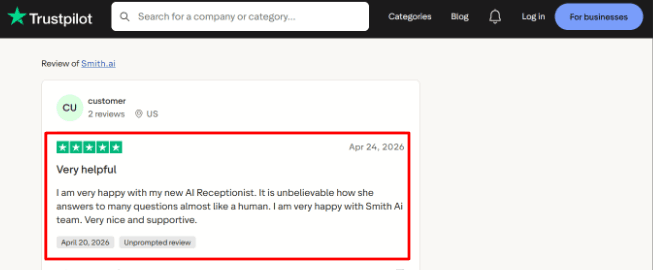
Client communication: Smith.ai’s communication during onboarding and support seems to be one of its stronger areas. A Trustpilot reviewer praised the team for being transparent, detailed, straightforward, and prompt across onboarding, sales, and support.
This aligns with my assessment of the product. The technology is not only a plug-and-play solution using artificial intelligence. It requires the right scripts, logic for routing calls, input conditions, CRM fields, and results of those calls to match. What was surprising is the emphasis Smith.ai places on providing a management service that continuously monitors performance, particularly on their higher tiers.
CRM and workflows: Smith.ai integrates call data to CRMs, calendars, and other platforms. According to the website, the software is compatible with HubSpot, Salesforce, Clio, and over 7,000 others through Zapier and other channels through Smith.ai integrations.
This is crucial since the AI answering service cannot be useful if there is no way of keeping track of the lead after the call. The service can create summaries, create notes, schedule follow-ups, and assist with a timely response to the inquiry. Nonetheless, I would run a full check to determine whether everything works as expected. It is easier to log a lead than it is to properly categorize and prioritize it.
Call records: Smith.ai includes call recording, transcription, searchable transcripts, summaries, and PII masking on its AI Receptionist plans, according to Smith.ai call recording details.
This will be beneficial in analyzing the missed revenue, training employees, and determining if the AI managed the objection appropriately. The dashboard will also assist managers in seeing what transpired during the call, including appointments set up, intakes taken, and transferred calls. In smaller offices, this offers better visibility compared to a regular answering service.
The one concern here is that while call analytics is different from call quality. I would continue listening to some calls weekly, even the first month.
Pros
Strong hybrid model with AI answering first and human backup when needed.
Good fit for businesses that need lead qualification, intake, routing, and call summaries.
Better operational depth than basic AI phone bots.
Strong CRM and workflow coverage, especially for professional services.
Review patterns suggest support and onboarding communication are a major strength.
Cons
Can become expensive if call volume or live handoffs increase.
Service consistency may vary when different human agents handle calls.
Setup quality depends heavily on how clearly you define scripts and call rules.
Self-service plans are less flexible than managed plans.
Not ideal for very small businesses that only need basic message taking.
Pricing
Smith.ai AI Receptionist starts at $95/month for self-service monthly plans, according to Smith.ai AI Receptionist pricing.
Self-service plans list monthly options at $95/month, $270/month, and $800/month, with overages at $2.40 per call.
Done-for-you annual plans start at $500/month and go up to $1,000/month and $2,000/month, with setup, customization, optimization, and no overages listed.
Human Virtual Receptionist plans are separate and start at $300/month for 30 calls, according to Smith.ai Virtual Receptionist pricing.
Rosie AI
The Rosie AI is most popular for being used as an AI receptionist for local businesses who miss their calls during business hours, after business hours, or when they’re too busy to answer the phone. It will serve you well if your problem is simply having someone to take messages from the phone.
Features
Call Answering:
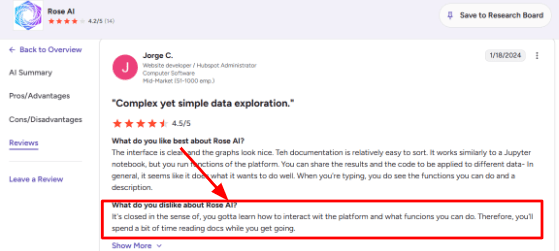
Rosie is available 24/7 to answer incoming calls and even able to take many calls simultaneously, something that could be helpful for plumbers, HVAC workers, realtors, lawyers, and any other company who relies heavily on phone work. As far as the basic concept of Rosie answering calls, I understood it very easily during testing. I saw the same thing in the G2 review where the user said the platform takes some time to learn. That screenshot would fit well below this feature because it explains the setup learning curve in a real user’s words.
AI Setup:
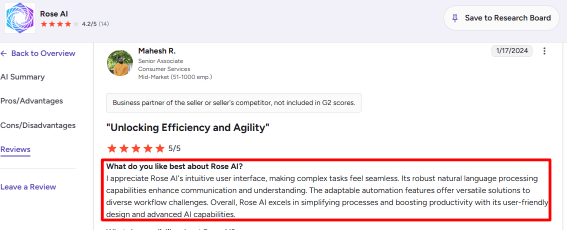
Rosie can scan your site and Google Business Profile and use this information to answer frequently asked questions by callers. Rosie is useful in answering FAQs about operating hours, services offered, price range, locations, and appointments. The second G2 review I went through talks about the interface feeling intuitive and the natural language processing being strong. I would place that screenshot below this point, because it supports the part where Rosie feels simple once the knowledge base is set up properly.
Calendar Integration:
Rosie allows appointment booking using Google Calendar, Calendly, Acuity, and Appointlet in her higher plans. In real-life application, it becomes essential when you wish to move your caller from a phone call to a booking without having to wait for a call back. Even if you're on the basic plan, you will still be able to send an appointment link via text.
Call Summaries:
Rosie provides call summaries along with transcriptions, recordings, as well as email and text reminders following each call. This is one feature I appreciate since it enables you to know who called you, why they called, and what urgency their call entailed. It's especially important for field-related businesses.
Spam Filtering:
Smart spam protection comes with Rosie’s Professional plan, and it may not seem like much at first glance. Local enterprises waste their valuable time dealing with robocalls, sales calls, and poor callers. One area that escapes notice during initial reviews is adherence to AI voice usage. The FCC has treated AI-generated voices as artificial voices under robocall rules, so Rosie is best framed around inbound answering, clear consent, and transparent call handling.
Pros
Rosie is easy to understand for small businesses with missed-call problems. The product explains its value quickly: answer calls, capture leads, and send the owner the details.
Setup is guided through website and business profile scanning, which reduces manual work for basic FAQs.
Call summaries, transcripts, and recordings make follow-up easier for owners who are away from the desk.
Calendar booking on higher plans makes Rosie useful for appointment-led businesses.
English and Spanish support is helpful for many US local service companies.
Cons
Rosie AI should not be considered the primary ai-receptionist if you require comprehensive omnichannel engagement via phone, live chat, email, WhatsApp, and more complicated customer journey mapping. Rosie excels when the primary task is taking in calls on the phone and transferring them to texts or messages and appointments.
Full appointment booking is available only on higher plans, so the $49 plan may feel limited for booking-heavy teams.
Pricing needs a close look because current plans use included minute limits, and Rosie’s terms mention automatic upgrades if usage goes over the plan limit.
The setup is simple at the surface, though custom flows and platform rules can take time to learn.
Businesses in legal, healthcare, finance, or other sensitive categories should review recording, SMS, and data rules before using it.
Pricing
Rosie AI currently lists plans from $49/month for Professional, with 250 included minutes. Scale is $149/month with 1,000 minutes and adds appointment booking, direct transfers, warm handoff, and texts during calls. Growth is $299/month with 2,000 minutes and training files. Custom plans start at $999+/month. Website Texting is listed as a $50/month add-on.
When to Choose Rosie AI
Use Rosie AI if you operate a business requiring lots of phone interactions that need answering outside of working hours or during peak hours.
Rosie AI is best for those operating service-based companies requiring features such as message taking, FAQ answers, lead generation, call summaries, and scheduling appointments without needing a big front desk staff.
It might not work well if you require advanced workflow assistance, various communication platforms, strong compliance control measures, or automated booking functionality at a low plan level.
Dialzara
Dialzara is widely recognized as an inexpensive AI receptionist capable of responding to calls, taking messages, directing calls, and making appointments. Dialzara is definitely a logical choice for a small business that requires a simple call response system but does not need an entire front desk.
Features
AI Receptionist:
Dialzara makes the call, poses basic questions, logs the caller information, and provides a summary at the end of the call. From what I saw in the configuration process, the application seems to be tailored for small groups of people who just want to get started within business hours.
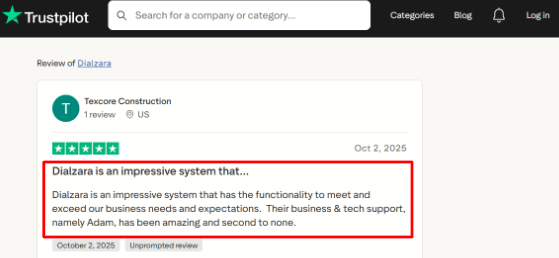
I also saw a Trustpilot review saying Dialzara had strong business and tech support, especially during setup. I am sharing that screenshot below because support quality matters a lot when the AI is handling real customer calls.
Call Routing:
It can route calls to the appropriate recipient or department depending on the caller’s intention. This is useful for organizations that receive mixed calls for sales, support, urgency, and inquiries.
However, one area which I would like to further test is the ability of the tool in dealing with vague caller intentions. AI-based call routing seems easy to implement, but this may not be the case in reality.
Calendar Integration:
It is possible for Dialzara to book an appointment using Google Calendar as she can see if the time is available before confirming it.
The key is in the depth of the calendar. It seems that the best choice will be Google Calendar, while others might require more than just basic plans.
Voicemail Transcription:
In the case where the phone cannot be connected to a real person, the app will record a voicemail message, type it out, and then provide the information via email or SMS. It is convenient for after-hours sales leads as there would be no necessity for a human to analyze each recorded message first.
From my point of view, this would work better if the caller provides a clear reason for contacting someone. Otherwise, noisy messages that last less than a minute may need some human intervention.
Spam Screening:
There is also the capability of spam detection and call screening. In the context of small local business, this is important since spam calls may secretly take away some of the time of receptionists.
Another market-related consideration supporting this feature is the fact that, according to Gartner, customer service managers are highly pressured into using AI solutions. That is why such technologies are getting much attention even from small teams.
Pros
Dialzara starts at a low monthly price, so it is easier to test than many traditional answering services. It works well for small businesses that want basic AI call answering, call summaries, and booking without a heavy setup.
The setup feels simple enough for non-technical users, especially if the business only needs standard answering rules.
It includes useful call handling features like recordings, summaries, voicemail transcription, and blind transfers.
The Google Calendar booking feature is helpful for appointment-led businesses that lose leads after hours.
The Trustpilot review you shared points to strong support, which is important because AI receptionist tools often need tuning after real calls.
Cons
Do not choose Dialzara over a broader ai-receptionist platform if you need complex workflows across multiple locations, deep CRM logic, payments, and advanced human handoff. It is better suited to simpler phone answering and appointment capture setups.
The cheapest plan has limited included minutes, so busier businesses may move into overage quickly.
Warm transfer is not included on the lowest plan, which can matter when callers need a smoother handoff.
Some calendar and CRM use cases may need higher plans or Zapier, Make, or API setup.
Compliance should be checked directly before using it for healthcare, legal, or finance calls, especially because HIPAA and sensitive-data rules can be strict under HHS guidance.
Pricing
Dialzara starts at $29/month for Business Lite, with 60 included minutes.
Business Pro is listed at $99/month with 220 included minutes.
Business Plus is listed at $199/month with 500 included minutes.
Overage is $0.48 per minute.
It also offers a 7-day free trial, no setup fee, and no long-term contract.
When to Choose Dialzara
Go for Dialzara if you operate a small service company where all you need is answering calls, generating leads, creating summaries and scheduling appointments. This software will be a perfect choice for after-hours call answering, single-person teams, and businesses requiring a basic AI-based receptionist system, but at an affordable price point.
Avoid this software as the first choice when it comes to the need for advanced call center procedures, regulation-compliant call handling, sophisticated CRM integration, or a totally customized multilocation phone system.
Goodcall
Goodcall is primarily known as an artificial intelligence-based receptionist that handles business phone calls by taking down contact information from callers as well as guiding callers through easy processes via the phone call. This software would be useful for businesses that miss a lot of calls and require after hours support.
Features
AI call answering:
Goodcall can make outbound calls, ask simple questions, provide information about the company, and gather caller data before you step in. In my experience, Goodcall appears to be designed specifically for local service businesses receiving repetitive phone calls.
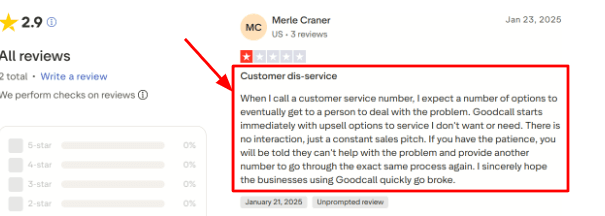
One thing to be careful about is how the opening call flow is written. I saw a similar concern in a Trustpilot review where the caller felt pushed into sales-style prompts before getting help. I would place that screenshot below this point because it explains why call script setup matters.
Lead capture:
Goodcall can gather information like names, phone numbers, emails, the type of service required, messages, and other custom responses from the caller. It’s ideal for organizations where every missed call could be a potential customer.
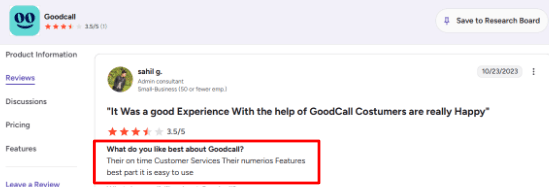
The setup is fairly simple, and that matched a G2 review where the user liked the customer service, number of features, and ease of use.I am adding the screenshot below this section so readers can see the original wording themselves.
Call flow logic:
The ability to create call flows using forms, skills, departments, transfer options, and branching can be utilized when callers will require different results based on their needs, such as scheduling, sales calls, customer support, pricing questions, or callbacks.
Moreover, this step highlights the significance of flow creation for optimal performance. Poor flow design may result in the chatbot acting as a gatekeeper rather than a useful tool that provides initial responses.
Calendar integration:
It is possible to deal with booking inquiries from callers by creating booking links, capturing messages, transferring calls, or integrating with the appropriate services via work flows. There is also a deeper Boulevard integration to provide scheduling assistance to appointment-driven wellness companies.
I would not consider it as a standalone scheduling tool. Instead, the platform should be viewed as a phone receptionist that can handle booking activities effectively when integrated with other services.
Workflow automation:
Using Zapier, Goodcall integrates call outcomes with other apps, including CRMs, Google Sheets, Slack, and even calendars. It is one of the more valuable features of this product, as the call itself does not simply end up as yet another recording in the dashboard.
One of the facts that is often overlooked in reviews is that Microsoft itself categorized Goodcall as a small business conversation app for missed calls and actual customer interactions. That Microsoft profile gives helpful context on why the product is focused so heavily on phone-led businesses.
Pros
Goodcall is useful for businesses where missed calls directly mean missed revenue. It can answer after hours, capture intent, and give the team a cleaner lead record than a basic voicemail.
The product is easy to start with because setup is mostly no-code and built around forms, call flows, and business information.
Zapier support makes it practical for sending call data into CRMs, Slack, Sheets, and follow-up workflows.
It has strong fit for local services, restaurants, salons, wellness businesses, home services, and small teams with heavy phone traffic.
The pricing model includes unlimited minutes and AI tokens, which can feel easier to plan than per-minute billing for some businesses.
Cons
Goodcall may not be the best choice if you need a deeply customizable AI receptionist with full control over every booking, payment, intake, and handoff step. In that case, a more specialized ai-receptionist platform may give you better control over the full customer journey.
The first-call experience depends heavily on the script, and the Trustpilot review shared above shows how a sales-heavy flow can hurt caller trust.
Starter plan limits can feel tight for teams that need more call history, more logic flows, or larger directories.
High unique-caller volume can increase cost because Goodcall charges overages after the included monthly customer allowance on its pricing page.
Public review volume is still limited, so buyers have fewer independent customer stories to compare against older answering services.
Pricing
Goodcall pricing starts at $79/month per agent for the Starter plan, with annual billing shown at $66/month per agent.
The Growth plan is $129/month per agent, and Scale is $249/month per agent.
Plans include unlimited minutes and AI tokens, with usage based on unique monthly customers.
Extra usage is charged at $0.50 per unique customer after the plan limit.
Enterprise pricing is custom for larger teams, custom integrations, SLAs, onboarding, and priority support.
When to Choose Goodcall
Goodcall is recommended for those companies who receive many incoming calls and require a basic AI receptionist solution for answering, qualifying, routing, and recording callers' calls. The solution works best for local businesses that need telephone support without adding more front desk employees.
However, if you have highly complex booking workflows, billing, complicated lead capturing workflows, or even if you want an AI receptionist that provides an in-depth experience as per your customer journey, it will be better to skip this one and evaluate it against other ai-receptionist solutions.
My AI Frontdesk
My AI Frontdesk is known as the AI receptionist for small businesses where every call can be answered and recorded without employing a dedicated front desk executive.
Features
AI call answering: My AI Frontdesk answers inbound calls 24/7, qualifies callers, books appointments, routes urgent calls, and sends SMS confirmations from the same flow. On its official AI Phone Receptionist page by My AI Frontdesk, the product is positioned around fast answering, call routing, warm transfers, recordings, and live appointment booking.
This is relevant to the article about AI answering services as the key benefit of using this system is not merely message receiving but turning missed calls into leads. I found it especially interesting that the system can be built upon the existing phone number by means of call forwarding so that a business would not have to switch the number used in marketing materials.
Call flow control: This platform allows for various options of call handling, such as responding to questions, rerouting the calls, forwarding priority contacts, making appointments, or sending text messages after the calls. This makes it superior to plain voicemail solutions.
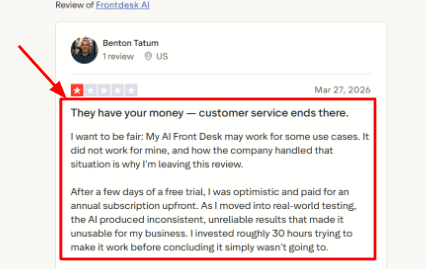
I would still be careful if the business needs very specific branching logic. I saw the same concern in a Trustpilot review, where the reviewer liked the platform overall but wanted more advanced call-flow and integration customization inside the dashboard instead of relying on external automation tools. The screenshot below fits naturally here because this is exactly where buyers may wonder how flexible the system is.
Voice, SMS, and chat: My AI Frontdesk is not only a phone answering tool. It also includes SMS, web chatbot, email drafts, forms, CRM, and automation, according to the official My AI Frontdesk homepage. For a small business, that means a caller can ask a question by phone, get a confirmation by text, and still be tracked in the same customer record.
That is another good thing. Most of the AI receptionist applications end up at call reception and summarization of conversation. In my case, AI Frontdesk attempts to cover all fronts from reception to conversation to sending out the prices and links through SMS in the event that a client contacts you out of office time.
Lead capture CRM: Every call, text, chat, and form submission can become a customer record. The official AI CRM page by My AI Frontdesk says contact records, timelines, lead scores, and linked appointments update after conversations.
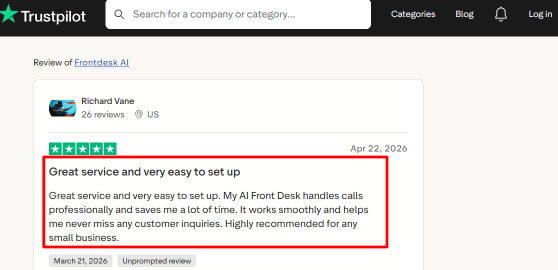
After going through the reviews, this matched one positive Trustpilot review, where the reviewer said Frontdesk AI helped manage large volumes of customer interactions, answer common questions, schedule meetings, transfer priority calls, handle SMS, and support chatbot-led lead capture. I agree with that use case for busy local businesses. It is strongest when the incoming questions are repetitive and the business mainly needs speed, consistency, and clean follow-up.
Call transfers: Warm transfer is crucial to any AI call center because not all calls require automated handling. The AI FrontDesk can direct calls based on intent, urgency, language preference, or VIP status, and the official call center website states that speech context must be considered prior to the transfer.
A practical example would be a company providing home services. A newly calling client wanting prices could easily be qualified using AI. An existing client needing help with a leak could be directed more quickly. A sales-ready lead could easily be redirected to the owner in a quick summary, rather than having him repeat the same questions once again.
Reports and transcripts: The AI Frontdesk keeps transcript, summary, call history, and CRM notes so that teams can know what was said during each call. Its G2 product page has details about transcript, CRM, voice bank, and workflow used for different results like SMS confirmation and appointment scheduling on the G2 My AI Frontdesk profile.
This will allow the owner to detect missed questions, bad answers, and cases when the transfer could have taken place. What I would look out for is the comfort level of the caller. There have been some instances where the AI has provided slower or robotic responses to complicated questions.
Pros
Covers more than phone calls. Voice, SMS, chatbot, forms, CRM, and workflows are bundled into one front-office system.
Good fit for small businesses that miss calls after hours, during jobs, or while staff are busy with walk-ins.
Can keep the existing business number through forwarding, which reduces switching pain.
Strong for repeat questions like hours, pricing, availability, appointment requests, directions, and basic lead qualification.
The built-in CRM and transcripts make it easier to see which calls became leads and which ones need follow-up.
Cons
Advanced call logic may need more setup work than buyers expect, especially for businesses with many services, locations, departments, or exceptions.
Some workflows still appear to depend on integrations or external automation tools, which may not suit non-technical owners.
Review volume is still limited. G2 shows a small number of reviews, so buyers should test it directly before relying only on ratings.
It may not replace a human receptionist for sensitive, emotional, or high-stakes calls where callers insist on live help.
AI voice pace and response quality should be tested with real customer questions before sending all inbound calls to it.
Pricing
My AI Frontdesk has a free plan with limited usage, including 20 voice minutes, 10 chatbot conversations, 40 SMS, and 50 email drafts per month, according to its official pricing page.
The main Business-in-a-Box plan is listed at $99 per month, or $79 per month when billed annually. It includes 200 voice minutes, 100 chatbot conversations, 400 SMS, Zapier, a verified outbound number, and 3 notification recipients.
Extra usage runs on credits. The pricing page says 1 credit equals $0.01, with voice charged at 25 credits per minute for Free and Business plans.
Partner and Enterprise pricing is custom. It includes volume pricing, API access, custom integrations, white-glove onboarding, a dedicated account manager, and custom data retention options.
Methodology
AI-based receptionist solutions were analyzed based on our experience using manual checks for call routing, installation process, voice mail handling, calendar booking features, lead capturing options, integration with other systems, and transfer performance. Additional aspects of analysis included the examination of the pricing page, documentation, customer feedback, and real-time calls with the system.
FAQs
What is the best AI receptionist for small businesses?
Ring Jenny, Rosie AI, Goodcall are strong picks for most small businesses. Choose based on setup speed, call quality, scheduling needs, fallback routing, and whether you need simple lead capture or deeper call handling.
How do I choose the right AI receptionist for my business?
Start with your call problem:
Missed calls
Appointment booking
Cancellations
Lead capture
Payment reminders
Then test call recordings, transcripts, spam filtering, escalation rules, and handoff to a human.
Which AI receptionist tools are best for service businesses?
Ring Jenny fits businesses that need booking and packages. Smith.ai is better when human backup matters. Dialzara and My AI Frontdesk suit teams that want simple scripts, FAQs, and call routing.
What mistakes do people make when buying an AI receptionist?
The biggest mistake is choosing only by price. Check how it handles accents, noisy calls, angry callers, reschedules, urgent requests, and wrong answers before sending every live call to it.
How do I test an AI receptionist before switching phone systems?
Run test calls with real scenarios:
New lead
Existing customer
Cancellation
Emergency
Spam call
Review the transcript, booking accuracy, call summary, escalation path, and whether staff received the right handoff.
When is a human answering service better than an AI receptionist?
Use a human service when calls need judgment, empathy, legal intake, medical sensitivity, or complex sales qualification. AI works best for routine calls, after hours coverage, FAQs, bookings, and simple routing.