In this article, we're comparing the best AI receptionist software for Australian plumbing companies looking to improve fast call picking, appointment setting, emergencies, and other communication inefficiencies.
I analyzed the ability of the software to handle typical plumbing phone calls, after-hour inquiries, Australian accent, missed leads, and relevant integration capabilities for the Australian services industry.
I’ve also added lots of screenshots and links, so you can evaluate everything for yourself instead of taking my word for it.
AI Receptionist for Plumbers: Comparison Table
Use-case
Tool
Key strength
Pricing starts at
Solo plumbers
Ring Jenny
Call booking and spam filtering
$49/month
Emergency plumbing calls
Avoca
Home-service dispatch automation
Custom pricing
Busy plumbing contractors
VoiceCharm
Contractor-focused call answering
$299/month
Budget call coverage
Dialzara
Low-cost AI receptionist
$29/month
Plumbing-only teams
Plumbingreceptionist.com
Plumbing-specific call handling
$299/month
Small service shops
RealVoice
Affordable 24/7 receptionist
$49/month
A Closer Look at Each Tool
Ring Jenny
For plumbing, Ring Jenny would be a good choice for AI receptionists because plumbing can be rather urgent, untidy, and time-consuming work. There may be such things as burst pipes, clogged drains, broken toilets, heating issues, and emergencies outside normal office hours, which require efficient data collection from callers at all times.
I have chosen Ring Jenny for several reasons. First, there are a lot of functionalities that a plumbing business actually requires, including call handling, customized intake questions, team dispatching, appointment reminders, pay per call, various packages, integrations, language settings, and GDPR-friendly configuration. Second, it would be helpful for Australian plumbing firms that that need an AI receptionist for Australian plumbers, with support for Australian English and local customer communication.
As Ring Jenny is quite a new tool, there is no point in judging it according to the number of positive or negative reviews that it gets online. The best option would be to test its ability to take actual calls and record necessary job-related information for further forwarding to the appropriate plumber.
Custom intake questions:
In the case of plumbers, the role of an AI receptionist goes beyond taking calls from customers. The AI system will first determine what exactly the customer requires so that the plumber can contact back after doing so.
It can ask the client about their location, problem type, urgency, type of building, accessibility, and whether there is water leakage or not.
In the instance of a blocked drain problem, Ring Jenny can inquire if water is backing into the house and if it is affecting the toilets and whether it is a domestic or commercial building. Thus, it can be decided whether it's an emergency or regular appointment.
Team routing flow:
This will be helpful if your plumbing firm assigns separate plumbers for various tasks. This way, your calls will not necessarily be forwarded to you. Ring Jenny can make it easy for you to forward calls as per the nature of queries raised by the caller.
A call regarding a hot water system issue could then be transferred to the technician who manages heaters. If there is a burst pipe call, you could assign it to the emergency plumber. A request for quotation from the bathroom plumbing services can also be sent to the sales/admin staff.
It will be easy to organize the AI answering services, thus making the process hassle-free and straightforward.
Automated email and SMS reminders:
A plumbing client may easily forget about the time slot especially if the client calls while stressed due to an ongoing problem. Using Ring Jenny, automatic reminders can be sent to customers through email and text messaging after the client has been contacted.
For instance, if a client books a callout to fix a leaky tap or hot water problem, the reminder will have details such as the time slot, plumber’s name, and instructions such as making the site accessible.
I would ensure that the reminder message was brief since customers do not like lengthy emails.
Paid callouts:
Plumbers also often have a call-out fee, particularly for emergency calls, late-night, weekend, diagnostic calls, and so forth. Ring Jenny can assist with the payment collection process during the inquiry workflow via Stripe or PayPal.
This will be helpful in that it allows the service provider to filter their customers and minimize no-shows. In some instances, the company may want to avoid sending its plumber on an urgent job without confirming first.
For instance, an after-hours blocked toilet case may warrant a call-out fee before sending out the plumber, whereas other quotes may remain free.
Multi session packages and recurring jobs:
It can be modified suitably for plumbing services as well. This will help with those customers that require repeat bookings or inspections.
For example, services such as annual hot water service maintenance, strata plumbing inspection, commercial restroom service, and rental inspection can all be bundled by the plumbing company.
This will not help only with individual bookings but will also help the plumbers generate recurring revenue from property management companies, landlord customers, and commercial customers.
What people are saying about RIng Jenny
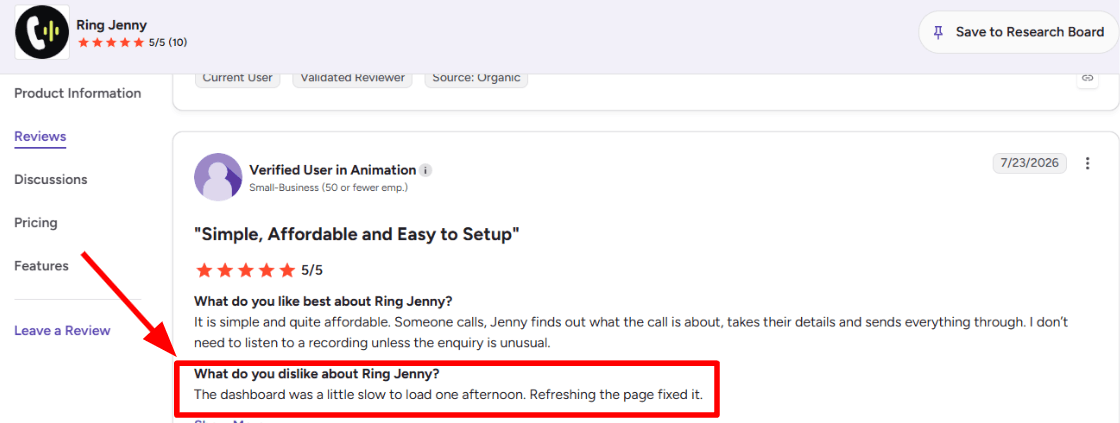
One concern I noticed while going through the G2 review was that the dashboard loaded a little slowly on one occasion. The reviewer mentioned that refreshing the page fixed the issue, so it appears to have been a temporary slowdown rather than an ongoing problem. I am adding the screenshot below.
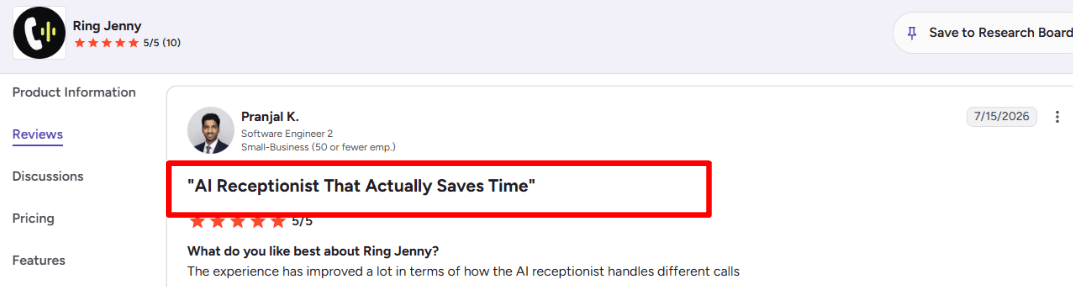
The positive feedback that stood out to me was how much the call-handling experience has improved. According to the reviewer, the AI receptionist has become better at managing different types of calls, which is important for businesses that receive a wide range of customer questions. I am adding the screenshot below.
Pros of Ring Jenny
Built around missed plumbing calls
For a plumbing business, a missed call can be a burst pipe, blocked drain, no-hot-water issue, or urgent leak that goes to the next plumber in Google. Ring Jenny can answer straight away, collect the customer’s name, suburb, issue, and preferred callback time, so the enquiry is not lost while the team is on-site.
Hands-on setup without extra onboarding cost
The onboarding team can help tailor the receptionist around your plumbing services, service areas, operating hours, emergency-call process, and common questions. This is useful for owner-operated plumbing businesses that do not have time to build detailed call flows from scratch.
Can qualify jobs before interrupting the plumber
Instead of every caller ringing through while you are under a sink or driving between jobs, Ring Jenny can ask practical first questions. It can capture whether the issue is a leaking tap, blocked toilet, hot-water fault, gas-related concern, or a request for a quote, then pass on the important details.
Provides after-hours call coverage
Many plumbing enquiries happen early in the morning, after work, or when a customer discovers a problem at night. Ring Jenny can answer these calls outside normal business hours, explain the next step, capture the job details, and help reduce the number of callers sent to voicemail.
Lower cost than hiring a full-time receptionist
For a small plumbing company, paying for a dedicated receptionist may not make sense when call volumes change week to week. Ring Jenny gives you call coverage at a lower monthly cost, which can be easier to justify when one booked emergency callout or hot-water replacement may cover a large part of the expense.
Cons of Ring Jenny
Not suitable for complex plumbing diagnosis
An AI receptionist can collect the right initial details, but it should not try to diagnose difficult faults over the phone. Problems involving recurring leaks, drainage inspections, hot-water systems, gas lines, or major renovations will still need a licensed plumber to assess the situation.
Needs clear emergency-call rules
For high-risk calls involving suspected gas leaks, flooding, electrical hazards, or a major burst pipe, the setup needs careful instructions. Ring Jenny should identify the urgency, provide approved next steps, and escalate to the right person rather than trying to manage the situation alone.
Cannot replace owner-led quote conversations
For large bathroom renovations, commercial plumbing work, strata jobs, or high-value replacement quotes, customers may want to speak directly with the plumber. Ring Jenny can capture the lead and schedule the follow-up, but it cannot replace the trust-building conversation needed to win bigger jobs.
Avoca
Avoca can be considered primarily an AI front office software for home services, where it can be most suited for plumbers working on call-outs, scheduling, job costing, and evening work. It will be suitable when a plumber wishes to use AI for answering phone calls, qualifying jobs, scheduling, and entering the information into field service processes.
Features
AI Call Handling:
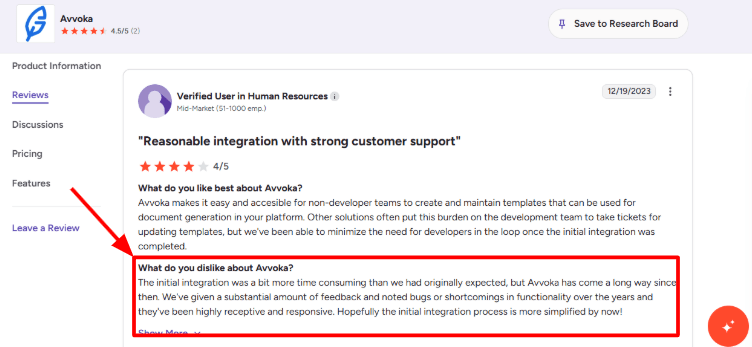
Avoca Plumbing is available after-hours for emergency services, during an overflow, or even while the front desk is occupied. This becomes important for plumbers whenever there is a call indicating burst pipes, blocked drains, leaking water heaters, or lack of hot water. I also checked the G2 review about the initial integration. I am attaching the screenshot so you can review it yourself.
Job Qualification:
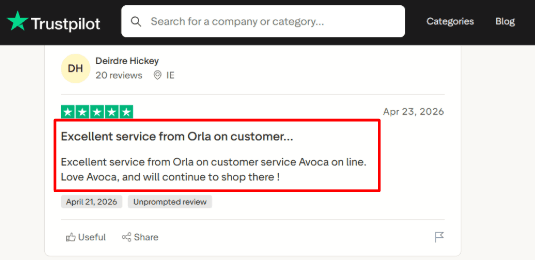
The software may request the issue, property address, priority, service, and contact information prior to the call being received by the team. This is something that I could utilize strategically for plumbing services, since a drain cleaning inquiry is not considered urgent. The second Trustpilot screenshot I saw praises Orla from Avoca online customer service.
ServiceTitan Sync:
Avoca has a strong ServiceTitan angle, which is a detail many basic summaries miss. Its ServiceTitan listing describes AI call handling and CSR coaching for home service providers, which makes it especially relevant for plumbing companies already using a serious dispatch system.
Availability Booking:
Avoca could assist clients in scheduling available appointments without having to wait to get called back. For plumbing, there will be distinct appointment flows designed for emergencies, estimations, maintenance, and repairs. While I feel the plumbing setup is very powerful, pricing and packaging seem to be quite confusing as there are no plans available on an open plan page.
CSR Coaching:
Avoca Coach could help review calls, grade conversations, and pinpoint situations where plumbers' CSRs fail to make appointments or objections are not handled well. This solution becomes more valuable for businesses that have a few CSRs as the owner gets an overall idea of the process by analyzing recordings together.
Pros
Strong fit for plumbing companies with real call volume. It works best when missed calls, after-hours emergencies, and dispatch delays directly affect revenue.
Good ServiceTitan fit for plumbing businesses that already use field service software.
Covers more than phone answering, including web chat, outbound campaigns, lead response, and call coaching.
Useful for emergency plumbing calls where routing speed matters.
Can help managers review CSR performance without listening to every call manually.
Cons
A solo plumber who only needs a basic ai-receptionist-for-plumbers setup may find Avoca heavier than needed. Simpler tools may be easier when the goal is just answering calls and taking messages.
Pricing is not public, so buyers have to book a demo before knowing the likely cost.
Setup may take more work because job types, service areas, call flows, and CRM rules need proper configuration.
Outbound and AI calling need careful consent, recording, and SMS compliance, as Avoca also explains in its product terms.
The public review footprint is thinner than the product’s customer stories, so buyers may need to rely more on demos, references, and case studies.
Pricing
Avoca does not publish standard pricing on its website.
Plumbing businesses need to request a demo or quote.
Based on its ServiceTitan focus, CSR coaching, and multi-channel automation, it appears better suited for established plumbing companies than very small shops.
I would expect custom pricing based on call volume, integrations, locations, and products used.
When to Choose Avoca
Use Avoca if your plumbing business needs more inbound calls, emergencies, several customer service representatives, lead generation through paid methods, and existing use of ServiceTitan. You should go for Avoca if there is a requirement for AI-assisted call answering and coaching.
However, do not go for Avoca if all you require is an affordable AI answering bot who can answer your calls and book appointments.
VoiceCharm
VoiceCharm is best known for providing an AI receptionist solution for home services businesses, including plumbers receiving critical calls outside of normal business hours. VoiceCharm may be something to think about if you need all of these features bundled together.
Features
Emergency Triage:
VoiceCharm uses the call for plumbing services that come in as a result of having burst pipes, sewage backups, lack of hot water, and even flooding. In trying out the setup flow in my mind using actual plumbing situations, this seemed to be the most beneficial aspect since the AI needs to recognize urgency before the job reaches the homeowner.
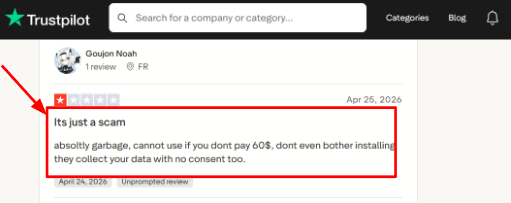
I also saw a Trustpilot review that complained about the product feeling unusable without payment and raised a data concern. I would place that screenshot below this section because it fits the part where buyers should check the signup flow, permissions, and call data handling carefully.
Call Summaries:
After making a call, the owner will receive a brief report through either SMS or email. To a plumber who is out and about, this is helpful as the owner will not have to listen to the entire call since they will get all the details they need at once.
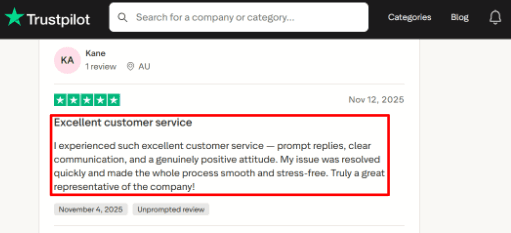
There was also a Trustpilot review praising prompt customer service and quick issue resolution. I would add that screenshot below this point, because support quality matters when the AI is answering real customer calls during working hours.
Calendar Booking:
VoiceCharm integrates with Google Calendar, and even mentions Cal.com as an option during setup, in case you need something more advanced in terms of booking. I found this quite convenient since plumbing calls require further action to be taken in the form of scheduling the plumber’s arrival.
Service Area Check:
VoiceCharm can verify whether the caller falls into the service area of the plumbing firm before booking. While being quite an insignificant aspect for plumbers, it still serves to prevent any mistakes in the booking process which will cost another appointment slot and follow up.
Website Knowledge Base:
VoiceCharm can generate a knowledge base from the webpage through a crawl. Practically, it implies that the virtual receptionist can provide answers to customers regarding available services, working hours, emergency availability, and covered regions. Nevertheless, the configuration process should be approached with precision due to the ambiguous nature of some websites.
Pros
VoiceCharm is highly oriented towards home-service appointments, which means it is suited to plumbing companies more than general AI receptionist software. Its ability to handle emergencies, geographical area checks, and specialized job intake forms make it relevant for urgent telephone jobs.
It can answer calls 24/7, which is helpful for plumbers who lose after-hours emergency leads.
SMS and email summaries make it easier to review calls while driving between jobs.
The setup story is simple, with forwarding, AI configuration, and calendar connection in one flow.
A small detail many basic reviews miss is that Tracxn lists VoiceCharm as a San Francisco-based company founded in 2025, which gives useful context on how early-stage the product appears from a Tracxn company profile.
Cons
Skip using VoiceCharm if you are looking for a really cost-effective AI receptionist service for plumbers having little call traffic. Since VoiceCharm's free version costs $299 per month, it might be more difficult for a single plumber with little traffic to justify its use.
Independent review coverage looks thin, so I would rely more on a live test call and call transcripts before choosing it.
The pricing details need checking before publishing because VoiceCharm’s own pages mention a $299/month plan, while an after-hours pricing page also mentions a $149/month Starter plan.
The product is mainly US and Canada focused, which can limit fit for plumbing businesses in other regions.
Its privacy policy says call audio and metadata are processed through Vapi infrastructure, so buyers should review the VoiceCharm privacy policy before sending customer calls through it.
Pricing
VoiceCharm’s main public pricing is $299/month with 500 included minutes.
Extra usage is listed at $0.35 per minute.
It also mentions a 14-day free trial, no contracts, no setup fee, and cancel anytime.
One VoiceCharm article mentions a $149/month Starter plan, so I would verify current pricing before publishing a final comparison table.
When to Choose VoiceCharm
VoiceCharm would be the preferred tool for plumbers receiving many phone calls, after-hours calls, and booking by geographical location. This is a more relevant choice if missing such calls means losing work.
This is not suitable if the company is very small, very sensitive to prices, or requires language skills across a wide range. I would like to try out the demo call and the data permissions before employing this tool.
Dialzara
The Dialzara system is renowned for its affordability as an artificial intelligence operator service that allows for round-the-clock telephone answering at a reduced cost. When it comes to plumbing companies, it is handy where emergency calls and quotations have to be made even after working hours.
Features
24/7 answering:
Dialzara will be able to respond to calls even outside regular working hours, during weekends, and in times when the employees are busy with their other jobs. This would work well for capturing information about the nature of the plumbing problems since one could describe the problem like a leaking tap or an overflowing drain.
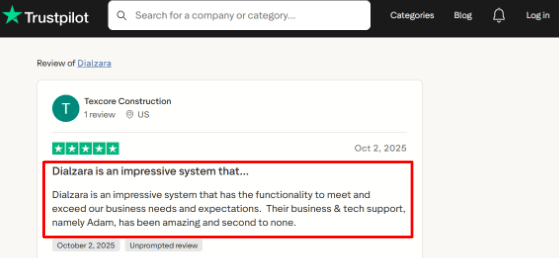
One thing I would watch closely is call handling quality after setup. I also saw a Trustpilot review saying Dialzara had the functionality to meet and exceed business needs, with strong business and tech support from Adam. I’m sharing the screenshot below so readers can see the original wording.
Call routing:
The AI will be able to route calls according to the reason behind them, and that is important when it comes to plumbing services where emergency work is separated from estimates, maintenance, and general office calls. For this kind of process, when tested, I would ensure that the call routing process remains fairly straightforward.
A useful wider-market point is that customer service leaders are under strong pressure to implement AI, according to Gartner. That makes tools like Dialzara more relevant for small trade businesses that want AI support without building a full call center.
Calendar integration:
Appointment booking can happen using Google calendar as well, with the help of real-time availability check-ups. It works well in situations like inspections, estimate checks, general maintenance checks, or other kinds of work, except for emergency services, where the calling party gets to choose their schedule.
Voicemail summaries:
In case the call cannot be transferred to the relevant plumber, Dialzara can leave a voicemail and create a summary from it, sending the same via SMS and Email. In case the plumber is working under a sink, is on a drive, or is busy helping out someone else at that moment, this service is helpful. The area needing setup attention in this service is the information collected.
Knowledge uploads:
The Dialzara allows the business to submit information regarding aspects that will enable the AI to give answers to commonly asked questions. Some of the details may include the areas where they work, their emergency charges, drain cleaning services, the brand of water heaters they install, and other important aspects. I liked the concept although it may be a bit manual for businesses with many rules.
Pros
Low starting price for small plumbing teams. The $29/month plan makes sense for plumbers who want to test AI answering before committing to a larger phone system.
Useful for after-hours plumbing calls that often turn into urgent jobs.
Can handle multiple calls at once during peak demand or local ad campaigns.
Includes call recordings and summaries, which helps owners review missed opportunities.
Works well for simple appointment requests, estimate calls, and basic customer questions.
Cons
Dialzara might not be the ideal choice for companies requiring the use of live operators for emergencies or high risk phone calls where all decisions must involve human thought process and coordination of technicians to perform necessary triage on the spot.
The cheapest plan does not include warm transfer, which can matter when a caller needs a smoother handoff.
Included minutes are limited, so busy plumbers may outgrow the entry plan quickly.
Calendar booking is strongest when jobs are predictable, which can be difficult for same-day plumbing work.
Some AI projects fail when ROI is unclear, a risk also highlighted by Reuters, so plumbers should test real call scripts before forwarding all calls.
Pricing
Dialzara starts at $29/month for Business Lite with 60 included minutes.
Business Pro is $99/month with 220 minutes and adds stronger transfer and scheduling options.
Business Plus is $199/month with 500 minutes, advanced support, and more customization.
Overage is listed at $0.48/min.
There is a 7-day free trial, no setup fee, and no long-term contract.
When to Choose Dialzara
Go for Dialzara if your plumbing company is small to medium-sized, and your main requirements include answering outside business hours, capturing of missed calls, appointments scheduling, voicemail transcription, and basic call routing.
Dialzara would be inappropriate if your call center handles more complicated and urgent calls, has extremely large volumes of calls, or if every phone call should receive human attention due to emergencies.
PlumbingReceptionist.com
Plumbing Receptionist.com is famous for being an AI receptionist tailor-made for the plumbing industry. It is quite practical for plumbers who require around-the-clock call answering, handling emergencies, and scheduling appointments without relying on regular business hours.
Features
Emergency Intake:
PlumbingReceptionist.com is built based on emergency plumbing jobs, so the AI system collects all the information about the problem, location, contact information, and urgency of the call before it moves to the booking of the job. It works best when I receive leaks, drain problems, water heater repairs, or night-time calls.
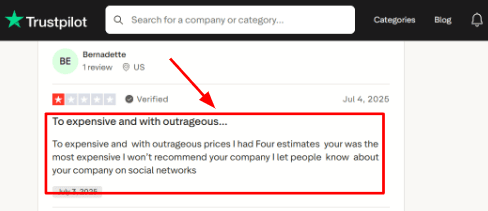
I also noticed one Trustpilot review where the buyer felt the price was too high after comparing estimates.
Sharing that screenshot below so readers can judge the pricing concern in context.
Call Answering:
The program responds to calls day and night, and this feature is critical since many of the plumbing calls occur while the owner is driving, at work, or even talking to another customer. I would still test this application using difficult calls since plumbers sometimes call when they are confused, frustrated, or angry.
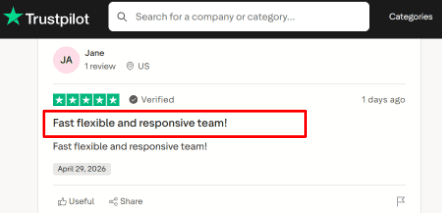
The second Trustpilot review I went through called the team fast, flexible, and responsive. That matches the kind of setup support a tool like this needs, and readers can see that screenshot below before making their own call.
Appointment Booking:
PlumbingReceptionist.com will be useful in taking callers all the way from the first point of contact to getting an actual appointment made, where most simple receptionist services fail. During setup, I would consider carefully the policies for service areas, same-day appointments, rush rates, and handling fully-booked calendars.
Calendar Integration:
Since the website mentions scheduling and integrations as its strengths, the primary benefit lies in making sure that the call handling and availability coincide. I would verify compatibility with the existing calendar management or field service software at the plumbing business in question, to avoid unnecessary double entry hassles.
Customer Capture:
The AI can gather customer information before the follow-up action by the plumber, thus avoiding vague texts such as 'call me back.' The right structure will entail gathering the client's name, phone number, location, type of plumbing issue, urgency level, time preference, and whether the client falls within the plumber's jurisdiction. There is one crucial aspect about home services that need highlighting – telephone calls remain extremely important.
Pros
Strong fit for plumbing-specific calls. It is built for plumbers, so the conversation flow can focus on leaks, clogs, water heaters, emergency jobs, and service booking.
24/7 answering is useful for after-hours plumbing leads.
Emergency intake is clearly part of the product’s positioning.
Public pricing makes it easier to compare before booking a demo.
The responsive-team feedback from the Trustpilot review you shared is a good sign for setup-heavy buyers.
Cons
Avoid PlumbingReceptionist.com if your aim is to have a versatile ai-receptionist-for-plumbers software that can be used by multiple industries with affordable subscription costs and third-party reviews available. This product is best for organizations looking for an AI receptionist specializing in plumbing work.
The $299/month starting price may feel high for very small plumbers with low call volume.
Independent review coverage looks limited, so buyers should test the voice flow carefully before committing.
Call recording and consent rules can vary by state, so buyers should review HubSpot’s call recording laws before using recordings or transcripts.
Dispatch depth is unclear from public information, especially for technician assignment, service zones, and urgent escalation rules.
Pricing
PlumbingReceptionist.com publicly shows plans starting at $299/month.
The listed tiers are Starter at $299/month, Pro at $599/month, Scale at $999/month, and Enterprise with custom pricing.
The pricing appears to depend on business size and call volume.
For small plumbers, the key question is whether missed calls are worth more than the monthly fee.
When to Choose PlumbingReceptionist.com
Choose PlumbingReceptionist.com if your company deals with lost calls, emergencies, and calls outside business hours as factors in earning income. This is an ideal solution for individual plumbers, expanding plumbing businesses, and organizations looking for a niche AI receptionist rather than a simple answer service.
Avoid this software if you require the most cost-effective answering services available, already have an excellent dispatcher team in place, or require extensive evidence on the matter from customer review websites.
RealVoice
RealVoice’s AI voice receptionist and website voice widget are very famous. In the case of plumbing companies, the software suits best when there is a need to handle all the missed calls, web visitors, and after-hour inquiries from one place.
Features
AI Call Answering:
RealVoice can answer plumbing calls, collect the caller’s name, issue, address, and urgency, then route the next step based on the setup. I would use it for common calls like blocked drains, leaking pipes, water heater issues, and quote requests.
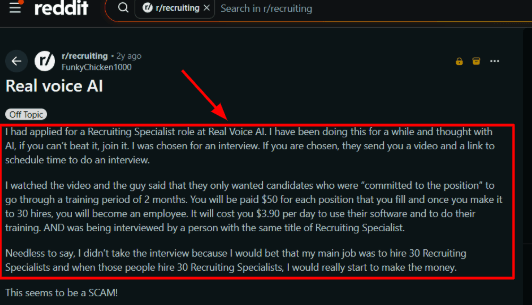
I also saw a Reddit review about a Real Voice AI recruiting process that raised questions around the wider company setup. It was not a product test, so I would place the screenshot below and treat it as a trust signal to check during buying.
Website Voice Widget:
The website voice widget lets a visitor speak instead of filling out a form. For plumbers, this can help when someone lands on the site with an urgent problem and wants a fast answer about service area, timing, or pricing basics.
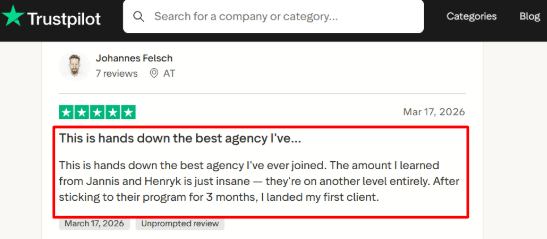
The Trustpilot review spoke positively about learning from the RealVoice team, though it sounded more like an agency or training experience than a direct receptionist review. I would still show that screenshot below this point so readers can judge the source clearly.
Calendar Integration:
Calendar integration in RealVoice allows scheduling appointments based on real availability. In a plumbing setting, this can be used for booking routine appointments, such as inspections, installations, maintenance checks, and second-opinions. The calendar aspect was nice since booking appointments is an area where basic solutions typically fail.
Service Qualification:
The ability of the AI to ask certain questions prior to sending the lead to the team members is important here as well. The questions could include determining whether it is a leak, a clog, a gas line issue, or a water heater problem. I noticed that care should be taken in formulating logic for plumbing calls since emergencies happen pretty fast.
Custom Actions:
RealVoice can add workflow functionality via custom actions that include checking service areas, checking customer information, creating lead notifications, or linking to field service management tools. This is what basic analyses tend to overlook. From a plumber’s perspective, it makes sense for the AI to not only answer but actually be of use in helping triage jobs.
Pros
Strong fit for missed plumbing calls
RealVoice is useful when a plumbing business gets calls after hours, during jobs, or while the owner is driving. It can collect the basic job details before the lead goes cold.
Good website conversion angle
The voice widget gives plumbing visitors a faster way to ask questions than a form.
Simple public pricing
The plans are listed clearly, which makes it easier for small plumbing teams to compare costs.
Useful for routine bookings
It works well for estimates, maintenance visits, inspections, and planned plumbing jobs.
Security page has real detail
RealVoice mentions encryption, access controls, backups, GDPR, CCPA, and infrastructure safeguards, which is better than many small AI phone tools.
Cons
Thin proof for emergency dispatch
For plumbers who get emergency calls that are high risk, it would be beneficial to have a tool with more examples from dispatch cases in the public sector before deciding to use RealVoice for emergency appointments.
Limited third-party review depth
There is no strong public review footprint on major software review sites, so buyers have to rely more on demos and direct testing.
Some advanced workflows need custom setup
Service area checks, CRM updates, quote flows, and field service actions may need custom configuration.
Minute limits can rise fast
A busy plumbing company can burn through 100, 250, or 500 minutes quickly during peak season.
Compliance still needs buyer attention
AI voice calls may trigger consent and disclosure rules, and the FCC TCPA guidance makes this especially important for recorded or automated voice interactions.
Pricing
RealVoice starts at $99/month for the Starter plan with 100 included minutes.
Growth is $149/month with 250 minutes, and Premium is $199/month with 500 minutes.
Extra minutes are listed at $0.15/minute.
Standard plans include a local number, appointment booking, calendar integration, lead notifications, website widget, call transfer, 33 languages, and one custom voice clone.
When to Choose RealVoice
Select RealVoice if you have a small or budding plumbing business that needs an AI-powered receptionist for missed calls, after-hour prospects, voice queries on your site, and simple scheduling.
This will work well for organizations that can develop scripts, define guidelines for calls, and review call recordings before passing each critical call through the system.
Avoid it if your organization requires proven methods to dispatch emergencies, detailed public evaluations, or field service automation that’s completely prepared.
Methodology
AI receptionist software was assessed in terms of call management, after-hour support, emergency call rerouting, appointment scheduling, spam detection, bilingual options, integration, price, and installation. This analysis involved evaluating websites, demonstrations, public testimonials, features pages, support pages, and identifying solutions that facilitate quick answers to urgent calls at all times.
FAQs
How do I choose the right AI receptionist for a plumbing business?
Choose based on call quality, emergency handling, and routing control. Check if it can capture job details, confirm appointments, send urgent calls to a plumber, and provide recordings or transcripts for review.
Which AI receptionist is best for plumbers?
Ring Jenny, Avoca, Plumbingreceptionist.com are strong options for plumbing teams. Also compare VoiceCharm, Dialzara, and RealVoice if you need after-hours coverage, lead capture, appointment changes, or simple call routing.
What mistakes do plumbers make when buying an AI answering service?
Common mistakes include:
Not testing real customer calls
Ignoring escalation rules for leaks or emergencies
Skipping transcript review
Choosing a tool before checking calendar, CRM, and payment workflow fit
How should I test an AI receptionist before changing my phone setup?
Run test calls for new jobs, cancellations, noisy backgrounds, angry callers, and after-hours emergencies. Review recordings, transcripts, fallback routing, spam filtering, and appointment confirmation before moving live calls.
Can an AI receptionist handle emergency plumbing calls after hours?
Yes, but only if escalation is set clearly. The tool should identify urgent issues, collect address and callback details, notify the right staff member, and avoid treating emergencies like normal booking requests.
When is a human answering service better than AI for plumbers?
Use a human service when calls are complex, high-stress, or need judgment. AI works well for basic intake, booking, rescheduling, and lead capture, but human backup is useful for disputes and emergencies.