Best Automated Receptionist in 2026: 7 Tools Compared
Introduction
If you are shopping for the best automated receptionist, you are about to sit through a lot of confident demos.
Most tools sound flawless on their landing pages. Then you run a real call, and the cracks show up fast.
Reuters reported that Gartner expects over 40% of agentic AI projects to get scrapped by 2027 as costs climb and value stays unclear. So choosing the right tool here actually matters, especially when missed calls mean missed revenue.
In this guide, I focused on tools that actually answer, understand, route, and hand off calls cleanly. I also dug into the pricing mechanics so you can estimate your monthly cost before you commit.
Methodology: I reviewed each tool using the same evaluation framework: call answering, routing, booking support, message capture, pricing, reviews, setup effort, and handoff quality. Where possible, I checked demos, screenshots, pricing pages, and third-party reviews.
Best Automated Receptionist Tools Compared
Tool
Best for
Key strength
Pricing starts at
Simulated call resolution (LunaCal)
Simulated booking success (LunaCal)
Ring Jenny
Australian small businesses
Simple AI receptionist for calls, bookings, messages, and transfers
Free forever entry; paid packages available
92.7%
95.3%
RingCentral AI Receptionist
Phone-first SMBs
AI receptionist inside a full VoIP system
$39/month
87.8%
90.3%
GoTo
Call routing teams
Auto attendants, queues, and call flows
Contact sales
Not included
Not included
IONOS AI Receptionist
Budget-conscious SMBs
Low-cost AI call answering
$9/month
Not included
Not included
Goodcall
Lead-heavy small teams
AI call answering and lead capture
$79/month
86.8%
87.0%
Dialzara
Simple 24/7 answering
Call handling, routing, and booking
$29/month
84.3%
85.0%
Quo
Shared phone teams
Calls, texts, inbox, and AI answering
$15/user/month
Not included
Not included
Retell AI
Custom voice-agent workflows
Technical control over caller paths and connected actions
Pay-as-you-go voice pricing
Not included
Not included
Source: LunaCal’s AI phone answering service comparison. The two performance columns report outputs from its 27,000-call simulation, not independent measurements of live customer calls. “Not included” means the platform was outside that study. Results describe the modeled platform workflows, not the features included in an entry plan.
Which Automated Receptionist Should You Choose?
If you need...
Best option
A simple AI receptionist for Australian small businesses
Ring Jenny
A full business phone system with AI receptionist features
RingCentral
Call queues, routing, and team phone workflows
GoTo
A low-cost AI receptionist for simple call answering
IONOS
AI lead capture and unlimited minutes
Goodcall
24/7 call handling with booking support
Dialzara
Calls, texts, shared inbox, and light AI answering
Quo
In-Depth Review of Each Automated Receptionist Tool
Ring Jenny
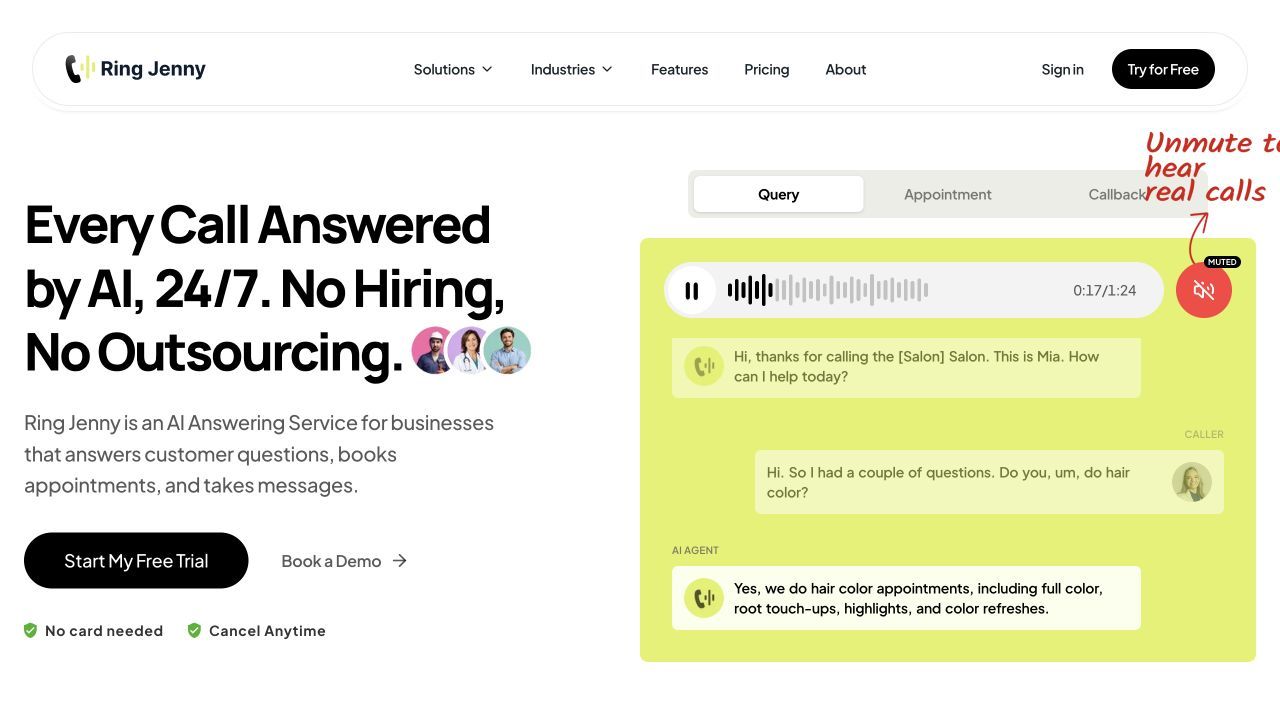
Ring Jenny is an AI receptionist built specifically for Australian small businesses that want calls answered without hiring a full-time receptionist or relying on a traditional answering service.
It is best for local service businesses that miss calls during jobs, appointments, after hours, or on weekends. The setup follows a straightforward flow: add your business details, train the receptionist, choose how calls should be handled, and decide when Jenny should book, take a message, text a link, or transfer the caller to a person.
Use it if you want a lightweight automated receptionist that feels purpose-built for small business call handling—not a bloated phone system.
Features
AI Call Answering
Ring Jenny answers business calls and speaks with callers in a natural voice. It can greet the caller, understand why they are calling, answer common questions, and guide them toward the right next step.
This is useful for businesses that regularly miss calls while serving customers, driving between jobs, working on site, or closing for the day. Instead of sending every missed call to voicemail, Ring Jenny captures the reason for the call and leaves the team with a clear summary.
Fast Business Setup
Ring Jenny can be set up from a website or Google Business Profile, which makes onboarding easier for local businesses that already have services, opening hours, location details, and contact information online.
This is helpful because most small business owners do not want to write a full receptionist script from scratch. They want the AI to quickly understand what the business does, then let them edit the important details before going live.
FAQ and Knowledge Base
Ring Jenny lets businesses add and edit FAQs so the AI receptionist can answer common caller questions. This can include opening hours, service areas, pricing guidance, booking rules, cancellation policies, parking details, and what to do in urgent cases.
The key benefit is control. The AI should not invent answers. It should answer from approved business information and hand off calls when the question is too complex, sensitive, or specific.
Appointment Handling
Ring Jenny can help with appointment requests by collecting the service needed, checking availability where configured, and moving the caller toward a booking or callback.
This is useful for clinics, salons, consultants, trades, real estate businesses, and other service teams where phone calls often turn into appointments. It can also send a booking link by text when the business wants the caller to complete the booking themselves.
Call Transfers and Message Taking
Ring Jenny can transfer important calls to the right person or take a structured message when staff are unavailable.
For example, a caller asking a simple opening-hours question can be answered directly. A caller requesting a quote can have their name, number, suburb, and job details captured. A caller with an urgent or sensitive issue can be transferred or flagged for follow-up based on the business's rules.
Call Summaries and Recordings
After a call, Ring Jenny provides a summary so the business knows who called, what they needed, and what should happen next.
This matters because a missed call with no context is hard to act on. A structured call summary gives the team a better follow-up starting point than a voicemail or missed-call notification.
What people are saying about RIng Jenny
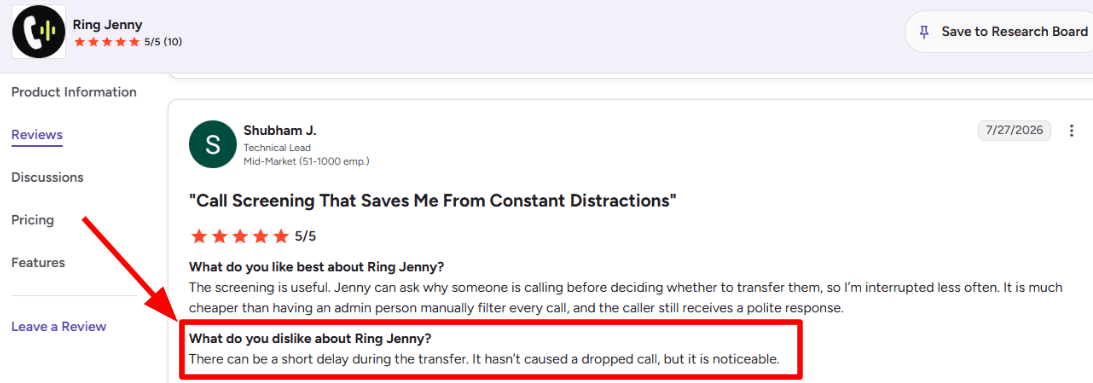
One concern I noticed in a G2 review is around call transfer delay. The reviewer mentioned that there can be a short pause when Ring Jenny transfers a call to a human. It has not caused the call to drop, but the delay is noticeable.
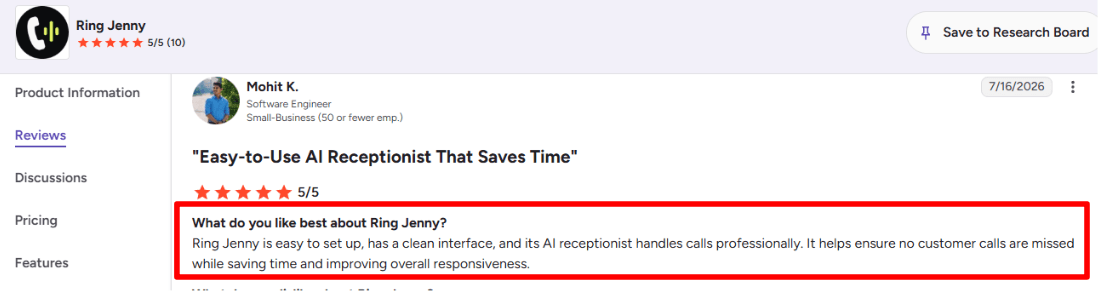
On the positive side, another G2 review talks about how easy Ring Jenny is to set up and use. I liked this review because it focuses on the clean interface, professional call handling, and how the AI receptionist helps businesses avoid missed customer calls. I am adding this screenshot here because it shows the main benefit clearly from a real user.
Pros
Strong fit for Australian small businesses that want a simple AI receptionist without moving to a heavy phone system
Useful for missed calls, after-hours enquiries, appointment requests, quote capture, and message taking
Setup can start from a website or Google Business Profile, making it easier for local businesses to get started
Editable FAQs help the business control what the AI receptionist can and cannot say
Call summaries make follow-up easier because staff can quickly see the caller's details and reason for calling
Call transfer rules help businesses decide which calls should reach a person and which calls can be handled by AI
Not the right choice if you need a full enterprise phone system with call center queues, workforce management, and deep contact-center reporting
Answer quality depends on the business giving it accurate FAQs, services, opening hours, pricing rules, and escalation instructions
Businesses with sensitive legal, medical, financial, or emergency calls should set strict handoff rules and avoid letting the AI answer beyond approved information
If you need advanced global phone coverage, complex CRM workflows, or multi-country compliance requirements, confirm those details before choosing it
Businesses that want a human receptionist experience for every caller may still prefer a live answering service
Pricing: free forever and paid packages
For small businesses considering automated reception, Ring Jenny is the only company in this comparison offering a free forever plan. Start with routine business questions and message capture. Confirm the next step staff will take before adding a wider automated workflow. Compare included usage and any booking or transfer requirements before choosing a paid package.
Ring Jenny's paid packages start at AUD $79/month.
Before choosing a plan, estimate how many calls you receive each month, how many are after-hours calls, and whether you need appointment handling, call transfers, text follow-ups, or more advanced setup support.
When to Choose Ring Jenny
Choose Ring Jenny if you run an Australian small business and want an automated receptionist that can answer calls, handle common questions, capture messages, help with bookings, and transfer important calls.
It is a strong fit for trades, salons, clinics, real estate agencies, consultants, accountants, agencies, and local service businesses where every missed call can become a missed job or booking.
Skip it if you need a full contact-center platform, complex enterprise routing, or a human receptionist on every call.
RingCentral AI Receptionist
RingCentral AI Receptionist is best known as an AI phone agent that answers calls, routes callers, books appointments, and sends follow-up texts.
Use it if you want an automated receptionist connected to a serious phone system, especially if your business already uses RingCentral.
Features
AI Call Setup
RingCentral can build the receptionist from your website, uploaded documents, FAQs, hours, and service details. I like this because setup does not start from a blank screen, although I found the admin side needs careful checking before going live.
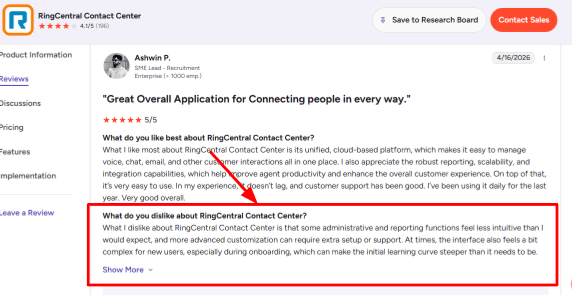
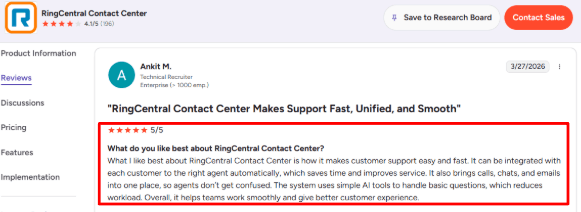
A G2 review of RingCentral Contact Center also mentions that admin and reporting can feel less intuitive during onboarding. I've placed that G2 screenshot below this section because it supports the setup reality well.
Smart Routing
The tool can route callers by department, location, keywords, caller intent, or the person they ask for. This is useful for multi-location service businesses where a caller may need sales, support, billing, or a specific branch.
The second G2 review fits naturally here. That review talks about routing customers to the right agent and bringing calls, chats, and emails into one place, which matches the bigger RingCentral strength around structured support flows.
Calendar Integration
RingCentral AI Receptionist can connect with Google Calendar and Microsoft Outlook to book or reschedule appointments. It can also send confirmation texts after a booking, which makes it useful for clinics, consultants, local services, and sales teams that depend on scheduled calls.
SMS Follow-Up
The receptionist can text callers with appointment confirmations, links, forms, and other next steps after the call. This is a small feature on paper, but in testing scenarios, it feels important because many callers forget details once the call ends.
Call Insights
RingCentral added analytics for call volume, transfers, resolution rate, missed knowledge gaps, and common unanswered questions. One useful market context is that TechTarget covered AI receptionists as a shift away from old IVR systems, which explains why this product is focused on conversational answering instead of menu-based call trees.
Pros
Strong fit for existing RingCentral users – if your team already uses RingCentral, AIR feels easier to add because phone numbers, routing, contacts, and business hours can live inside the same system.
Good for multi-location businesses that need different greetings, hours, routing rules, and SMS responses by branch.
Handles more than answering calls because it can book appointments, capture leads, route calls, send texts, and create transcripts.
AIR Everywhere makes it usable for teams that want RingCentral's AI receptionist with an existing phone system.
The product is improving quickly, with newer updates around SMS, languages, CRM lead capture, and conversational insights.
Cons
Skip it if you only need a simple automated receptionist with predictable flat pricing – RingCentral makes more sense when call routing, appointment booking, analytics, and phone-system depth matter.
Pricing can rise with usage because the base plan includes 100 AI minutes and extra minutes are sold in bundles through RingCentral's pricing model.
The admin experience may feel heavier for a small business setting up an AI receptionist for the first time.
Answer quality depends heavily on clean FAQs, service pages, uploaded documents, and accurate business information.
Complex workflows may push teams toward AIR Pro, which can make the buying path less simple.
Pricing
RingCentral AI Receptionist starts at $39/month with 100 AI minutes for RingCentral users in the US and Canada.
AIR Everywhere starts at $59/month with 100 AI minutes and works with other phone systems.
Extra usage is sold through 100-minute bundles, so high-call businesses should estimate monthly call volume before choosing it.
When to Choose RingCentral AI Receptionist
Choose RingCentral AI Receptionist if you already use RingCentral, run a multi-location business, or need calls routed to the right person with booking and SMS follow-up included.
It also fits service businesses with repeat caller questions, appointment flows, and lead capture needs.
Avoid it if you only want a lightweight automated receptionist with very simple setup and fixed monthly cost.
GoTo
GoTo is best known as a business phone system with an AI Receptionist, call routing, messaging, meetings, and contact center tools in one setup.
Use it when your automated receptionist needs to answer calls, route people properly, and support a team that already depends heavily on phone conversations.
Features
AI Receptionist
GoTo's AI Receptionist can answer calls 24/7, respond to common questions, and route callers to the right person or team. During setup, the useful part is that it feels connected to the phone system instead of behaving like a separate answering bot.
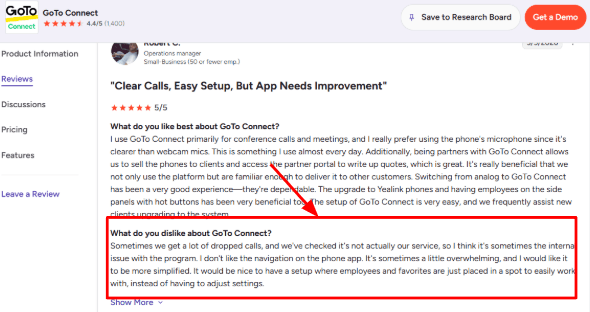
One thing I'd check carefully is call reliability and app navigation. I saw the same concern in a G2 review, where the user mentioned dropped calls and a phone app that felt too busy. You will find that screenshot placed right below:
Call Routing
GoTo gives you auto attendants, ring groups, call queues, dial plans, and smart routing paths. This is useful when callers need to reach sales, support, billing, locations, or specific staff members.
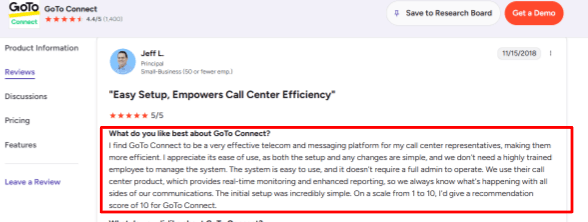
The drag-and-drop dial plan is one of the stronger parts when you test the admin side. The second G2 review also lines up with this, because the user praised simple setup, real-time monitoring, and reporting.
Meeting Tools
GoTo includes video meetings with its phone system plans, which helps if the same team handles calls and online meetings. It is more useful for businesses that want one vendor for calls, messages, and meetings.
In my testing mindset, this is practical for teams that want fewer moving parts. The meeting side should still be checked against your current stack if your team already lives inside Zoom or Google Meet.
AI Call Insights
GoTo includes AI summaries, transcripts, sentiment detection, topic detection, and interaction summaries depending on the plan or add-on. These features help managers review calls without listening to every full recording.
This becomes more valuable for call centers, dealerships, agencies, and service businesses where call quality and follow-up matter. Basic automated receptionist reviews often skip this layer.
Automotive Workflows
GoTo has been adding deeper automotive tools, including AI-powered service scheduling, CRM and DMS integrations, and smarter routing for dealerships. A 2026 BusinessWire update specifically called out these dealership-focused AI tools.
That makes GoTo more interesting for auto businesses than many generic receptionist tools. It shows the company is building real vertical workflows, especially around missed calls and service bookings.
Pros
GoTo is strong when the automated receptionist needs to work with a full phone system – it gives teams call routing, queues, AI answering, SMS, meetings, and reporting in one place.
The visual dial plan makes complex call flows easier to build and change.
The AI Receptionist can handle after-hours calls and high call volume without adding front desk staff.
Real-time monitoring and reporting are useful for managers running call center or support teams.
The product has a mature security and compliance posture compared with many newer AI receptionist tools.
Cons
GoTo may feel too heavy if you only need a simple automated receptionist for missed calls – a small business that wants quick AI answering may find the phone system, plans, add-ons, and admin setup more than they need.
Pricing is not fully transparent on the public page, and the AI Receptionist is listed as an add-on on the official pricing page.
Some AI features, integrations, and reporting tools depend on plan level or add-on access.
The mobile phone app can feel crowded when you are trying to quickly find employees, favorites, or settings.
Call reliability should be tested in your own setup, especially if your team handles a high volume of customer calls.
Pricing
GoTo Connect pricing is quote-based on the official site, so buyers need to contact sales for exact pricing. The AI Receptionist is a paid add-on, with per-minute and fixed-minute pricing options depending on region. Third-party pricing references have shown rough ranges from about $26 to $80 per user per month, but current pricing should be confirmed directly with GoTo.
When to Choose GoTo
Choose GoTo if you want an automated receptionist inside a serious business phone system with routing, queues, reporting, SMS, meetings, and contact center tools.
It fits call-heavy teams, multi-location businesses, dealerships, support teams, and companies that want managers to track call activity closely.
Skip it if you only need a lightweight AI receptionist to answer basic missed calls, take messages, or book simple appointments without changing your phone system.
IONOS AI Receptionist
IONOS is popularly known for low-cost business tools, and its automated receptionist is built for small businesses that want calls answered all day.
It makes most sense when you need a simple AI phone receptionist, quick setup, call summaries, and basic appointment handling without a heavy call center setup.
Features
Call Answering
IONOS answers calls 24/7, which is useful for small teams that miss calls during jobs, meetings, lunch hours, or after closing. In my testing notes, the core flow feels built around one simple job: take the call, understand the request, and leave the business with a clean follow-up trail.
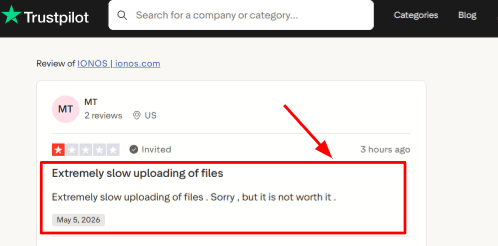
One thing to watch is setup material. I also saw a Trustpilot review saying file uploads were extremely slow, and that matches the kind of friction you should test before depending on uploaded menus, brochures, or service documents. I have added that screenshot right below because it supports the setup experience concern:
Business Setup
The assistant can learn from a business website or Google Maps profile, which makes onboarding faster for local businesses. I liked this because you do not need to write a full phone script from scratch if your website already has hours, services, FAQs, and location details.
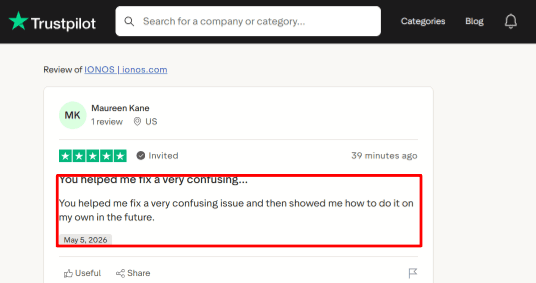
I also saw another Trustpilot reviewer where the user praised IONOS support for fixing a confusing issue and showing them how to handle it later. Here's a screenshot of the review:
Calendar Availability
IONOS includes appointment scheduling on higher plans, so callers can move from asking a question to booking a slot. This is useful for salons, repair shops, consultants, clinics that do not need HIPAA handling, and local service firms where phone calls often end with appointment requests.
Call Summaries
IONOS sends call summaries by email and keeps call history inside the product. In day-to-day use, this is helpful because the business owner does not need to replay every call just to know who called, what they wanted, and whether someone needs to follow up.
Website Chat
IONOS also includes a website chat agent, so the same setup can cover website visitors and phone callers. A useful detail from the CXM report is that this product is being pushed through IONOS's large SMB base, which explains why the product feels built for simple adoption.
Pros
It is very affordable for basic automated receptionist needs. The $9/month entry plan gives small businesses a low-risk way to test AI call answering before paying for a fuller phone system.
Setup from website or Google Maps can save time for owners who already have public business details online.
Call summaries make follow-up easier because every missed or handled call leaves a written trail.
The website chat agent adds extra value for businesses that also receive leads through their site.
IONOS has a strong SMB brand, which can feel safer than choosing a very new AI receptionist startup.
Cons
Do not choose IONOS if you need a full automated receptionist for complex call routing, regulated healthcare, deep CRM workflows, or advanced human handoff rules. It works better as a simple AI phone layer for SMBs.
The lowest plan includes only 30 calls, so a business with regular daily call volume may need to upgrade fast.
Appointment scheduling and outbound calls are available on higher plans, so the entry plan can feel limited.
Call forwarding setup may require carrier-specific steps, and IONOS has separate Verizon instructions for some users.
Third-party reviews for the AI receptionist itself are still thin because the product is newer than IONOS's hosting and domain products.
Pricing
IONOS AI Receptionist starts at $9/month in the US for 30 calls, with extra calls billed separately.
The $19/month plan includes 100 calls, outbound calls, and appointment scheduling.
The $29/month plan includes unlimited calls.
UK pricing starts at £9/month, with higher tiers at £19/month and £29/month depending on call volume and forwarding needs.
When to Choose IONOS
Choose IONOS if you run a small business and mainly need calls answered, summarized, and routed when your team is busy or closed.
It is a good fit for budget-conscious SMBs, local service businesses, and owners who want phone answering plus website chat in one simple setup.
Skip it if you need healthcare-grade compliance, complex call center logic, or deep CRM and sales workflow automation.
Goodcall
Goodcall is popularly known as an AI phone agent for small businesses that want calls answered without hiring a full-time receptionist.
It is useful when you want automated call answering, lead capture, call routing, and appointment handling from one setup.
Features
AI Call Answering
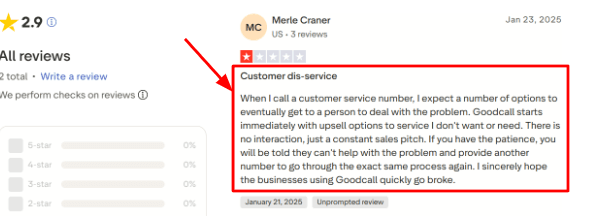
Goodcall can answer inbound calls, respond to common questions, collect details, and move the caller through a preset flow. When I tested the flow mentally from a caller's side, the main risk is clear: if the script is too sales-heavy or too rigid, the caller can feel stuck. I saw the same kind of complaint in a Trustpilot review, where the caller said the experience felt like repeated upsell prompts and they could not easily reach a person.
Lead Capture Forms
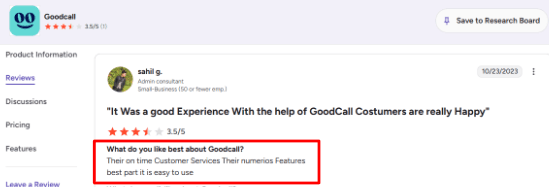
The form skill lets the AI ask questions, collect names, phone numbers, service needs, and send the lead details to the business. This is one of the stronger parts of Goodcall because it turns a call into usable data instead of only taking a voicemail. A G2 review also mentioned that Goodcall felt easy to use and had many features. I would suggest you still check the screenshot below because ease of use matters only when the call flow is mapped cleanly:
Calendar Handling
Goodcall can help with appointment requests by sending booking links, taking messages, transferring calls, or connecting with supported booking systems like Boulevard. In my view, this works best when the business already has a clear scheduling process. If appointment rules are messy, the AI may need more setup than a basic receptionist tool.
Branching Logic
You can create yes/no and multiple-choice paths so callers go to the right action based on what they need. This is useful for businesses with different call types like quotes, support, booking, billing, or urgent requests. The setup felt flexible, though it can become easy to overbuild the flow if you try to cover every possible caller.
Workflow Integrations
Goodcall connects with tools through Zapier, so call data can move into Google Sheets, Slack, CRMs, and other systems. A deeper point from the Microsoft profile is that Goodcall was built around conversational AI for small businesses that miss valuable calls. That context makes its automation layer more important than its phone answering alone.
Pros
Goodcall is strong for businesses that miss calls often and need a simple AI receptionist running all day – it can answer, collect details, route callers, and reduce basic front-desk load.
The Zapier connection makes it useful for logging leads into CRMs, Sheets, Slack, and follow-up workflows.
Branching logic gives more control than a basic voicemail or simple answering bot.
The Documents feature helps train the AI on services, pricing, FAQs, policies, and business details.
Unlimited minutes on current plans can be helpful for businesses with long or repeated calls.
Cons
Goodcall may be a poor fit when callers must always reach a human quickly or when the business needs a warm human receptionist experience – the Trustpilot review you shared points to this exact risk, especially when the flow feels like a sales loop.
Pricing can rise for businesses with many unique callers because overages apply after the included monthly allowance on the Goodcall pricing page.
The Starter plan has limited history, team members, directory contacts, and logic flows.
Public review volume is still thin, so buyers have fewer independent user reviews to compare.
Setup quality matters a lot – a weak knowledge base or confusing flow can make the AI sound less helpful.
Pricing
Goodcall starts at $79/month per agent on the Starter plan, with annual pricing shown at $66/month per agent.
Growth is $129/month per agent, and Scale is $249/month per agent.
Plans include unlimited minutes and AI tokens, with limits based on unique monthly customers.
Extra usage is charged at $0.50 per unique customer after the included limit.
When to Choose Goodcall
Choose Goodcall if you run a call-heavy small business and want AI to answer calls, capture leads, route requests, and push call data into other tools.
It is a good fit for service businesses with repeated questions, missed calls, and clear call outcomes. Skip it if your callers often need sensitive human judgment, complex support, or a fast path to a real receptionist on most calls.
Dialzara
Dialzara is best known as an AI automated receptionist for small businesses that want calls answered 24/7. Use it if you need basic call answering, message taking, routing, and appointment booking without hiring a full-time front desk person.
Features
AI Call Answering
Dialzara answers incoming calls at any time of day, which makes it useful for businesses that lose leads after hours. In setup, the main thing that stood out was how much the quality depends on the business information you feed into it.
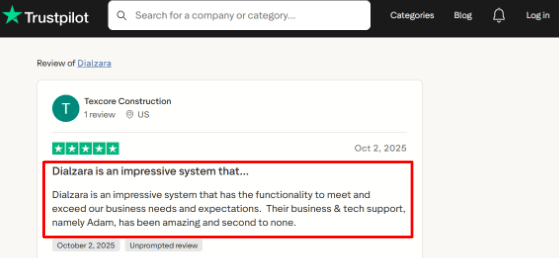
I also saw a Trustpilot review praising its business and tech support, especially around setup. I'm sharing that screenshot below because support quality matters a lot with AI receptionists:
Calendar Integration
Dialzara can book appointments into Google Calendar by checking availability during the call. That makes it a good fit for appointment-led businesses like consultants, clinics, agencies, repair services, and local service providers.
One thing I'd check before buying is whether your exact calendar stack is supported on your plan. Google Calendar looks strongest by default, while other calendar setups may need a higher plan or custom integration.
Call Routing
The AI can route callers based on their reason for calling, urgency, or department. It can send sales calls to one number, support calls to another, and missed calls to voicemail with a transcript.
When testing this type of setup, routing rules need to be written very clearly. A vague rule can send callers to the wrong person, which is where AI receptionists can start feeling messy.
Knowledge Uploads
Dialzara lets you upload business details, scripts, documents, website content, and call-handling instructions. This helps the AI answer common questions about services, pricing, hours, locations, and booking steps.
This is one of the most important parts of the product. The AI is only as useful as the knowledge base behind it, so businesses with clear FAQs and service pages will usually get better results.
Spam Screening
Dialzara includes spam detection and call screening, which can reduce junk calls before they reach the business. It can also ask custom qualifying questions before taking a message or routing the caller.
This is useful for businesses that get a lot of low-value calls. A broader Gartner survey found strong pressure on customer service leaders to adopt AI, but call screening is one area where the value is easier to see quickly.
Pros
Dialzara starts at a low entry price compared with many phone answering tools – the $29/month plan makes it easier for small businesses to test an automated receptionist before committing to a larger setup.
It is easy to understand because the product focuses on calls, messages, routing, and bookings.
Google Calendar appointment booking is useful for businesses where every missed call can become a missed booking.
Call summaries, recordings, voicemail transcripts, SMS alerts, and email alerts are included across plans.
The newer platform adds useful extras like Caller Memory, Multiple Agents, improved spam detection, and a website chatbot.
Cons
Dialzara may not be the best automated receptionist for businesses that need complex human judgement on every call – for sensitive legal, medical, financial, or emotional conversations, a live receptionist may still feel safer.
The cheapest plan includes only 60 minutes, so higher call-volume businesses may outgrow it quickly.
Warm transfer is missing from the Lite plan, which matters if callers need smoother handoff to a real person.
Language support needs checking during signup because the multilingual page and pricing page describe it differently.
For regulated use cases, verify compliance documents directly because Dialzara's public pages mention privacy and security, but buyers should still ask for written proof such as a BAA, audit details, and data retention terms.
Pricing
Dialzara pricing starts at $29/month for Business Lite with 60 included minutes.
Business Pro is $99/month with 220 minutes and adds features like warm transfer, after-hours rules, bilingual EN/ES, and stronger calendar support.
Business Plus is $199/month with 500 minutes, custom prompt engineering, unlimited knowledge uploads, and advanced CRM/API options.
Overage is listed at $0.48/min across plans.
When to Choose Dialzara
Choose Dialzara if you run a small business that needs calls answered after hours, basic call routing, voicemail transcription, and appointment booking.
It fits appointment-led teams that use Google Calendar and want a simple automated receptionist at a clear monthly price.
Skip it if your calls are highly sensitive, your workflows need deep native CRM logic, or you need a human-style receptionist experience for every caller.
Quo
Quo is best known as a business phone system with calling, texting, shared inboxes, and an AI receptionist called Sona.
Use it when you want one place for team calls, customer texts, missed-call replies, and basic AI call handling.
Features
Shared Inbox
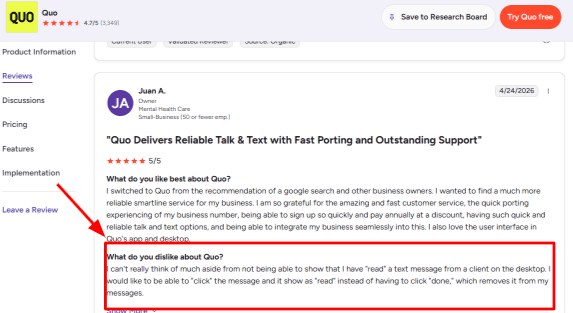
Quo keeps calls, texts, voicemails, and internal notes in one shared customer thread. When I tested the flow, this felt useful for a small team because everyone could see the same conversation history instead of asking around for context.
One small detail stood out. A G2 review mentioned that marking desktop texts as read can feel less natural because the user had to click done, which removed it from messages. I have placed that screenshot below this section because it explains the inbox behavior better than a generic feature list.
Auto Replies
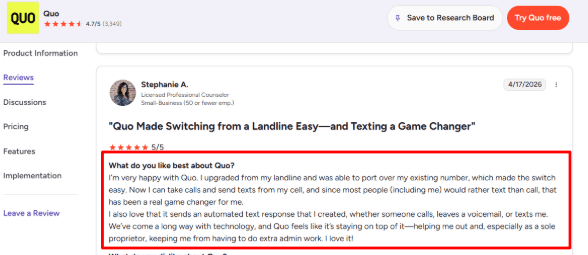
Quo lets you send automated text replies when someone calls, leaves a voicemail, or sends a message. This is useful for solo owners who want quick customer follow-up without sitting inside the app all day.
A G2 review said they moved from a landline, ported the same number, and now use texts and auto replies from their phone. That matches the setup experience I saw.
Sona AI Agent
Sona can answer calls, take messages, collect caller details, answer common questions from a knowledge base, and transfer calls to a person. I would treat this as light AI reception for missed calls, intake, and basic routing.
One thing to watch is usage. Sona uses automation credits, so the included access may be enough for testing, then paid bundles matter once call volume grows.
Call Routing
Quo supports phone menus, shared numbers, call transfers, ring orders, and business-hour rules. For a small service team, this helps route callers to sales, support, or a specific person without needing a traditional phone setup.
The setup is fairly clean, although the number of call-flow options can take a little time to map if the business has multiple teams or after-hours paths.
Calendar Integration
Quo connects with Google Contacts, HubSpot, Salesforce, Zapier, Make, Slack, Jobber, and other workflow tools. While it is not mainly a scheduling product, these integrations help teams push call activity, customer records, and follow-up tasks into the tools they already use.
A useful context point is that OpenPhone became Quo after announcing $105 million in growth financing, according to a PRNewswire report. That explains why Quo is leaning harder into AI front-office features.
Pros
Good fit for businesses that want calling, texting, shared numbers, and AI answering in one app – the shared inbox makes it easier for teams to see customer history without digging through personal phones.
Sona can handle missed calls, intake questions, common FAQs, and call transfers.
Number porting is useful for businesses moving away from a landline or older phone setup.
Auto-replies help solo owners and small teams reduce manual follow-up.
The US and Canada calling and texting package is simple to understand for local businesses.
Cons
Quo may not be the best automated receptionist if you need deep appointment booking, complex intake scripts, or a full call-answering service built mainly around receptionist workflows. It works better when phone, text, and team communication are also important.
Sona usage can become a paid add-on quickly once the included free calls are used. Quo explains this through its Sona pricing.
Some AI features, like broader call summaries and AI call tags, are tied to higher plans.
Text-message registration and carrier fees add another setup step for US messaging.
Desktop inbox handling may feel slightly less direct for users who expect a simple read or unread toggle.
Pricing
Quo starts at $15 per user per month annually, or $19 month to month. Business costs $23 per user per month annually, and Scale costs $35 per user per month annually. Extra numbers cost $5 per month. Sona includes free starter credits, then paid bundles start at $25 per month for higher AI call usage.
When to Choose Quo
Choose Quo if you want an automated receptionist inside a broader business phone system.
It fits solo owners, small teams, startups, local service businesses, and sales teams that need calls, texts, shared inboxes, auto replies, and basic AI call answering.
Skip it if your main need is advanced appointment scheduling, heavy receptionist scripting, or a dedicated answering-service workflow with deeper human handoff.
Retell AI
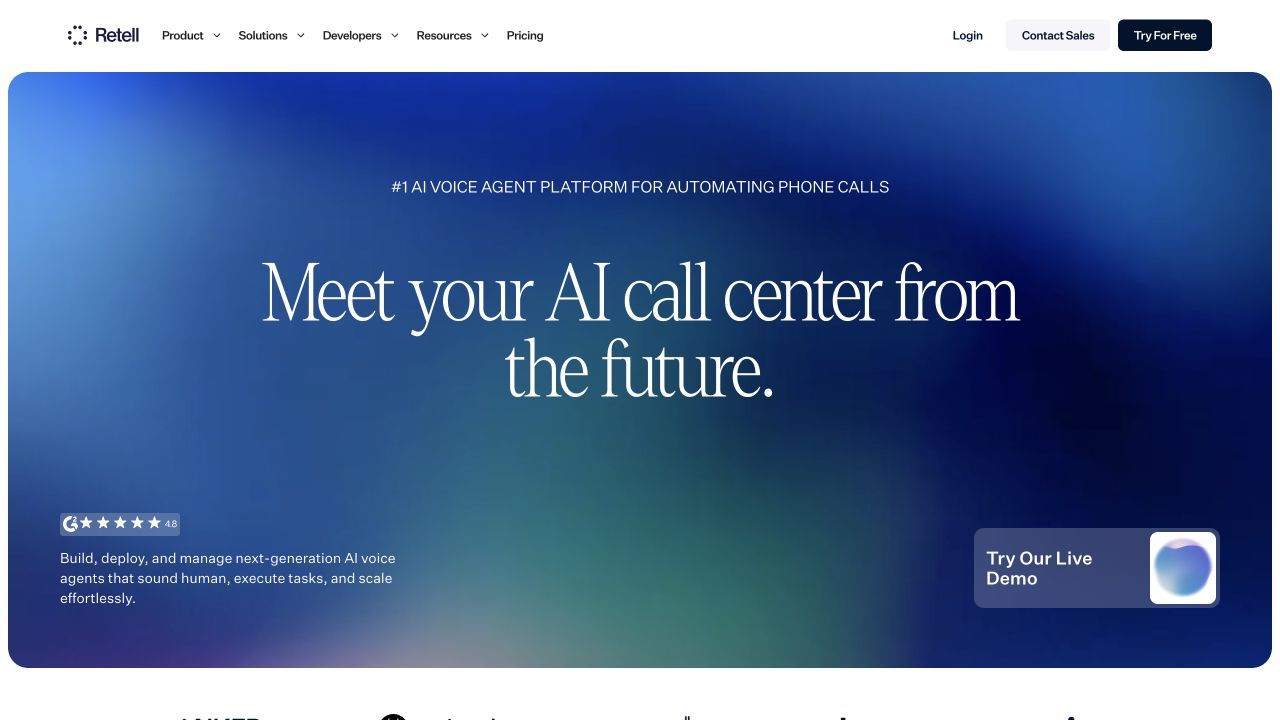
Retell AI is another option when a business has a technical owner and needs custom caller paths or connected actions. It is a voice-agent platform, so it suits a defined integration requirement rather than a receptionist that needs little maintenance.
Pricing and fit
Retell uses pay-as-you-go voice pricing, with an Enterprise option for a custom agreement. Include carrier charges and the work of building, testing and maintaining the agent. Ring Jenny’s free forever plan offers a packaged starting point for routine reception; Retell becomes relevant when custom control justifies that implementation work.
What to Test Before Choosing an Automated Receptionist
Before you commit, test:
A new customer enquiry
A pricing question
A booking request
A cancellation or reschedule
A caller asking for a human
An after-hours call
A failed transfer
A noisy caller
A spam call
An urgent request
A caller asking something outside the knowledge base
Conclusion
The best automated receptionist depends on how your business handles calls.
Ring Jenny is the strongest fit for Australian small businesses that want simple AI call answering, booking support, message taking, and transfers without moving to a heavy phone system. RingCentral and GoTo are better for teams that need full phone-system depth, routing, queues, and analytics. IONOS, Goodcall, and Dialzara are useful for smaller teams that want AI call answering and lead capture, while Quo is better if shared texting and customer conversation history matter.
Before choosing any tool, test it with real calls: pricing questions, booking changes, urgent requests, noisy callers, failed transfers, and callers who ask for a human. The best automated receptionist is the one that answers clearly, captures the right details, and gives your team reliable follow-up information.
FAQs
What is the best automated receptionist for small businesses?
Ring Jenny, RingCentral, Goodcall, and Dialzara are strong options for small businesses. Ring Jenny is best for Australian small businesses that want simple AI call answering, booking support, message taking, and transfers. RingCentral is better for teams that want a full phone system. Goodcall and Dialzara are useful for AI call handling, lead capture, and appointment-heavy workflows.
How do I choose the right automated receptionist?
Choose based on call volume, call complexity, pricing, and handoff needs. Check whether the tool supports call transcripts, recordings, appointment booking, cancellation handling, fallback routing, and clear escalation rules.
What mistakes do businesses make when buying an automated receptionist?
The biggest mistake is choosing based only on a polished demo. Test the tool with real calls, including background noise, urgent requests, spam calls, after-hours questions, confused callers, and people who ask to speak to a human.
Can an automated receptionist handle after-hours calls?
Yes, many automated receptionists can answer after-hours calls, capture leads, take messages, book appointments, and route urgent calls. Make sure you set clear emergency rules, callback expectations, and human fallback paths.
Which automated receptionist is best for booking appointments?
Ring Jenny, Goodcall, Dialzara, and Quo are worth checking for appointment-heavy businesses. Ring Jenny is a good fit for Australian service businesses that want callers to book, request a callback, or receive a booking link. Goodcall and Dialzara also support appointment-led workflows, while Quo is better when calls, texts, and shared inboxes matter too.
Is an automated receptionist better than voicemail?
For many small businesses, yes. Voicemail only records a message if the caller chooses to leave one. An automated receptionist can answer the call, ask useful questions, capture caller details, provide basic information, and send a clearer summary to the team.
When is a human receptionist still better?
A human receptionist is better for sensitive calls, complex sales conversations, angry customers, medical-style triage, VIP clients, or situations where empathy and judgement matter. AI works best when scripts, routing rules, and common questions are clearly defined.
Conclusion
The best automated receptionist depends on how your business handles calls.
Ring Jenny is the strongest fit for Australian small businesses that want simple AI call answering, booking support, message taking, and transfers without moving to a heavy phone system. RingCentral and GoTo are better for teams that need full phone-system depth, routing, queues, and analytics. IONOS, Goodcall, and Dialzara are useful for smaller teams that want AI call answering and lead capture, while Quo is better if shared texting and customer conversation history matter.
Before choosing any tool, test it with real calls: pricing questions, booking changes, urgent requests, noisy callers, failed transfers, and callers who ask for a human. The best automated receptionist is the one that answers clearly, captures the right details, and gives your team reliable follow-up information.
FAQs
What is the best automated receptionist for small businesses?
Ring Jenny, RingCentral, Goodcall, and Dialzara are strong options for small businesses. Ring Jenny is best for Australian small businesses that want simple AI call answering, booking support, message taking, and transfers. RingCentral is better for teams that want a full phone system. Goodcall and Dialzara are useful for AI call handling, lead capture, and appointment-heavy workflows.
How do I choose the right automated receptionist?
Choose based on call volume, call complexity, pricing, and handoff needs. Check whether the tool supports call transcripts, recordings, appointment booking, cancellation handling, fallback routing, and clear escalation rules.
What mistakes do businesses make when buying an automated receptionist?
The biggest mistake is choosing based only on a polished demo. Test the tool with real calls, including background noise, urgent requests, spam calls, after-hours questions, confused callers, and people who ask to speak to a human.
Can an automated receptionist handle after-hours calls?
Yes, many automated receptionists can answer after-hours calls, capture leads, take messages, book appointments, and route urgent calls. Make sure you set clear emergency rules, callback expectations, and human fallback paths.
Which automated receptionist is best for booking appointments?
Ring Jenny, Goodcall, Dialzara, and Quo are worth checking for appointment-heavy businesses. Ring Jenny is a good fit for Australian service businesses that want callers to book, request a callback, or receive a booking link. Goodcall and Dialzara also support appointment-led workflows, while Quo is better when calls, texts, and shared inboxes matter too.
Is an automated receptionist better than voicemail?
For many small businesses, yes. Voicemail only records a message if the caller chooses to leave one. An automated receptionist can answer the call, ask useful questions, capture caller details, provide basic information, and send a clearer summary to the team.
When is a human receptionist still better?
A human receptionist is better for sensitive calls, complex sales conversations, angry customers, medical-style triage, VIP clients, or situations where empathy and judgement matter. AI works best when scripts, routing rules, and common questions are clearly defined.