RingCentral AI Receptionist refers to the AI-based call answering and routing features connected with RingCentral’s business phone system. In simple terms, it is used to help answer calls, understand basic caller needs, and direct people to the right person or next step.
People usually search for RingCentral AI Receptionist when they want to understand how AI can support phone answering without relying fully on a human receptionist. The search often connects to problems like missed calls, after-hours enquiries, long wait times, appointment requests, and basic customer questions.
For a business owner, the main question is not just whether AI can answer calls. It is whether it can handle routine conversations clearly, pass on useful messages, and know when a real person should take over.
Table Comparing Best RingCentral AI Alternatives
Use case
Tool name
Main workflow
Entry-plan note
Simulated call resolution (LunaCal)
Simulated booking success (LunaCal)
General AI receptionist for small businesses
Ring Jenny
Small-business answering, intake, messages, and booking workflows
Free forever; compare paid features
92.7%
95.3%
Human-backed answering service
Smith.ai
AI reception with separate human-support options
See product pricing
91.7%
93.3%
Lead capture and calendar-connected call handling
Goodcall
FAQ answering, lead capture, and call routing
See product pricing
86.8%
87.0%
Appointment booking and front-office automation
My AI Front Desk
Phone, SMS, CRM, and appointment workflows
See product pricing
85.9%
87.7%
After-hours calls and call routing
Dialzara
AI answering, messages, and transfer workflows
See product pricing
84.3%
85.0%
Source: LunaCal’s AI phone answering service comparison. The two performance columns report outputs from its 27,000-call simulation, not independent measurements of live customer calls. “Not included” means the platform was outside that study. Results describe the modeled platform workflows, not the features included in an entry plan.
A closer look at Each Tool
Ring Jenny
Ring Jenny is one of the tools I selected for this RingCentral AI Receptionist article because it is built for small businesses that want their calls answered without hiring a receptionist.
It fits the AI answering service category well because it can answer calls 24/7, handle customer questions, take messages, capture new enquiries, and transfer calls when needed.
I also like that it is Australia specific, uses a natural Australian accent, has reasonable pricing, and focuses on simple setup instead of making small businesses deal with a complex phone system.
Pricing: free forever and paid packages
For businesses comparing ringcentral ai, an ongoing free plan changes the starting-cost decision: Ring Jenny is the only company in this article offering a free forever tier. Start with the call-answering task that needs replacing. Separate routine messages from bookings, transfers and any work that still needs a staff member. Choose a paid package only after comparing the included usage and the reception actions the business needs.
24/7 AI call answering
Ring Jenny can answer business calls even when the owner is busy, closed, driving, or with another customer.
For someone comparing it with RingCentral AI Receptionist, this matters because many small businesses do not need a full business phone suite. They simply need every caller answered clearly, day and night.
Business trained responses
Ring Jenny can learn from your website or business details, so it can answer common customer questions in a more useful way.
For example, a plumber can train it on service areas, emergency callouts, prices, and opening hours. A salon can train it on treatments, parking, late arrival rules, and booking steps.
Message taking and lead capture
Ring Jenny can collect the caller’s name, phone number, reason for calling, and any extra details your team needs before calling back.
This is useful for local service businesses where missed calls often mean missed revenue. Instead of sending callers to voicemail, Ring Jenny can capture the enquiry properly and send a clear summary.
Ring Jenny can transfer important calls to the right person when the caller needs human help.
For example, a real estate agency can route rental enquiries, sales calls, and urgent tenant issues differently. This makes the AI receptionist useful without forcing every call into the same path.
Australian voice and local fit
Ring Jenny is built with Australian small businesses in mind, so the voice, tone, and call handling feel more local than a generic global phone bot.
That makes it a better fit for Australian trades, clinics, salons, agencies, and service businesses that want an AI receptionist but still want callers to feel like they are speaking to a local business.
What people are saying about Ring Jenny
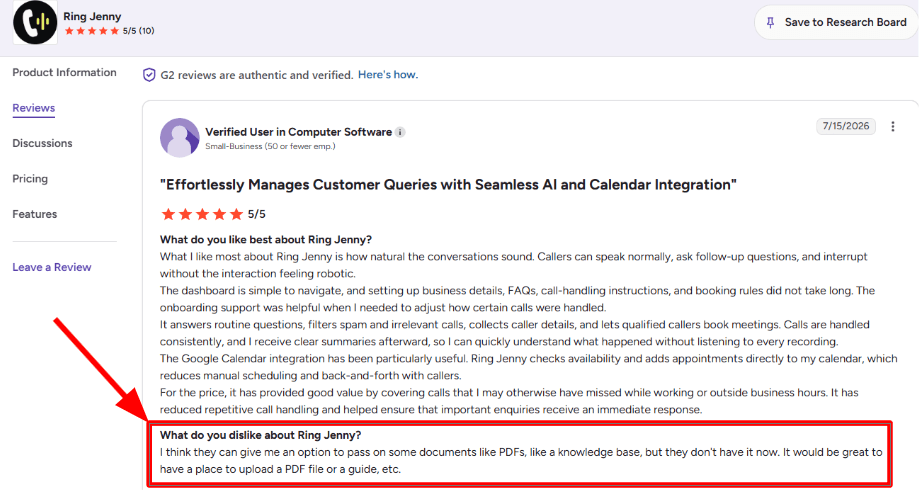
One concern I noticed in a G2 review is that Ring Jenny could improve how it handles uploaded business documents.
The reviewer mentioned that it would be useful to add PDFs, guides, or a proper knowledge base inside the tool. I think this is a fair point, especially for businesses that already have detailed service guides, policy documents, or internal FAQs.
I am adding the screenshot below so readers can see the exact concern in the reviewer’s own words.
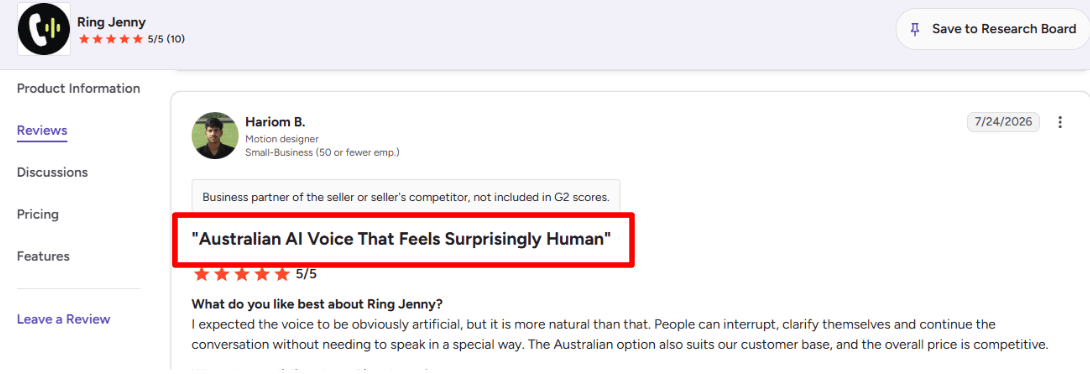
The stronger benefit I saw in another G2 review was around voice quality and natural conversation.
The reviewer said they expected the voice to sound clearly artificial, but it felt more natural than expected. Callers could interrupt, clarify what they meant, and continue the conversation normally. They also liked the Australian voice option and felt the pricing was competitive.
I am adding this screenshot below because it shows why Ring Jenny can work well for Australian businesses that want an AI answering service without making callers speak in a robotic way.
Pros of Ring Jenny
Lower cost than hiring reception staff
Ring Jenny gives a small business call coverage without the cost of hiring, training, and managing a receptionist.
For someone comparing it with a RingCentral AI Receptionist setup, this is important because many local businesses do not need a full phone system upgrade. They mainly need missed calls answered, leads captured, and customers helped without adding another salary.
Easier setup for small businesses
Ring Jenny can be set up using a website or Google Business Profile, so the AI can learn basic details like services, opening hours, location, and common questions.
This feels useful for businesses that want an AI receptionist quickly, instead of spending time building complex phone menus, call flows, departments, and rules from scratch.
Works with an existing phone number
Ring Jenny can work through call forwarding, so the business does not have to change the number customers already know.
That makes it easier to test alongside an existing phone setup. A business can forward missed calls, after-hours calls, or overflow calls to Jenny without moving fully away from its current provider.
Natural call handling
Ring Jenny is built to answer in a more natural receptionist-style voice, not like a basic IVR or phone menu.
For small business callers, this matters. Many people do not want to press numbers or wait through options. They want to explain what they need and get a clear next step, such as booking, message taking, or call transfer.
Keeps answering after business hours
Ring Jenny can answer evening, weekend, lunch-break, and busy-period calls when the team is unavailable.
This is one of the clearest use cases for an AI receptionist. Even if the business does not work after hours, customers may still call to book, ask for pricing, request a quote, or leave an urgent message.
Cons of Ring Jenny
Not ideal for complex phone systems
Ring Jenny is better suited to straightforward call answering, lead capture, bookings, and basic routing.
If a business needs a larger cloud phone system with many users, extensions, analytics, internal messaging, video meetings, and enterprise-level admin controls, a RingCentral-style setup may be a better fit.
Ring Jenny should not be used to give legal, medical, financial, or regulated advice.
For those businesses, the safer setup is to let Jenny collect the caller’s details, understand the reason for the call, and route the enquiry to the right person for a proper follow-up.
Some callers may still prefer a human
A few callers may still want to speak directly with a person, especially if the matter is urgent, sensitive, or high-value.
That is why I would not treat Ring Jenny as a full replacement for every conversation. It works best as the first layer that answers, qualifies, routes, and captures calls before a human steps in when needed.
Smith.ai
Smith.ai is popularly known for combining AI call answering with live North America-based receptionists. Businesses comparing it with RingCentral AI Receptionist may choose Smith.ai when they want stronger human backup for complex enquiries, lead intake, and sensitive customer conversations.
Features
AI and human answering: Smith.ai can use AI for routine questions, qualification, scheduling, and call routing, while sending more difficult conversations to a live receptionist. This hybrid setup is the main difference from a fully automated AI receptionist.
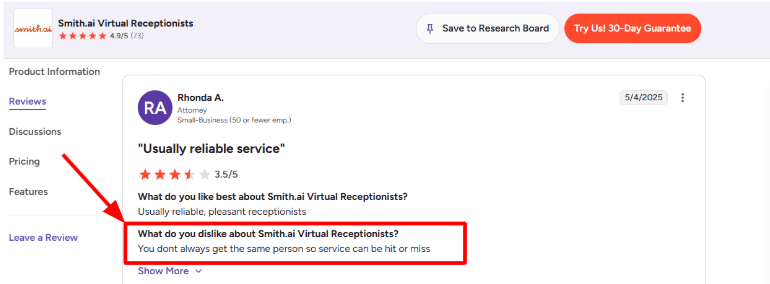
The human element can make complicated calls easier to handle, but it also creates some variation. I found the same concern in a G2 review of Smith.ai, where the reviewer said the service could be hit or miss because the same receptionist does not always answer. I have included the screenshot below.
Custom lead intake: Smith.ai can ask different questions based on the caller’s service needs, location, budget, case type, or reason for calling. It can then qualify the lead, collect the required details, and decide whether to book, transfer, or send a follow-up.
For example, a new prospect asking for a quote can follow a sales intake flow, while an existing customer reporting an urgent problem can be transferred immediately. I found this more useful than a simple phone tree, although detailed branching may take time to configure properly.
RingCentral forwarding: Businesses do not necessarily need to replace their RingCentral phone system to use Smith.ai. Calls can be forwarded to Smith.ai for complete answering, overflow coverage, after-hours calls, weekends, staff holidays, or emergencies.
This makes it a practical add-on for a RingCentral user who needs human-backed answering. The trade-off is that the business must manage Smith.ai as another service and dashboard rather than keeping everything inside one RingCentral platform.
Managed onboarding support: Pro customers receive dedicated onboarding and live phone, email, and chat support. Enterprise plans add full-service setup, ongoing optimization, custom AI prompting, and a dedicated success manager.
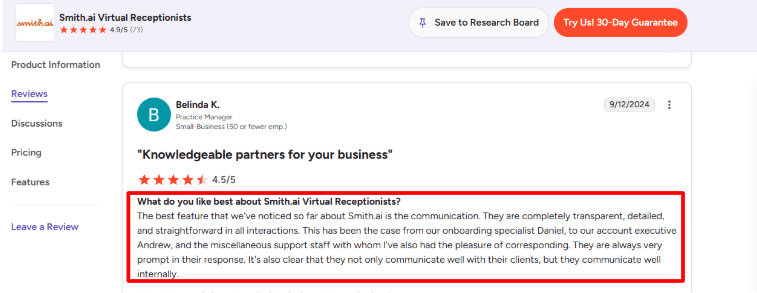
This appears to be a real strength. In a G2 review of Smith.ai, the onboarding and support teams were described as “transparent, detailed, and straightforward.” That matches the more managed approach Smith.ai offers compared with AI answering tools that leave businesses to build every call flow themselves.
Call actions and integrations: Smith.ai can schedule appointments, update CRMs, send text or email follow-ups, collect intake information, route calls, and provide post-call summaries. It supports direct integrations and wider connections through tools such as Zapier.
For an AI answering service, the important part is what happens after the conversation. Caller details can move into the business system instead of sitting in a transcript that someone must manually process. Some human receptionist actions, including appointment booking and complex routing, carry additional per-call charges.
Call testing and analytics: Quality Studio lets a business define call goals, run simulated scenarios, read live transcripts, review performance, and apply suggested improvements before taking customer calls. After launch, Smith.ai provides recordings, transcripts, summaries, call history, and performance analytics.
This was the most useful surprise during my review. It gives teams a structured way to test difficult questions and routing rules instead of discovering mistakes through real customers. However, custom AI prompting and custom integrations are reserved for Enterprise plans.
Pros
Human backup is available: Complicated or sensitive calls can move from the AI receptionist to a trained live agent instead of ending in voicemail or an unsuccessful transfer.
Works with RingCentral: Businesses can forward all calls or only selected after-hours and overflow calls from their existing RingCentral setup.
Strong lead qualification: Custom intake questions help separate suitable prospects from spam, sales calls, wrong numbers, and enquiries outside the business’s service area.
Detailed call records: Recordings, transcripts, summaries, caller details, and completed actions make it easier to review calls and follow up with leads.
Useful pre-launch testing: Quality Studio allows businesses to test realistic scenarios and improve weak answers before allowing the AI receptionist to handle live calls.
Cons
Receptionist consistency can vary: Businesses using live receptionists may not always get the same person, so tone, familiarity, and call quality may differ between conversations.
Not a complete phone platform: Smith.ai focuses on answering, intake, and front-desk work. It does not replace RingCentral’s wider business phone, messaging, meetings, and contact-centre system.
Advanced setup costs more: Custom AI prompting, custom workflows, multi-location synchronization, and full-service optimization are mainly available through Enterprise plans.
Limited language coverage: Smith.ai mainly provides English and Spanish call handling with North America-based human receptionists, which may not suit businesses requiring broader international language coverage.
Pricing
Smith.ai’s AI Receptionist has a free plan with 25 live calls per month. Additional calls are listed at $3 per call.
The AI Receptionist Pro plan starts at $150 per month for 75 calls. It includes onboarding, live support, and custom SMS branding.
Enterprise AI pricing starts at $500 per month for 300 calls. It adds managed setup, custom integrations, multi-location support, and ongoing optimization.
The human-first Virtual Receptionist service is much more expensive. It starts at $300 per month for 30 calls, with some actions such as appointment booking, complex routing, and call transcription charged separately.
Goodcall
Goodcall is popularly known as an AI phone agent for small businesses that want calls answered automatically.
It is useful when a business wants help with missed calls, lead capture, simple questions, call routing, and appointment requests without adding a full front desk team.
AI call answering
Goodcall answers inbound calls, asks questions, and tries to guide callers through the right next step. When I looked at it as a RingCentral AI Receptionist alternative, this felt useful for small businesses that mainly need call answering and lead capture.
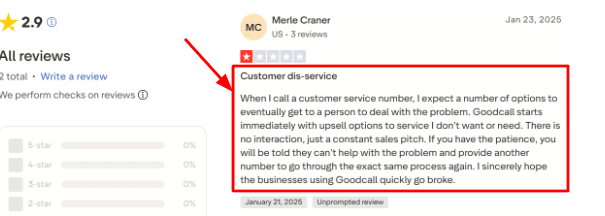
That said, I also saw a Trustpilot review saying the call experience became too sales-led and hard to escape. I would place that screenshot below this point because it shows why setup and call flow design matter.
Easy setup
The setup is one of the simpler parts of Goodcall. You can train the agent with business details, FAQs, documents, and basic call handling rules.
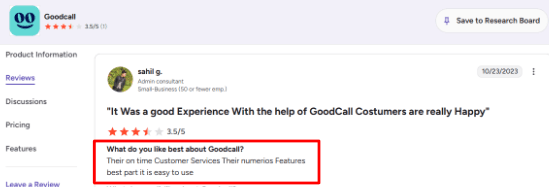
The G2 review also mentions that Goodcall is easy to use and has many features. That matches the first setup impression, and the screenshot can sit well under this feature because it supports the ease-of-use angle.
Calendar routing
Goodcall can handle appointment requests by sending booking links, taking messages, transferring calls, or connecting to booking workflows through tools like Zapier.
It may work well for businesses that already use a simple calendar or booking page and want callers pushed toward the right action.
Lead capture forms
Goodcall can collect caller details like name, phone number, service need, location, and preferred time. This is helpful for businesses where every missed call could become a quote request or booking request.
I liked that the lead data can also move into Google Sheets, Slack, or CRM tools through Zapier.
Call workflows
Goodcall has branching logic, skills, contact forms, call transfers, and directory routing. This gives more control than a very basic phone bot.
A useful detail from a Microsoft profile is that Goodcall was built around conversational AI for small businesses, which explains why the product feels more focused on local business calls than broad enterprise phone systems.
Pros
Goodcall is easy to set up for basic call answering, FAQs, lead capture, and simple routing.
For a small team, it can be quicker to launch than a heavier phone system.
It is strong for missed calls, after-hours calls, and first-touch customer questions.
Zapier support makes it easier to send call data into CRMs, Slack, Google Sheets, and calendars.
The pricing includes unlimited minutes and AI tokens, which can feel simpler than minute-based billing.
It has useful controls like documents, forms, skills, branching logic, and directory routing.
Cons
Goodcall may be a weaker choice than RingCentral AI Receptionist when a company already needs a full business phone system with team calling, meetings, messaging, admin controls, and deeper telecom features.
In that case, RingCentral can be easier to keep as the main communication platform.
The AI experience depends heavily on how well the call flow is written and tested.
Starter plan limits like 1 logic flow and short call history may feel tight for growing teams.
High-volume businesses with many new callers may see costs rise because Goodcall charges overages by unique customer after the included limit.
Some workflows need extra setup because documents answer questions while actions like transfer, SMS, and forms need Skills. Goodcall’s own Help Center explains this split clearly.
Pricing
Goodcall pricing starts at $79 per month per agent on the Starter plan. Growth is $129 per month per agent, and Scale is $249 per month per agent.
Plans include unlimited minutes and AI tokens, with usage based on unique monthly customers.
Starter includes 100 unique customers, Growth includes 250, and Scale includes 500. Extra usage is charged at $0.50 per unique customer.
When to Choose Goodcall
Choose Goodcall if you mainly need an AI receptionist for inbound calls, missed calls, FAQs, lead capture, appointment requests, and simple follow-up workflows.
It is a better fit for local service businesses that want quick setup and call automation. It may be less suitable if the company needs a complete business phone platform with meetings, internal messaging, advanced admin controls, and larger team communication features.
Mt AI Frontdesk
My AI Frontdesk is popularly known as a 24/7 AI receptionist that answers calls, handles texts, captures leads, and books appointments. For someone comparing tools in a Best RingCentral AI Receptionist article, it feels more like a focused AI answering service than a full business phone system.
24/7 Call Answering: My AI Frontdesk can answer inbound calls when the team is busy, closed, or simply not able to pick up. That matters for businesses comparing it with RingCentral AI Receptionist because the main use case here is not team calling or video meetings. It is missed-call prevention.
When I went through the setup, the call answering flow was easy to understand. You train the AI on your business details, services, FAQs, and preferred answers, then let it handle common caller questions instead of sending people to voicemail.
Custom Call Flows: The AI can qualify callers, collect details, answer common questions, and move the conversation toward the next step. For example, a caller can ask about pricing, availability, opening hours, or service areas, and the AI can decide whether to answer, book, text a link, or transfer the call.
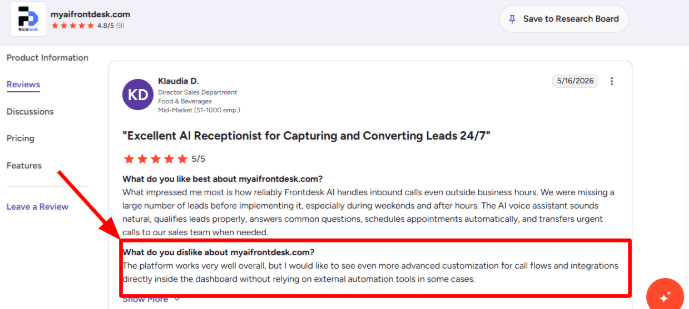
One gap I also noticed in a G2 review for My AI Frontdesk was around deeper dashboard control. The reviewer liked the platform overall, but wanted more advanced call-flow and integration customization without relying on external automation tools in some cases. I would share that screenshot below this section because it matches the kind of limitation buyers should know before switching from a larger phone system.
SMS Follow-Ups: My AI Frontdesk does not stop after the call. It can also handle SMS conversations, send follow-up messages, and share useful links after speaking with a caller.
This is useful for an AI answering service because many leads do not convert from one phone call alone. A caller may ask for pricing, availability, or a booking link, and the AI can continue the conversation by text instead of making the business owner chase them manually.
Lead Capture Tools: My AI Frontdesk combines voice calls, chatbot, SMS, forms, CRM, and automations in one platform. That makes it useful for businesses that want their AI receptionist to capture the caller’s name, phone number, reason for calling, and next action without needing a separate intake tool.
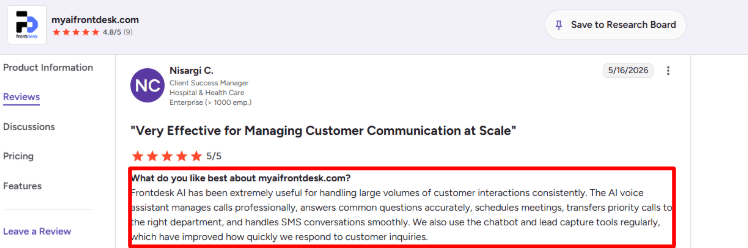
A positive G2 review for My AI Frontdesk also mentioned that the AI voice assistant handled large volumes of customer interactions, answered common questions, scheduled meetings, transferred priority calls, and managed SMS conversations smoothly. I mostly agree with that for routine front-desk calls, especially when the business has clear FAQs and simple routing rules.
Priority Call Transfers: My AI Frontdesk can transfer important calls instead of trying to handle every conversation by itself. This matters when comparing it with RingCentral AI Receptionist because a good AI answering service should know when to stop and pass the caller to a real person.
A simple example would be a new customer asking about service availability versus an existing customer calling with an urgent issue. The first call can usually be handled by AI. The second should be collected properly and routed with enough context.
Conversation Dashboard: The dashboard gives access to call history, text conversations, caller details, transcripts, and follow-up information. This is useful because the business owner can quickly check what happened without listening to every call recording.
The part I would watch closely is usage volume. If a business receives a lot of calls, the included minutes, SMS limits, and overage costs matter more than the monthly starting price. This is where buyers should compare My AI Frontdesk carefully with RingCentral AI Receptionist and other AI answering services.
Pros
My AI Frontdesk is a good fit for businesses that mainly need AI call answering, lead capture, SMS replies, and simple booking support instead of a full business phone system.
The setup feels simple enough for small businesses. The product is positioned around quick setup, 24/7 answering, and the ability to keep using an existing business number.
It covers more than phone calls. Voice, SMS, chatbot, forms, CRM, and automations are part of the same product direction, which can reduce the need for too many separate tools.
It is useful for after-hours calls, weekend enquiries, missed leads, and busy periods where voicemail would usually lose the customer.
The positive review pattern is strongest around consistent call handling, SMS conversations, lead capture, and call routing, which are core needs for an AI answering service.
Cons
Advanced call-flow customization may feel limited for some users, especially if they want everything managed directly inside the dashboard without external automation tools.
The lower plan is more useful for testing than serious AI call answering. Businesses that want voice answering at a practical level may need a higher plan.
It may not replace RingCentral for companies that need a full phone system, team messaging, video meetings, enterprise admin controls, or complex call-center workflows.
Like most AI receptionists, it works best when the business has clear FAQs, clear escalation rules, and simple caller journeys. Sensitive, emotional, or complex calls still need human handling.
Pricing
My AI Frontdesk starts with a lower entry plan, but buyers should check what is actually included for voice answering before choosing it.
The main plan for AI answering service use is usually the higher business plan because it includes voice minutes, SMS, chatbot, CRM, and automations.
Included call minutes and SMS limits are important. A business with high call volume should calculate the real monthly cost, not just compare the starting price.
Custom or enterprise pricing may be better for agencies, multi-location businesses, higher call volume, API access, custom integrations, or white-glove onboarding.
Dialzara
Dialzara is popularly known as a low-cost AI receptionist for small businesses that want calls answered 24/7.
It is worth considering if you want basic call answering, message taking, call routing, and appointment booking without a long setup process.
Features
AI Receptionist
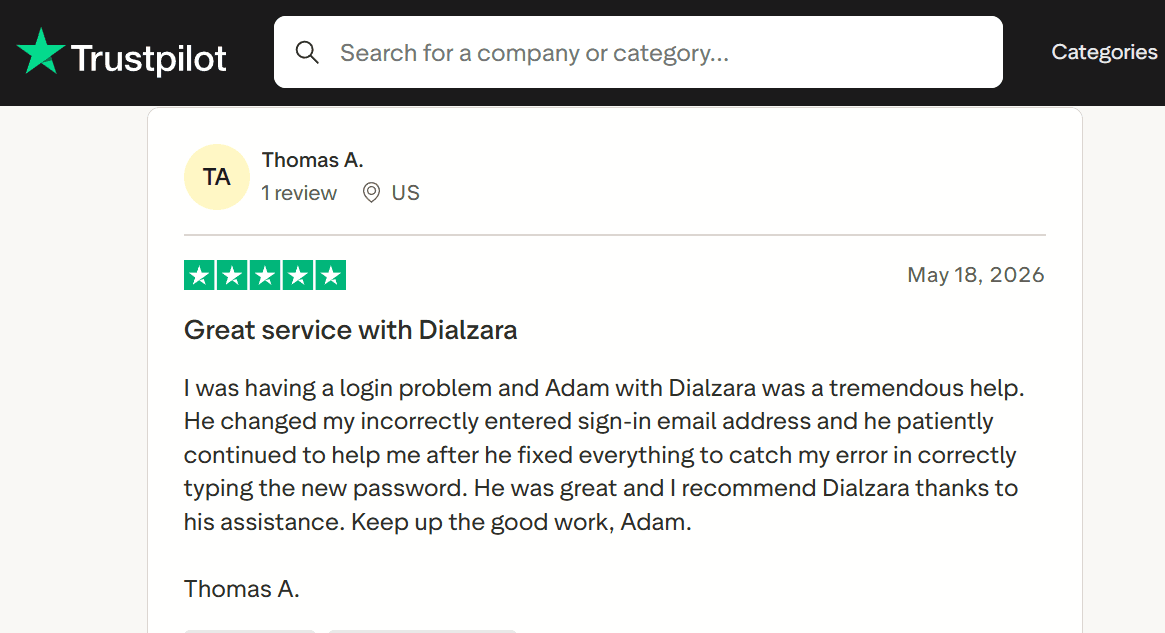
Dialzara can answer calls, ask basic questions, take messages, and route callers based on what they need. I liked that the setup is quite direct, because you can train it with business details and call-handling rules instead of building everything from scratch. I also saw a Trustpilot review saying Dialzara’s support helped the business meet its needs, and
Calendar Booking
Dialzara can book appointments through Google Calendar by checking availability during the call. In my testing flow, this looked most useful for service businesses where the caller wants a slot right away. The part I would check carefully is whether your calendar setup is simple enough for the AI to follow every rule correctly.
Call Routing
It can send callers to the right person or department and also use voicemail fallback when someone does not answer. This is useful for small teams that still need a clean path for sales calls, support calls, urgent calls, and general enquiries.
Call Summaries
Dialzara includes call summaries, recordings, voicemail transcription, and email or SMS notifications. This makes it easier to review what happened after every call. A small detail that matters is that these summaries can help spot weak answers and improve the AI over time.
Spam Blocking
Dialzara includes spam detection, call screening, and allow or block lists. This is easy to miss in basic reviews, but it matters because AI receptionists can otherwise waste minutes on bad calls. The broader shift is clear too, with Gartner reporting strong pressure on service leaders to use AI in customer support.
Pros
Dialzara starts at a low monthly price, which makes it easier to test than many phone answering tools. For a small business, this lowers the risk of trying AI before replacing any current phone setup.
The setup feels simple and fast for basic call answering, especially if the business has clear services, hours, and FAQs.
It includes call recordings, summaries, and notifications, so missed details are easier to review later.
It supports appointment booking, which is useful for salons, clinics, consultants, home services, and local service businesses.
It has useful routing and voicemail fallback options for small teams that cannot answer every call live.
Cons
Do not choose Dialzara over RingCentral AI Receptionist if you already need a full business phone system with team messaging, video meetings, advanced admin controls, and deeper enterprise workflows. Dialzara is better suited to AI call answering first.
The lowest plan includes limited minutes, so a business with longer calls may move into overage quickly.
Warm transfer is not available on the cheapest plan, which may matter if callers often need a smoother handoff.
Its calendar booking appears strongest around Google Calendar, so businesses using more complex scheduling systems should test it properly.
For regulated or sensitive calls, I would verify documents before using it heavily, especially because healthcare and privacy workflows need clear proof of compliance from the vendor and should be checked against standards like HHS HIPAA.
Pricing
Dialzara’s Business Lite plan starts at $29 per month with 60 included minutes.
Business Pro is listed at $99 per month with 220 included minutes.
Business Plus is listed at $199 per month with 500 included minutes.
Overage is listed at $0.48 per minute across plans.
It also offers a 7-day free trial, no setup fee, and no long-term contract.
When to Choose Dialzara
Choose Dialzara if you want a simple AI receptionist for answering calls, taking messages, booking appointments, and routing calls at a lower starting price.
It fits small service businesses, solo operators, and teams that mainly need better call coverage.
Do not choose it as your first option if you need a complete RingCentral-style communications platform with phone, meetings, messaging, enterprise controls, and complex team workflows.
I also like that it is Australia specific, uses a natural Australian accent, has reasonable pricing, and focuses on simple setup instead of making small businesses deal with a complex phone system.
Pricing: free forever and paid packages
For businesses comparing ringcentral ai, an ongoing free plan changes the starting-cost decision: Ring Jenny is the only company in this article offering a free forever tier. Start with the call-answering task that needs replacing. Separate routine messages from bookings, transfers and any work that still needs a staff member. Choose a paid package only after comparing the included usage and the reception actions the business needs.
24/7 AI call answering
Ring Jenny can answer business calls even when the owner is busy, closed, driving, or with another customer.
For someone comparing it with RingCentral AI Receptionist, this matters because many small businesses do not need a full business phone suite. They simply need every caller answered clearly, day and night.
Business trained responses
Ring Jenny can learn from your website or business details, so it can answer common customer questions in a more useful way.
For example, a plumber can train it on service areas, emergency callouts, prices, and opening hours. A salon can train it on treatments, parking, late arrival rules, and booking steps.
Message taking and lead capture
Ring Jenny can collect the caller’s name, phone number, reason for calling, and any extra details your team needs before calling back.
This is useful for local service businesses where missed calls often mean missed revenue. Instead of sending callers to voicemail, Ring Jenny can capture the enquiry properly and send a clear summary.
Call transfer rules
Ring Jenny can transfer important calls to the right person when the caller needs human help.
For example, a real estate agency can route rental enquiries, sales calls, and urgent tenant issues differently. This makes the AI receptionist useful without forcing every call into the same path.
Australian voice and local fit
Ring Jenny is built with Australian small businesses in mind, so the voice, tone, and call handling feel more local than a generic global phone bot.
That makes it a better fit for Australian trades, clinics, salons, agencies, and service businesses that want an AI receptionist but still want callers to feel like they are speaking to a local business.
What people are saying about Ring Jenny
One concern I noticed in a G2 review is that Ring Jenny could improve how it handles uploaded business documents.
The reviewer mentioned that it would be useful to add PDFs, guides, or a proper knowledge base inside the tool. I think this is a fair point, especially for businesses that already have detailed service guides, policy documents, or internal FAQs.
I am adding the screenshot below so readers can see the exact concern in the reviewer’s own words.
The stronger benefit I saw in another G2 review was around voice quality and natural conversation.
The reviewer said they expected the voice to sound clearly artificial, but it felt more natural than expected. Callers could interrupt, clarify what they meant, and continue the conversation normally. They also liked the Australian voice option and felt the pricing was competitive.
I am adding this screenshot below because it shows why Ring Jenny can work well for Australian businesses that want an AI answering service without making callers speak in a robotic way.
Pros of Ring Jenny
Lower cost than hiring reception staff
Ring Jenny gives a small business call coverage without the cost of hiring, training, and managing a receptionist.
For someone comparing it with a RingCentral AI Receptionist setup, this is important because many local businesses do not need a full phone system upgrade. They mainly need missed calls answered, leads captured, and customers helped without adding another salary.
Easier setup for small businesses
Ring Jenny can be set up using a website or Google Business Profile, so the AI can learn basic details like services, opening hours, location, and common questions.
This feels useful for businesses that want an AI receptionist quickly, instead of spending time building complex phone menus, call flows, departments, and rules from scratch.
Works with an existing phone number
Ring Jenny can work through call forwarding, so the business does not have to change the number customers already know.
That makes it easier to test alongside an existing phone setup. A business can forward missed calls, after-hours calls, or overflow calls to Jenny without moving fully away from its current provider.
Natural call handling
Ring Jenny is built to answer in a more natural receptionist-style voice, not like a basic IVR or phone menu.
For small business callers, this matters. Many people do not want to press numbers or wait through options. They want to explain what they need and get a clear next step, such as booking, message taking, or call transfer.
Keeps answering after business hours
Ring Jenny can answer evening, weekend, lunch-break, and busy-period calls when the team is unavailable.
This is one of the clearest use cases for an AI receptionist. Even if the business does not work after hours, customers may still call to book, ask for pricing, request a quote, or leave an urgent message.
Cons of Ring Jenny
Not ideal for complex phone systems
Ring Jenny is better suited to straightforward call answering, lead capture, bookings, and basic routing.
If a business needs a larger cloud phone system with many users, extensions, analytics, internal messaging, video meetings, and enterprise-level admin controls, a RingCentral-style setup may be a better fit.
Cannot provide professional advice
Ring Jenny should not be used to give legal, medical, financial, or regulated advice.
For those businesses, the safer setup is to let Jenny collect the caller’s details, understand the reason for the call, and route the enquiry to the right person for a proper follow-up.
Some callers may still prefer a human
A few callers may still want to speak directly with a person, especially if the matter is urgent, sensitive, or high-value.
That is why I would not treat Ring Jenny as a full replacement for every conversation. It works best as the first layer that answers, qualifies, routes, and captures calls before a human steps in when needed.
Smith.ai
Smith.ai is popularly known for combining AI call answering with live North America-based receptionists. Businesses comparing it with RingCentral AI Receptionist may choose Smith.ai when they want stronger human backup for complex enquiries, lead intake, and sensitive customer conversations.
Features
AI and human answering: Smith.ai can use AI for routine questions, qualification, scheduling, and call routing, while sending more difficult conversations to a live receptionist. This hybrid setup is the main difference from a fully automated AI receptionist.
The human element can make complicated calls easier to handle, but it also creates some variation. I found the same concern in a G2 review of Smith.ai, where the reviewer said the service could be hit or miss because the same receptionist does not always answer. I have included the screenshot below.
Custom lead intake: Smith.ai can ask different questions based on the caller’s service needs, location, budget, case type, or reason for calling. It can then qualify the lead, collect the required details, and decide whether to book, transfer, or send a follow-up.
For example, a new prospect asking for a quote can follow a sales intake flow, while an existing customer reporting an urgent problem can be transferred immediately. I found this more useful than a simple phone tree, although detailed branching may take time to configure properly.
RingCentral forwarding: Businesses do not necessarily need to replace their RingCentral phone system to use Smith.ai. Calls can be forwarded to Smith.ai for complete answering, overflow coverage, after-hours calls, weekends, staff holidays, or emergencies.
This makes it a practical add-on for a RingCentral user who needs human-backed answering. The trade-off is that the business must manage Smith.ai as another service and dashboard rather than keeping everything inside one RingCentral platform.
Managed onboarding support: Pro customers receive dedicated onboarding and live phone, email, and chat support. Enterprise plans add full-service setup, ongoing optimization, custom AI prompting, and a dedicated success manager.
This appears to be a real strength. In a G2 review of Smith.ai, the onboarding and support teams were described as “transparent, detailed, and straightforward.” That matches the more managed approach Smith.ai offers compared with AI answering tools that leave businesses to build every call flow themselves.
Call actions and integrations: Smith.ai can schedule appointments, update CRMs, send text or email follow-ups, collect intake information, route calls, and provide post-call summaries. It supports direct integrations and wider connections through tools such as Zapier.
For an AI answering service, the important part is what happens after the conversation. Caller details can move into the business system instead of sitting in a transcript that someone must manually process. Some human receptionist actions, including appointment booking and complex routing, carry additional per-call charges.
Call testing and analytics: Quality Studio lets a business define call goals, run simulated scenarios, read live transcripts, review performance, and apply suggested improvements before taking customer calls. After launch, Smith.ai provides recordings, transcripts, summaries, call history, and performance analytics.
This was the most useful surprise during my review. It gives teams a structured way to test difficult questions and routing rules instead of discovering mistakes through real customers. However, custom AI prompting and custom integrations are reserved for Enterprise plans.
Pros
Human backup is available: Complicated or sensitive calls can move from the AI receptionist to a trained live agent instead of ending in voicemail or an unsuccessful transfer.
Works with RingCentral: Businesses can forward all calls or only selected after-hours and overflow calls from their existing RingCentral setup.
Strong lead qualification: Custom intake questions help separate suitable prospects from spam, sales calls, wrong numbers, and enquiries outside the business’s service area.
Detailed call records: Recordings, transcripts, summaries, caller details, and completed actions make it easier to review calls and follow up with leads.
Useful pre-launch testing: Quality Studio allows businesses to test realistic scenarios and improve weak answers before allowing the AI receptionist to handle live calls.
Cons
Receptionist consistency can vary: Businesses using live receptionists may not always get the same person, so tone, familiarity, and call quality may differ between conversations.
Not a complete phone platform: Smith.ai focuses on answering, intake, and front-desk work. It does not replace RingCentral’s wider business phone, messaging, meetings, and contact-centre system.
Advanced setup costs more: Custom AI prompting, custom workflows, multi-location synchronization, and full-service optimization are mainly available through Enterprise plans.
Limited language coverage: Smith.ai mainly provides English and Spanish call handling with North America-based human receptionists, which may not suit businesses requiring broader international language coverage.
Pricing
Smith.ai’s AI Receptionist has a free plan with 25 live calls per month. Additional calls are listed at $3 per call.
The AI Receptionist Pro plan starts at $150 per month for 75 calls. It includes onboarding, live support, and custom SMS branding.
Enterprise AI pricing starts at $500 per month for 300 calls. It adds managed setup, custom integrations, multi-location support, and ongoing optimization.
The human-first Virtual Receptionist service is much more expensive. It starts at $300 per month for 30 calls, with some actions such as appointment booking, complex routing, and call transcription charged separately.
Goodcall
Goodcall is popularly known as an AI phone agent for small businesses that want calls answered automatically.
It is useful when a business wants help with missed calls, lead capture, simple questions, call routing, and appointment requests without adding a full front desk team.
Features
AI call answering
Goodcall answers inbound calls, asks questions, and tries to guide callers through the right next step. When I looked at it as a RingCentral AI Receptionist alternative, this felt useful for small businesses that mainly need call answering and lead capture.
That said, I also saw a Trustpilot review saying the call experience became too sales-led and hard to escape. I would place that screenshot below this point because it shows why setup and call flow design matter.
Easy setup
The setup is one of the simpler parts of Goodcall. You can train the agent with business details, FAQs, documents, and basic call handling rules.
The G2 review also mentions that Goodcall is easy to use and has many features. That matches the first setup impression, and the screenshot can sit well under this feature because it supports the ease-of-use angle.
Calendar routing
Goodcall can handle appointment requests by sending booking links, taking messages, transferring calls, or connecting to booking workflows through tools like Zapier.
It may work well for businesses that already use a simple calendar or booking page and want callers pushed toward the right action.
Lead capture forms
Goodcall can collect caller details like name, phone number, service need, location, and preferred time. This is helpful for businesses where every missed call could become a quote request or booking request.
I liked that the lead data can also move into Google Sheets, Slack, or CRM tools through Zapier.
Call workflows
Goodcall has branching logic, skills, contact forms, call transfers, and directory routing. This gives more control than a very basic phone bot.
A useful detail from a Microsoft profile is that Goodcall was built around conversational AI for small businesses, which explains why the product feels more focused on local business calls than broad enterprise phone systems.
Pros
Goodcall is easy to set up for basic call answering, FAQs, lead capture, and simple routing.
For a small team, it can be quicker to launch than a heavier phone system.
It is strong for missed calls, after-hours calls, and first-touch customer questions.
Zapier support makes it easier to send call data into CRMs, Slack, Google Sheets, and calendars.
The pricing includes unlimited minutes and AI tokens, which can feel simpler than minute-based billing.
It has useful controls like documents, forms, skills, branching logic, and directory routing.
Cons
Goodcall may be a weaker choice than RingCentral AI Receptionist when a company already needs a full business phone system with team calling, meetings, messaging, admin controls, and deeper telecom features.
In that case, RingCentral can be easier to keep as the main communication platform.
The AI experience depends heavily on how well the call flow is written and tested.
Starter plan limits like 1 logic flow and short call history may feel tight for growing teams.
High-volume businesses with many new callers may see costs rise because Goodcall charges overages by unique customer after the included limit.
Some workflows need extra setup because documents answer questions while actions like transfer, SMS, and forms need Skills. Goodcall’s own Help Center explains this split clearly.
Pricing
Goodcall pricing starts at $79 per month per agent on the Starter plan. Growth is $129 per month per agent, and Scale is $249 per month per agent.
Plans include unlimited minutes and AI tokens, with usage based on unique monthly customers.
Starter includes 100 unique customers, Growth includes 250, and Scale includes 500. Extra usage is charged at $0.50 per unique customer.
When to Choose Goodcall
Choose Goodcall if you mainly need an AI receptionist for inbound calls, missed calls, FAQs, lead capture, appointment requests, and simple follow-up workflows.
It is a better fit for local service businesses that want quick setup and call automation. It may be less suitable if the company needs a complete business phone platform with meetings, internal messaging, advanced admin controls, and larger team communication features.
Mt AI Frontdesk
My AI Frontdesk is popularly known as a 24/7 AI receptionist that answers calls, handles texts, captures leads, and books appointments. For someone comparing tools in a Best RingCentral AI Receptionist article, it feels more like a focused AI answering service than a full business phone system.
24/7 Call Answering: My AI Frontdesk can answer inbound calls when the team is busy, closed, or simply not able to pick up. That matters for businesses comparing it with RingCentral AI Receptionist because the main use case here is not team calling or video meetings. It is missed-call prevention.
When I went through the setup, the call answering flow was easy to understand. You train the AI on your business details, services, FAQs, and preferred answers, then let it handle common caller questions instead of sending people to voicemail.
Custom Call Flows: The AI can qualify callers, collect details, answer common questions, and move the conversation toward the next step. For example, a caller can ask about pricing, availability, opening hours, or service areas, and the AI can decide whether to answer, book, text a link, or transfer the call.
One gap I also noticed in a G2 review for My AI Frontdesk was around deeper dashboard control. The reviewer liked the platform overall, but wanted more advanced call-flow and integration customization without relying on external automation tools in some cases. I would share that screenshot below this section because it matches the kind of limitation buyers should know before switching from a larger phone system.
SMS Follow-Ups: My AI Frontdesk does not stop after the call. It can also handle SMS conversations, send follow-up messages, and share useful links after speaking with a caller.
This is useful for an AI answering service because many leads do not convert from one phone call alone. A caller may ask for pricing, availability, or a booking link, and the AI can continue the conversation by text instead of making the business owner chase them manually.
Lead Capture Tools: My AI Frontdesk combines voice calls, chatbot, SMS, forms, CRM, and automations in one platform. That makes it useful for businesses that want their AI receptionist to capture the caller’s name, phone number, reason for calling, and next action without needing a separate intake tool.
A positive G2 review for My AI Frontdesk also mentioned that the AI voice assistant handled large volumes of customer interactions, answered common questions, scheduled meetings, transferred priority calls, and managed SMS conversations smoothly. I mostly agree with that for routine front-desk calls, especially when the business has clear FAQs and simple routing rules.
Priority Call Transfers: My AI Frontdesk can transfer important calls instead of trying to handle every conversation by itself. This matters when comparing it with RingCentral AI Receptionist because a good AI answering service should know when to stop and pass the caller to a real person.
A simple example would be a new customer asking about service availability versus an existing customer calling with an urgent issue. The first call can usually be handled by AI. The second should be collected properly and routed with enough context.
Conversation Dashboard: The dashboard gives access to call history, text conversations, caller details, transcripts, and follow-up information. This is useful because the business owner can quickly check what happened without listening to every call recording.
The part I would watch closely is usage volume. If a business receives a lot of calls, the included minutes, SMS limits, and overage costs matter more than the monthly starting price. This is where buyers should compare My AI Frontdesk carefully with RingCentral AI Receptionist and other AI answering services.
Pros
My AI Frontdesk is a good fit for businesses that mainly need AI call answering, lead capture, SMS replies, and simple booking support instead of a full business phone system.
The setup feels simple enough for small businesses. The product is positioned around quick setup, 24/7 answering, and the ability to keep using an existing business number.
It covers more than phone calls. Voice, SMS, chatbot, forms, CRM, and automations are part of the same product direction, which can reduce the need for too many separate tools.
It is useful for after-hours calls, weekend enquiries, missed leads, and busy periods where voicemail would usually lose the customer.
The positive review pattern is strongest around consistent call handling, SMS conversations, lead capture, and call routing, which are core needs for an AI answering service.
Cons
Advanced call-flow customization may feel limited for some users, especially if they want everything managed directly inside the dashboard without external automation tools.
The lower plan is more useful for testing than serious AI call answering. Businesses that want voice answering at a practical level may need a higher plan.
It may not replace RingCentral for companies that need a full phone system, team messaging, video meetings, enterprise admin controls, or complex call-center workflows.
Like most AI receptionists, it works best when the business has clear FAQs, clear escalation rules, and simple caller journeys. Sensitive, emotional, or complex calls still need human handling.
Pricing
My AI Frontdesk starts with a lower entry plan, but buyers should check what is actually included for voice answering before choosing it.
The main plan for AI answering service use is usually the higher business plan because it includes voice minutes, SMS, chatbot, CRM, and automations.
Included call minutes and SMS limits are important. A business with high call volume should calculate the real monthly cost, not just compare the starting price.
Custom or enterprise pricing may be better for agencies, multi-location businesses, higher call volume, API access, custom integrations, or white-glove onboarding.
Dialzara
Dialzara is popularly known as a low-cost AI receptionist for small businesses that want calls answered 24/7.
It is worth considering if you want basic call answering, message taking, call routing, and appointment booking without a long setup process.
Features
AI Receptionist
Dialzara can answer calls, ask basic questions, take messages, and route callers based on what they need. I liked that the setup is quite direct, because you can train it with business details and call-handling rules instead of building everything from scratch. I also saw a Trustpilot review saying Dialzara’s support helped the business meet its needs, and
Calendar Booking
Dialzara can book appointments through Google Calendar by checking availability during the call. In my testing flow, this looked most useful for service businesses where the caller wants a slot right away. The part I would check carefully is whether your calendar setup is simple enough for the AI to follow every rule correctly.
Call Routing
It can send callers to the right person or department and also use voicemail fallback when someone does not answer. This is useful for small teams that still need a clean path for sales calls, support calls, urgent calls, and general enquiries.
Call Summaries
Dialzara includes call summaries, recordings, voicemail transcription, and email or SMS notifications. This makes it easier to review what happened after every call. A small detail that matters is that these summaries can help spot weak answers and improve the AI over time.
Spam Blocking
Dialzara includes spam detection, call screening, and allow or block lists. This is easy to miss in basic reviews, but it matters because AI receptionists can otherwise waste minutes on bad calls. The broader shift is clear too, with Gartner reporting strong pressure on service leaders to use AI in customer support.
Pros
Dialzara starts at a low monthly price, which makes it easier to test than many phone answering tools. For a small business, this lowers the risk of trying AI before replacing any current phone setup.
The setup feels simple and fast for basic call answering, especially if the business has clear services, hours, and FAQs.
It includes call recordings, summaries, and notifications, so missed details are easier to review later.
It supports appointment booking, which is useful for salons, clinics, consultants, home services, and local service businesses.
It has useful routing and voicemail fallback options for small teams that cannot answer every call live.
Cons
Do not choose Dialzara over RingCentral AI Receptionist if you already need a full business phone system with team messaging, video meetings, advanced admin controls, and deeper enterprise workflows. Dialzara is better suited to AI call answering first.
The lowest plan includes limited minutes, so a business with longer calls may move into overage quickly.
Warm transfer is not available on the cheapest plan, which may matter if callers often need a smoother handoff.
Its calendar booking appears strongest around Google Calendar, so businesses using more complex scheduling systems should test it properly.
For regulated or sensitive calls, I would verify documents before using it heavily, especially because healthcare and privacy workflows need clear proof of compliance from the vendor and should be checked against standards like HHS HIPAA.
Pricing
Dialzara’s Business Lite plan starts at $29 per month with 60 included minutes.
Business Pro is listed at $99 per month with 220 included minutes.
Business Plus is listed at $199 per month with 500 included minutes.
Overage is listed at $0.48 per minute across plans.
It also offers a 7-day free trial, no setup fee, and no long-term contract.
When to Choose Dialzara
Choose Dialzara if you want a simple AI receptionist for answering calls, taking messages, booking appointments, and routing calls at a lower starting price.
It fits small service businesses, solo operators, and teams that mainly need better call coverage.
Do not choose it as your first option if you need a complete RingCentral-style communications platform with phone, meetings, messaging, enterprise controls, and complex team workflows.
Methodology
To create this list, I compared RingCentral AI Receptionist with other AI receptionist and AI answering service tools that small businesses commonly consider.
I looked at how each tool handles real call answering needs, not just the feature list on the website. The main areas I checked were:
Call answering quality: whether the tool can answer common customer questions clearly and naturally.
Appointment booking: whether it can help with bookings, cancellations, reschedules, and appointment confirmations.
After-hours coverage: whether it can capture leads and messages when the business is closed.
Handoff options: whether calls can be transferred to a human or routed to the right person when needed.
Setup effort: how easy it is for a small business to train the AI using its website, business profile, FAQs, or call scripts.
Call records: whether the business gets transcripts, recordings, summaries, or missed-call details after each call.
Best-fit use case: whether the tool is better for solo businesses, local service teams, appointment-heavy businesses, or companies that still want human support.
I also considered practical buying factors like pricing clarity, ease of testing, integrations, and whether the tool can be used before fully replacing an existing phone setup.
The goal was not to rank tools only by popularity. The goal was to understand which AI receptionist tool fits which type of business need.
FAQs
How do I choose the right RingCentral AI Receptionist alternative?
Start with the calls you miss today. If you need 24/7 call answering, appointment booking, lead capture, transcripts, and clean handoff rules, shortlist tools that let you test real calls before changing your main number.
Which is the best RingCentral AI Receptionist alternative?
Ring Jenny, Smith.ai, and Goodcall are strong first checks. Ring Jenny suits simple AI reception, Smith.ai fits human-backed answering, and Goodcall works well for local businesses that need basic call capture and automation.
What mistakes do businesses make when choosing an AI receptionist?
The biggest mistake is testing only the demo voice. Also check call recordings, missed-call handling, spam filtering, fallback routing, booking accuracy, and whether the AI can answer real customer questions from your website or business profile.
How do I test an AI receptionist before switching from RingCentral?
Forward only after-hours or missed calls first. Then review transcripts, recordings, booking confirmations, message quality, and transfer behavior. Tools like Ring Jenny, Dialzara, and My AI Front Desk can be tested this way.
Can an AI receptionist handle after-hours calls and urgent enquiries?
Yes, but set clear rules. The AI can answer FAQs, take messages, book appointments, and route urgent calls. For emergencies, it should transfer to staff or share the correct next step, not guess.
When is a human answering service still a better choice?
A human answering service is better for emotional, complex, or high-value calls. If callers need judgement, negotiation, or sensitive advice, use AI for first response and lead capture, then hand off to a person.