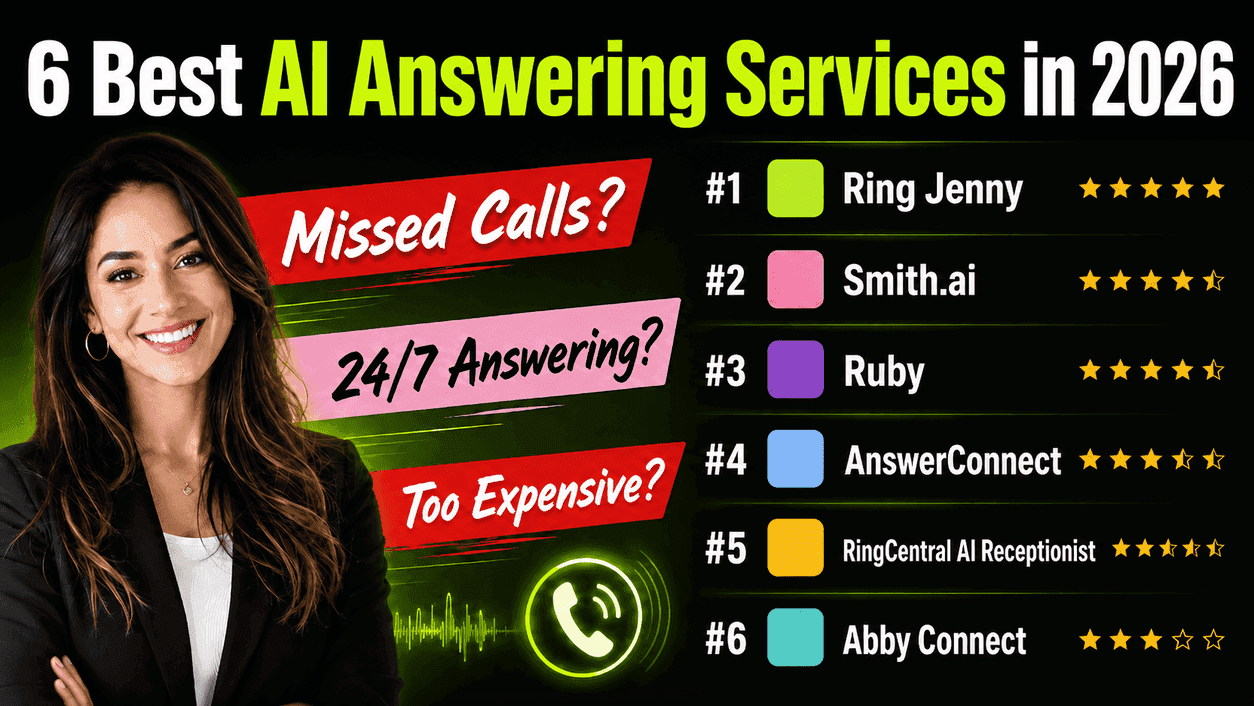
This guide is built specifically to help Australian businesses choose an AI phone answering service that feels practical, not just impressive on a demo. I compared the tools through manual testing, review portals, pricing pages, and setup checks. I also looked at the details many roundups skip: call handoff quality, local number support, setup friction, missed call recovery, human fallback, transcript quality, and whether the tool actually fits Australian small businesses.
Best AI Phone Answering Services in Australia: Table
Tool
Best for
Starting price
Main weakness
Ring Jenny
Australian small businesses
AUD$79/month
Needs more public review proof
Smith.ai
AI plus live agent backup
US$95/month
US-focused model
Ruby
Live receptionist support
Check site
Human-led service can cost more
AnswerConnect
24/7 human answering
Check site
Less AI-focused than dedicated AI tools
RingCentral AI Receptionist
Existing RingCentral users
US$39/month
Heavier setup
Abby Connect
Businesses wanting human receptionist support
Check site
Primarily a human receptionist service
Best AI Phone Answering Service by Use Case
Use case
Best pick
Best for Australian small businesses
Ring Jenny
Best for AI plus live agent backup
Smith.ai
Best for live receptionist support
Ruby
Best for 24/7 human answering
AnswerConnect
Best for existing phone system users
RingCentral AI Receptionist
Best for dedicated human receptionist support
Abby Connect
A detailed look at each answering service
Ring Jenny
Ring Jenny is a strong fit for Australian businesses that cannot afford to miss calls after hours, on weekends, or during busy service windows. I selected Ring Jenny because it is built around practical call handling: answering calls, capturing leads, routing enquiries, sending summaries, and helping small teams respond faster. It is useful for tradies, clinics, real estate teams, consultants, agencies, salons, legal offices, and other Australian service businesses where one missed call can mean lost revenue.
Features
Australian AI receptionist
Ring Jenny is useful if most of your customers call from Australia and expect a direct local phone experience. It can be set up around Australian business hours, service areas, common customer questions, and the way people actually call small businesses here. For example, a plumbing business in Brisbane can use it to answer emergency calls after hours, collect the suburb, understand the issue, and send the details to the right person.
Call intake questions
You can decide what Ring Jenny should ask callers before passing the message to your team. I would keep this simple. Ask for the caller's name, phone number, location, reason for calling, urgency, and any job specific detail you need. For example, a dental clinic can ask whether the call is for a new appointment, tooth pain, cancellation, or pricing question.
Smart call routing
Ring Jenny can help send different types of calls to the right person or process. This matters because every call is not the same. A sales enquiry, support question, urgent job, refund request, and existing customer call should not all be treated equally. For example, an electrician can route urgent power outage calls to the owner, while quote requests can go into a normal follow up queue.
Packages and service flows
Ring Jenny can be set up around the way your business sells, not just around one generic call script. You can create different flows for new leads, existing customers, after hours calls, missed calls, package enquiries, and repeat service requests. This is helpful for salons, clinics, tradies, agencies, and consultants that offer multiple services and need the AI to ask the right questions before handing over the lead.
Privacy aware call capture
For an AI answering service in Australia, trust matters because callers may share personal, health, financial, or business details over the phone. Ring Jenny can be positioned around privacy aware call handling and structured call capture. That is useful for clinics, legal offices, finance consultants, real estate teams, and any business where call details should not be handled casually.
What people are saying about Ring Jenny
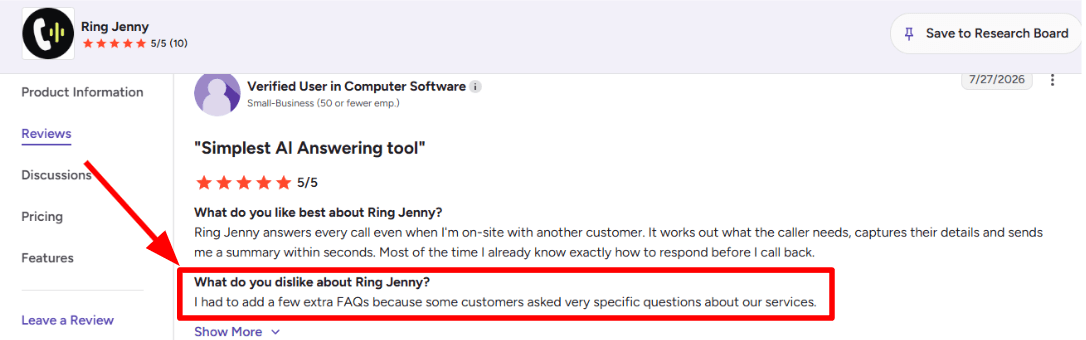
One concern I noticed while going through this G2 review is that the AI may need a little extra training when customers ask very specific questions. The reviewer had to add a few more FAQs about their services so Ring Jenny could handle those enquiries properly. I am adding the screenshot of the review below.
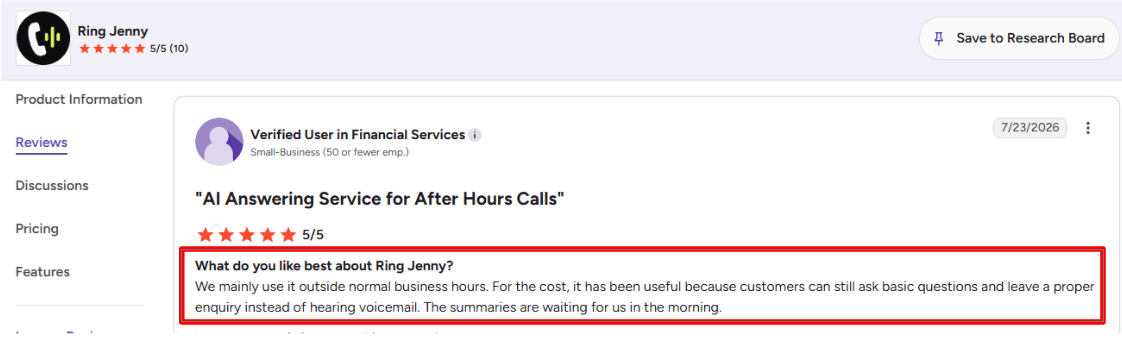
The benefit that stood out to me in this G2 review is how useful Ring Jenny can be outside normal business hours. Customers can still ask basic questions and leave a proper enquiry instead of being sent to voicemail. The business then has clear call summaries waiting for them the next morning. I am adding the screenshot of the review below.
Pros
Strong fit for Australian small businesses that miss calls after hours.
Useful for lead capture, call summaries, routing, and booking requests.
More affordable than many human answering services.
Can be adapted to different service types and packages.
Good option for teams that want AI first call handling.
Practical for tradies, clinics, agencies, salons, consultants, and local businesses.
Cons
Public review volume may be thinner than older answering service brands.
Not a full CRM or call centre platform.
Complex routing needs careful setup.
Sensitive or emotional calls may still need a human.
More public case studies would make the buying decision easier.
Teams still need to check summaries and follow up quickly.
Pricing
Ring Jenny pricing starts at US$49 per month. Australian businesses should check what is included in each plan, especially call volume, SMS notifications, routing, appointment booking, integrations, and whether higher usage changes the monthly cost.
When to Choose Ring Jenny
Choose Ring Jenny if you want an affordable AI phone answering service for missed calls, after hours enquiries, lead capture, summaries, and routing. It is best for Australian small businesses that want better phone coverage without hiring another receptionist. Skip it if every call needs a human, or if you need a full enterprise contact centre.
Smith.ai
Smith.ai is known for its hybrid AI answering service, where AI handles the first layer and live agents can step in when the call needs a human touch. For Australian businesses, Smith.ai can still be useful, but it needs careful setup because the service is more US focused. I would consider it for businesses where lead intake matters more than having a local Australian receptionist feel.
Features
AI call answering
Smith.ai can answer calls 24/7, ask basic questions, screen callers, and route the conversation based on your rules. For Australian businesses, this is useful when calls come in after 5 pm, during site visits, or from customers who do not want to wait until the next morning. The key is script quality. If your business needs local suburb names, emergency rules, or Australian service area logic, do not leave the default flow too broad.
Live agent handoff
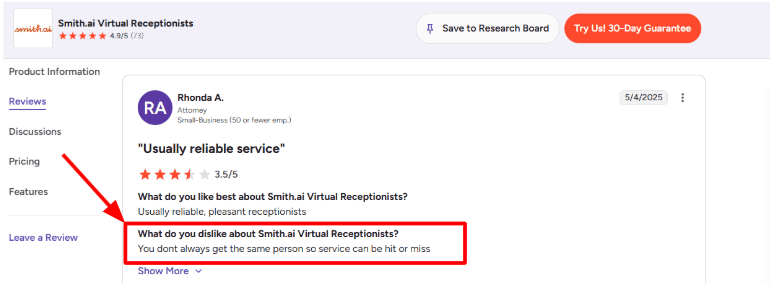
One of Smith.ai's stronger points is that it does not rely only on AI. The AI can escalate calls to live agents when the caller has a more complex question. This is helpful for law firms, clinics, tradies, real estate teams, and service businesses where one missed call can become a lost job. The catch is consistency. A G2 Smith.ai Virtual Receptionists review, where the reviewer said the service can vary because the same person does not always answer. I have placed the screenshot below because it explains the trade-off well.
Lead intake:
Smith.ai lets you collect caller details and qualify leads using custom questions. You can ask for name, phone number, location, budget, service needed, urgency, and preferred appointment time.
A real example would be a plumbing business in Melbourne. The AI can ask whether the caller has a burst pipe, blocked drain, hot water issue, or quote request. Emergency calls can be transferred, while quote requests can be logged and sent to the team. That is much better than a generic “we’ll call you back” message, especially when people are calling multiple providers.
Appointment booking:
Smith.ai can book meetings through calendar links and integrations. It works well when the business already has a clean booking process, clear availability, and simple appointment types.
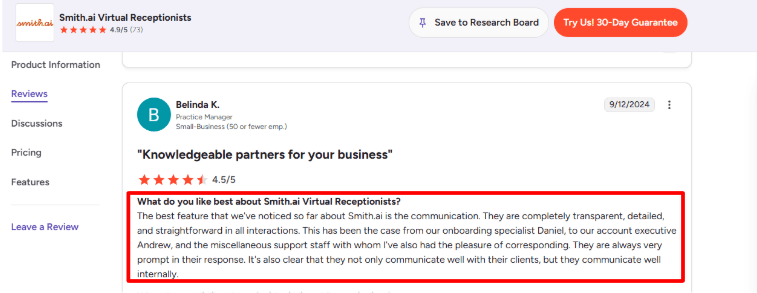
I would not treat it as a full scheduling system on its own. It is better as a call-to-book layer. For example, a caller asks for a consultation, the receptionist qualifies them, then books them using your existing calendar flow. After testing the flow, the positive surprise was how naturally this fits service businesses that already use Google Calendar or a booking page. Around this point, I also noticed a G2 Smith.ai review praising their communication during onboarding and support. I agree with that direction. The product needs proper setup, so responsive onboarding matters more here than it would in a simple AI-only tool.
Call records
Smith.ai records and transcribes calls, then sends summaries to tools like email, Slack, or Teams. This is useful when the owner is on site, in meetings, or managing calls across different Australian time zones. The value is not just call notes. It is having a searchable trail of what the caller asked, what was promised, and whether the lead should be followed up.
Integrations and routing
Smith.ai supports CRM integrations, Zapier, Make, HubSpot, Salesforce, Clio, and calendar workflows. This makes it stronger for businesses that want calls to move into a proper pipeline, not just an email inbox. The part to check carefully for Australia is your exact stack. If you use local tools, industry specific CRMs, or WhatsApp heavy workflows, you may need Zapier or custom setup.
Pros
Strong hybrid model with AI plus live human backup.
Good for after hours answering and overflowing calls.
Better lead qualification than basic message taking.
Useful call transcripts, recordings, and summaries.
Works well for businesses with clear intake rules.
Helpful integrations for CRM and scheduling workflows.
Cons
More US focused than Australian local options.
Human agents are North America based, so local tone may need scripting.
Per call pricing can get expensive if call volume grows.
Caller experience may vary when different receptionists handle calls.
Not ideal if you want a deeply local Australian receptionist feel.
Pricing
Smith.ai AI Receptionist self-service plans start at $95/month, with higher tiers around $270/month and $800/month, billed in USD.
Smith.ai’s human Virtual Receptionist plans start at $300/month for 30 calls, with higher plans at $810/month for 90 calls and $2,100/month for 300 calls.
Overage charges apply, so Australian businesses should estimate monthly call volume before choosing a plan. A small clinic or agency may be fine on a starter plan, but a busy trade business can move into higher costs quickly.
Pricing is in USD, so Australian buyers should factor in currency conversion, GST/accounting treatment, and whether local alternatives offer enough quality at a lower effective cost.
When to Choose Smith.ai
Choose Smith.ai if you want AI call answering with live human backup and strong intake workflows. It is useful for businesses where each lead is valuable and where call qualification matters. Skip it if you want an Australia first answering service, AUD pricing, or a very simple AI receptionist.
Ruby
Ruby is a human virtual receptionist service with AI support. It is used by small businesses that want real people answering calls instead of sending customers to voicemail. For Australian businesses, Ruby can work, but you should test local caller experience carefully because the service is US based.
Features
Live call answering
Ruby's biggest strength is live receptionist coverage. Calls are answered by trained people, while the AI layer helps with transcripts, sentiment analysis, and call flow support. For Australian businesses, this can work well if caller experience matters and you do not want every caller speaking to AI.
Call flow setup
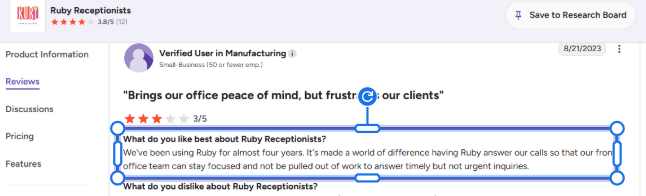
Ruby lets you set custom greetings, call handling rules, lead intake questions, FAQs, scheduling steps, and transfer instructions. Setup is not something to rush. One G2 review of Ruby Receptionists said Ruby made a “world of difference” because the front office team could stay focused instead of being pulled into calls that were important but not urgent. For Australian clinics, agencies and local service teams, that is probably Ruby’s cleanest use case.
The limit is complexity. If every caller needs local judgement, price quoting or deep business context, you will need very detailed call scripts and regular tuning.
AI enhanced tools:
Ruby is not a pure AI answering service. It is closer to a human answering service with AI enhancements. Ruby lists AI powered transcripts, sentiment analysis, AI assisted call flows and robocall filtering in its plan features on the Ruby pricing page.
That is a positive surprise if you want human callers but still need structured notes and visibility. You can review what happened on a call without depending only on the receptionist’s summary.
But if you want a fully automated AI phone agent that can answer FAQs, qualify leads, book jobs and scale across many calls at a lower cost, Ruby may feel heavier and more expensive than AI first tools.
App and dashboard:
Ruby gives access to messages, activity, call updates and business calling through its app and online portal. It also supports call and text from the business number, which is helpful when you do not want staff using personal numbers. I liked that the app makes the service feel less like a black box. You can see call history and follow up without digging through email. Reviews are mixed here though. A Capterra Australia Ruby Receptionists review praised the receptionist quality but said the app could lag when making outgoing calls. For a busy Australian office, I would test the app before making it central to daily callbacks.
Pros
Strong human receptionist experience.
Useful for after hours answering, overflow calls, intake, and call screening.
AI transcripts and sentiment analysis add better visibility.
Good fit for simple call flows.
Can reduce front desk interruptions.
Better for sensitive calls than AI only tools.
Cons
US based, so Australian caller fit should be tested.
Pricing is higher than many AI answering services.
Setup can take time.
Not the best fit if you want fully AI native call handling.
Some reviews mention app or routing issues.
Per minute pricing can rise quickly.
Pricing
Ruby’s virtual receptionist plans start at $250/month for 50 receptionist minutes, based on the Ruby plans and pricing page.
The 100 minute plan is listed at $395/month, the 200 minute plan at $720/month, and the 500 minute plan at $1,725/month.
Ruby says all virtual receptionist plans include the same main features, with the plan difference mainly based on receptionist minutes.
For Australian buyers, treat the pricing as USD unless confirmed otherwise with Ruby sales. Also check call forwarding, local number setup, overage rates and whether the caller experience feels local enough for your market.
When to Choose Ruby
Choose Ruby if you want a premium human receptionist service with AI supported notes and transcripts. It is best when caller experience matters more than cost. Skip it if you want a local Australian AI answering service with lower pricing.
AnswerConnect
AnswerConnect is a human led 24/7 answering service. Australian businesses usually look at it when they want real receptionists handling overflow calls, after hours enquiries, lead intake, and appointment requests instead of sending callers to voicemail. It is not AI first, but it can still belong in this comparison because many businesses prefer human answering for complex or high value calls.
Features
24/7 live answering
AnswerConnect's core strength is round the clock call answering by live receptionists. That matters in Australia because many missed calls happen outside standard business hours, especially for tradies, clinics, legal firms, real estate teams, and service businesses.
Custom call scripts
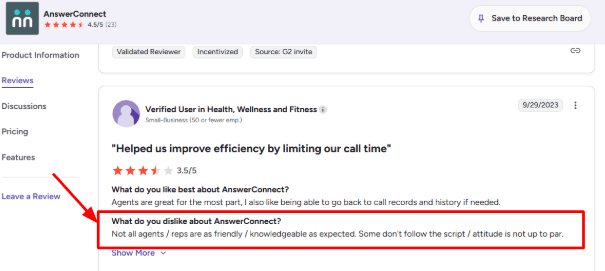
The scripting is one of the most useful parts of AnswerConnect. You can tell receptionists how to greet callers, what questions to ask, when to mark something urgent, and when to take a message instead of transferring the call. A G2 review on AnswerConnect where a user said not every agent was as friendly or knowledgeable as expected, and some did not follow the script properly. I would add the screenshot below this section because it is a fair warning for Australian businesses that depend on tone, accuracy and brand voice.
Lead intake and routing:
AnswerConnect can qualify callers, collect contact details, route calls to the right person, and send messages after the call. For example, a plumbing business in Melbourne could have the receptionist ask whether the job is emergency, residential, or commercial, then transfer emergency jobs to the on-call technician.
Appointment handling
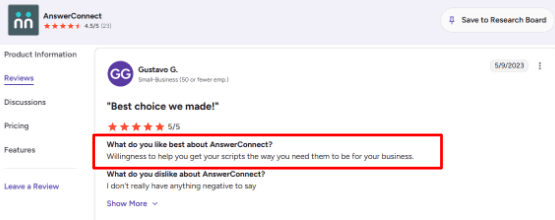
AnswerConnect offers appointment scheduling and says its plans include access to Setmore for booking management. This is useful if your business still gets a lot of booking requests by phone. A G2 review on AnswerConnect specifically praised their willingness to help get scripts right for the business. I agree with that being important because the service is only as good as the call script behind it.
CRM and app updates:
AnswerConnect supports integrations with tools like Salesforce, Zoho, Zendesk, Slack, HubSpot, Pipedrive, Google Sheets and Zapier, according to its AnswerConnect integrations page. For Australian teams using CRMs to track enquiries, this helps avoid calls sitting inside email inboxes or SMS threads.
The mobile app is also useful because you can view messages, forward them to your team, add notes and follow up from your phone. The setup is not difficult, but mapping call fields into the right CRM fields can take some cleanup.
Live chat support:
AnswerConnect also offers live chat support, which can help if your Australian website gets visitors after business hours but your team is offline. This is useful for businesses where people compare options quickly, like legal services, clinics, property services and trades.
The limitation is that this is still more of a managed human answering layer than a pure AI answering service. If you want instant AI voice agents, custom automations, self-serve knowledge base answers and low-cost unlimited call handling, AnswerConnect may feel heavier and more expensive than newer AI receptionist tools.
Pros
Strong fit for businesses that want real human receptionists instead of AI-only call handling.
Good for after-hours answering, overflow calls, lead capture and basic appointment booking.
Helpful script support, which matters if your call flow is detailed.
Integrates with common CRMs and apps, so call details do not stay trapped in messages.
Useful for Australian businesses that want a more premium caller experience.
Cons
Not a pure AI answering service, so it may not suit teams looking for full automation.
Call quality can vary by agent, based on some G2 feedback.
Pricing is minute-based, so high call volume can become expensive.
Australian businesses should confirm number setup, accents, billing currency and local caller experience before committing.
Complex scripts need ongoing review, otherwise receptionists may miss small but important details.
Pricing
AnswerConnect lists its Entry plan at $350/month for 200 minutes, with a $49.99 setup fee, according to the AnswerConnect pricing section.
The Growth plan is listed at $395/month for 300 minutes with no setup fee, and includes customizable scripting, CRM integrations, desktop and mobile app access, and live chat.
The Standard plan is listed at $575/month for 400 minutes, with a $49.99 setup fee.
Extra minutes are charged separately, so Australian businesses with unpredictable call volume should estimate monthly minutes before choosing a plan.
When to Choose AnswerConnect
Choose AnswerConnect if you want 24/7 human answering with scripts, lead capture, appointment handling, and message delivery. Skip it if you want a lightweight AI only phone answering service with lower costs.
RingCentral
RingCentral is a full business phone and contact centre platform. Australian teams use it when they want AI call answering, routing, voicemail, SMS, analytics, and human handoff in one place. It is more powerful than a simple AI answering service, but that also means setup can feel heavier.
Features
AI Receptionist
RingCentral's AI Receptionist is built for 24/7 call handling. It can answer common questions, collect caller intent, route calls, and reduce missed enquiries after hours. The RingCentral Australia AI Receptionist page says it can handle multiple calls at once, capture leads, and pass caller context to the right person.
Admin controls
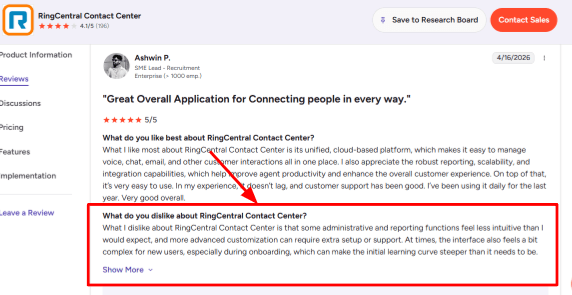
RingCentral gives you a lot of control over greetings, routing rules, knowledge base answers, and call flows. But it is not the lightest tool if all you want is a simple plug and play AI answering service. A G2 RingCentral Contact Center review, where the reviewer said admin and reporting functions were less intuitive, and advanced customisation needed extra setup or support. That matched my own experience too. The product is powerful, but the first setup can feel heavier than smaller AI receptionist tools. I’d place the G2 screenshot below this point so readers can see the exact review context.
Omnichannel inbox:
RingCentral is stronger when your business handles more than phone calls. Its RingCentral omnichannel contact centre page says teams can connect voice with 20+ channels, including chat, text, social, review sites, communities and SDKs.
This matters for Australian businesses that get enquiries from phone, website chat, Facebook, Instagram and SMS. Instead of treating the AI answering service as a separate call bot, RingCentral can sit inside a broader customer support setup where agents can see the conversation history in one place.
Smart routing:
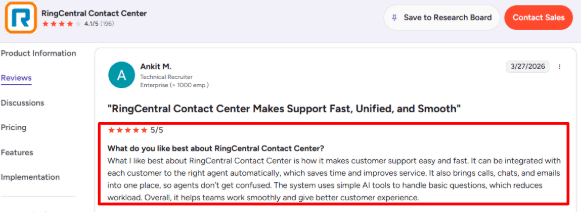
Call routing is one of the more practical features. RingCentral supports routing based on intent, skills, availability, and business rules. For example, a plumbing company could route emergency water leak calls to the on-call technician, quote requests to admin, and invoice questions to accounts. Another G2 RingCentral Contact Center review, which praised how calls, chats and emails come together and how customers can be routed to the right agent automatically. For small teams, it may be more than needed. For growing teams, it can save a lot of manual forwarding.
Agent Assist:
RingCentral’s AVA Agent Assist is useful when calls still need a human after the AI answers or screens them. The RingCentral AVA Agent Assist page says it can show agents AI-generated answers, checklists, live sentiment and guidance during customer conversations.
This is not just call answering. It is more like support help during the call. I liked that agents can get suggested answers from FAQs, web pages, CRM notes or internal guides, because it reduces the need to put callers on hold while someone searches for information.
Analytics and reliability:
RingCentral gives teams call metrics, dashboards, and performance visibility. The bigger advantage is that RingCentral is built like a communications platform, not a tiny AI bot. The downside is that reporting depth can be overkill for a small Australian business that only wants missed call coverage.
Pros
Strong fit for businesses that need AI answering plus phone system features.
Better for multi location teams and complex call routing.
Good handoff from AI to human agents.
Omnichannel support is useful for calls, chat, email, SMS, and social messages.
Agent Assist helps human staff during live calls.
More mature than many smaller AI receptionist tools.
Cons
Setup can feel heavy for simple missed call handling.
Admin and reporting may need more time.
Pricing can be less transparent for Australian AI Receptionist and RingCX setups.
Smaller teams may not use enough features to justify the cost.
Feels more like a full communications platform than a focused answering service.
May require sales conversations for larger setups.
Pricing
RingCentral’s Australian pricing page separates Business Phone, AI Receptionist and Contact Centre plans. The RingCentral Australia pricing page also mentions annual billing savings for RingEX.
The RingCentral Australia RingCX pricing page positions RingCX as an AI-powered contact centre and mentions savings for annual payment, but detailed plan prices may require checking the live pricing table or contacting sales.
RingCentral says AI Receptionist is available in Australia as an add-on, so buyers should confirm whether it is priced separately from RingEX or RingCX.
For a small Australian business, RingCentral is likely worth comparing against simpler AI answering tools only if you also need a proper phone system, routing, analytics or contact centre workflows.
When to Choose RingCentral AI Receptionist
Choose RingCentral if you already use RingCentral or need a business phone system with AI answering built in. It is a better fit for growing teams, multi location businesses, and companies with more complex call routing. Skip it if you only need a simple AI answering service for missed calls.
Abby Connect
Abby Connect is known for premium virtual receptionist support with AI call answering and human fallback. It is not a purely AI only tool. It works best for businesses that want automation but still want trained receptionists available when calls need a person. For Australian businesses, Abby can be useful, but it is clearly more US first in pricing and positioning.
Features
Human plus AI
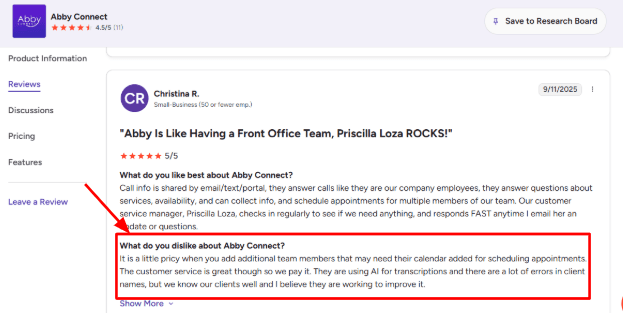
Abby combines a 24/7 AI receptionist with live human backup. The AI can answer FAQs, take messages, route calls, schedule appointments, and transfer callers. In a G2 Abby Connect review, one user said it becomes pricey when adding more team members and calendars, and also noted errors in AI transcriptions of client names. That lines up with my concern for Australian businesses handling names, suburbs, accents, and local spelling. I’d place the G2 screenshot below this point because it explains the issue in a very practical way.
Call routing:
Abby lets you create custom call flows and transfer rules. For example, an Australian plumbing business could route emergency burst pipe calls to the on call technician, send quote requests to admin, and let general questions be handled by AI.
24/7 answering
Abby's AI plans include 24/7 call handling. This is useful because Australian businesses often miss calls outside office hours, on weekends, or while staff are on site. The human backup makes it easier to trust than a pure AI receptionist.
Fast onboarding
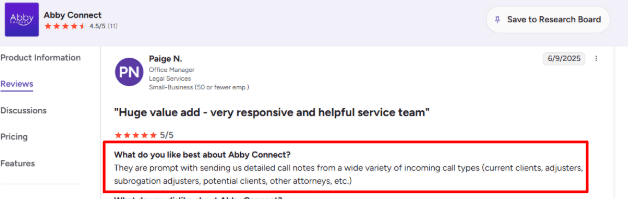
Abby promotes fast setup, and a G2 Abby Connect reviewer said it was easy to set up and get going.
I agree with that in the sense that the onboarding structure is simple: add business information, FAQs, call handling rules, transfers, and scheduling preferences. It feels less technical than building a custom voice agent from scratch.
The catch is that easy setup does not always mean complete setup. For an Australian business, I would still test local caller names, city names, after-hours rules, and appointment booking flows before sending real traffic to it.
Call insights:
Abby gives access to call summaries, transcripts, recordings, sentiment scores, caller intent, and activity data through the AbbyGO mobile app and portal.
This is helpful for small Australian teams because missed context is often the real problem. A receptionist may take the call, but the owner still needs to know who called, what they wanted, whether they were urgent, and whether someone followed up.
Abby’s portal also lets you review calls, block unwanted callers, tag calls, update availability, and change business FAQs. The AbbyGO app and portal page shows call summaries, transcripts, recordings, sentiment scores, call tagging, and minute tracking.
I would still be cautious with transcripts. For names, addresses, and Australian suburb pronunciation, AI summaries should be treated as a follow-up aid, not the final source of truth.
Scheduling support:
Abby can book appointments, reschedule calls, cancel appointments based on your rules, answer availability questions, and work with scheduling platforms.
For an AI answering service, this matters because many missed calls are not support calls. They are booking opportunities. If a dental clinic, salon, accountant, or allied health provider misses a call, that caller may simply book with someone else.
Abby’s own scheduling page says its team can use existing scheduling platforms, including Calendly, and can log appointment and client information for records. You can verify this on the Abby Connect scheduling page.
The limitation is that deeper scheduling can increase cost or complexity, especially if multiple staff calendars are involved. For Australia, also check timezone handling carefully if your team serves more than one state.
Pros
Strong hybrid model with both AI receptionist and human backup.
Good fit for businesses that want 24/7 answering without going fully AI.
Call routing, transfers, FAQs, and appointment booking are useful for lead capture.
Setup appears simple compared with building a custom AI phone agent.
Works well for businesses where caller experience matters, such as legal, healthcare, home services, finance, beauty, and professional services.
Cons
Pricing is higher than many AI-only answering services.
Plans are minute-based, so busy Australian businesses need to watch usage closely.
The product feels US-first, with US-based positioning, USD pricing, and English plus Spanish support.
AI transcription may need review, especially for names, accents, addresses, and local suburb names.
Advanced scheduling with multiple staff calendars can add cost or setup complexity.
Not ideal if you want a cheap, fully self-serve AI answering service with unlimited calls.
Pricing
Abby’s AI Receptionist starts at $99/month after a 14-day free trial for up to 50 minutes, based on the Abby Connect pricing page.
AI plans go up to $165/month for 100 minutes, $299/month for 200 minutes, and $690/month for 500 minutes.
Human receptionist plans start at $329/month for 100 minutes, then move to $599/month for 200 minutes and $1,380/month for 500 minutes.
For Australian businesses, remember this appears to be USD pricing, so compare the converted AUD cost against local answering services before choosing it.
When to Choose Abby Connect
Choose Abby Connect if you want AI answering with human receptionist backup and a more polished caller experience. It is useful for professional services, legal, finance, healthcare adjacent businesses, and teams where the first call matters. Skip it if you want a low cost Australia first AI answering service.
Conclusion
The best AI phone answering service in Australia depends on how your business handles calls today.
Ring Jenny is a strong starting point for small Australian businesses that want affordable AI call answering, lead capture, routing, and summaries. Smith.ai is useful if you want AI with live human backup and stronger intake workflows, but Australian businesses should test local caller fit carefully.
Ruby, AnswerConnect, and Abby Connect are better when you want a more human led answering experience. They are useful for sensitive, premium, or high value calls, but pricing can rise with call volume. RingCentral AI Receptionist makes the most sense if you already use RingCentral or need a broader phone system with routing, analytics, SMS, and contact centre workflows.
Before switching, test each tool with real calls: a noisy caller, urgent job, cancellation, pricing question, after hours enquiry, spam call, and booking request. The right tool should answer quickly, capture clean details, route urgent calls properly, and make follow up easier for your team. Do not choose based on the demo voice alone. The real test is whether the AI can handle the calls your business actually gets.
FAQs
Which AI phone answering service is best for Australian businesses?
Ring Jenny, Smith.ai, Ruby, AnswerConnect, RingCentral AI Receptionist, and Abby Connect are all worth comparing. Ring Jenny is a good starting point for small Australian businesses. Smith.ai is useful for AI plus live backup. Ruby, AnswerConnect, and Abby Connect suit businesses that want a more human led experience. RingCentral works best if you already need a phone system.
How do I choose the right AI phone answering service in Australia?
Start with your biggest call problem. That may be missed leads, after hours calls, appointment changes, urgent jobs, cancellations, or multi location routing. Then test call quality, transcripts, escalation rules, local number support, calendar booking, and how quickly staff receive call summaries.
What mistakes do businesses make when buying an AI receptionist?
The biggest mistake is comparing only monthly pricing. Check whether the tool can handle Australian accents, noisy callers, urgent calls, spam, cancellations, local suburb names, and human handoff. Cheap software becomes costly if good leads get lost.
How should I test an AI answering service before switching?
Run test calls using real scenarios: new enquiry, cancellation, angry caller, noisy background, urgent request, pricing question, after hours call, spam call, and booking request. Review recordings, transcripts, routing, booking accuracy, and fallback behaviour before replacing your current phone setup.
Do I need an Australian AI answering service?
Not always, but it helps. Australian-focused call handling can help with local caller expectations, time zones, suburb names, and business context. US tools can still work, but you should test caller experience, currency conversion, after-hours support, number setup, and local language handling before committing.